Showing posts with label script. Show all posts

Wednesday, March 11, 2015

More Apps Script APIs and Features

Developers like you have built amazing scripts with Apps Script, and we want to make Apps Script even more useful. Weve been working hard to add a variety of new APIs and features in Google Apps Script. Today, were ready to share a few of them with you.


New in Document service: named ranges, bookmarks, setting cursor or selection, and undo

Named ranges are a popular feature of the Spreadsheet service; and now, you’ll be able to do something similar in the Document service. With named ranges, your scripts can tag a section of a Google Doc for later reference. For example, a bibliography script could set a named range on every citation in a document, then easily update the citations in the future.


You can use a similar API to manage bookmarks, too. Unlike named ranges, bookmarks are visible to the user and allow you to link to a particular place in a document.

Also for Google Docs, weve added the server-side methods setCursor(position) and setSelection(range) to change the users cursor position or active selection, plus a client-side method, google.script.host.editor.focus(), which switches the browser focus from a sidebar or dialog back to the document.

Oh, and hey: the Undo command in Google Docs can now revert changes made by a script.


New in HTML service: NATIVE mode by default

If youve used HTML service much, youll know that the Caja security sandbox has two modes. NATIVE mode imposes fewer restrictions than EMULATED mode and generally runs faster. As of today, NATIVE is now the default if you have not specified which mode your script should use. In a few edge cases, this may affect how existing web apps operate; if so, simply append .setSandboxMode(HtmlService.SandboxMode.EMULATED) to your HtmlOutput object to restore the old behavior.


Revised Properties service

In preparation for future improvements to Apps Script, weve revamped script properties and user properties, combining them into a unified Properties service and adding the notion of document properties, which are (surprise!) specific to a particular document, but shared among all collaborators. The biggest change is that user properties are no longer shared between scripts, but our guide to the Properties service provides all the details. As part of the change, the old ScriptProperties and UserProperties services have been deprecated, although they will continue to function in existing scripts until a sunset date is announced.


Deprecation of Finance service

We’re excited to bring you these new tools. With these new additions, we have also deprecated Finance service. It will remain available for the next six months but will be turned off on September 26, 2014.


Saurabh Gupta   profile | twitter | blog

As the product manager for Google Apps Script, Saurabh is responsible for Apps Script’s overall vision and direction.

Tuesday, March 10, 2015

Introducing Google Docs Cursor Selection APIs in Apps Script

Ever wanted to programmatically insert something at the cursor in Google Docs (say, a “Sign Here” image) or read the user’s selection (maybe for an on-the-spot translation)? Starting today, you can.

Apps Scripts bound to Google Docs can now access the active users Cursor and Selection by calling Document.getCursor() and Document.getSelection(), respectively. The returned objects provide useful information like the element the cursor is positioned in and an array of all of the elements contained in the selection.


Example #1: Selection Translator

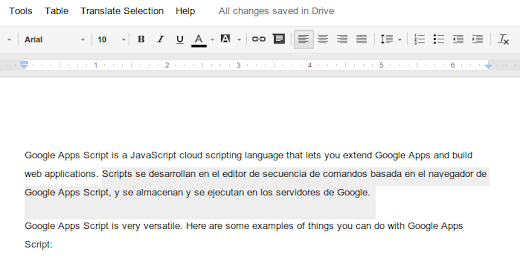
This Google Doc contains a simple script that uses Apps Script’s Language Service to translate selected text from English to Spanish through a custom menu item.


Here, it uses the getSelectedElements() method of the Selection class to get an array of selected elements:


var selection = DocumentApp.getActiveDocument().getSelection();
if (selection) {
var elements = selection.getSelectedElements();

Next, it loops through each element, performs the translation, and replaces the original text:


var translatedText = LanguageApp.translate(
element.asText().getText(), EN, ES);
element.asText().setText(translatedText);

Example #2: Bibliography App

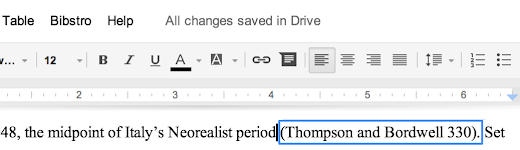
At Google I/O this year, Apps Script engineer Jonathan Rascher demonstrated Bibstro, a bibliography sample app for Google Docs that inserts inline citations at the cursor. Today, we’re releasing the source code for Bibstro; you can also try it out by making of copy of this Google Doc.


To insert text, the script calls the aptly named insertText() method of the Cursor object:


var cursor = DocumentApp.getActiveDocument().getCursor();
if (cursor) {
// Determine the text of the new inline citation to insert.
var citation = bibStrategy.getInlineCitationText(...);

var surroundingText = cursor.getSurroundingText().getText();
var surroundingTextOffset = cursor.getSurroundingTextOffset();

if (surroundingTextOffset > 0 &&
surroundingText.charAt(surroundingTextOffset - 1) != ) {
// If the cursor follows a non-space character, insert a space
// and then the citation.
cursor.insertText( + citation);
} else {
// Otherwise, just insert the citation.
cursor.insertText(citation);
}
}

You’ll also notice that the script uses the Cursor class’s getSurroundingText() method to determine whether to insert a space before the new inline citation.


Example #3: Cursor Inspector

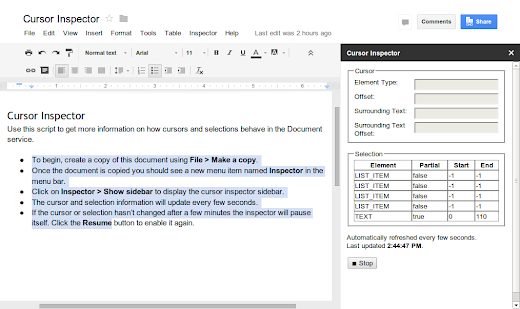
To help you become familiar with how cursor and selection work, weve also created a Cursor Inspector sample script. As you navigate through a document, the script displays up-to-date information about your cursor or selection in a custom sidebar. We’re also releasing the source code for Cursor Inspector on GitHub.


These new APIs are available immediately. We’re excited to see what kind of scripts you come up with!


Kalyan Reddy profile | Stack Overflow

Kalyan is a Developer Programs Engineer on the Google Apps Script team in New York City. He is committed to increasing developers’ productivity by helping them fully utilize the power of Apps Script. In his free time, he enjoys participating in the maker community and hacking together robots.