Showing posts with label google. Show all posts

Thursday, March 12, 2015

Reach New Customers Integrate with Google Apps in the Google Apps Marketplace

At tonights Campfire One, we launched the Google Apps Marketplace, to make it easier for you to create applications that integrate deeply with Google Apps, and give you access to our more than 2 million businesses and 25 million Google Apps users.

App integration is accomplished using existing standards such as OpenID, OAuth and Atom Publishing Protocol. The purchase experience is a simple "Add it now" button that streamlines provisioning and data authorization steps for admins, and it gives end users a link to your app in their Google universal navigation bar for one click access and single sign-on.

So what does it take to offer an integrated app for sale in the Google Apps Marketplace?
1) Have or create a business-related cloud application, on the hosting platform of your choice
2) Integrate your cloud app with Google Apps by:
  • Adding a single sign-on (SSO) feature using OpenID (required) - Enable your users to access your app more easily and avoid multiple passwords by becoming an OpenID relying party.

  • Offering features that integrate data between your app and Google Apps via Google Data APIs (optional) - Applications, like people, work better when they collaborate. Whether your app needs to schedule events, import or export documents and spreadsheets, sync contacts or publish information to sites, the APIs are ready. 

3) Create a manifest file which will drive your app installation flow and subsequent life cycle (URLs for setup, configuration, support and login, as well as which Google Data APIs the application requires), pay a $100 one-time listing fee, and submit it.

Once your application is approved it is easily discoverable by the millions of Google Apps customers. And in return for a streamlined purchase and install process, and integration features exclusive to installable apps, we ask to share 20% of your revenue from new customers. Our billing service, coming soon, is designed to be flexible enough to accommodate both established developers and brand new startups, and will automatically manage the Marketplaces revenue share fees. It will enable users to buy directly from the Marketplace using their existing Checkout account, and offer a unified bill for all purchases. Until this service is available, you can use your existing billing and payment mechanism for your app. For more details on how revenue sharing will work and when it will become a requirement, see the marketplace billing policy.

More than 50 developers have already integrated their apps with Google Apps and have made them available in the Google Apps Marketplace. We hope you will join them and we cant wait to see what new & innovative applications you will bring to the market. And if youre also a Google Apps customer, check these great apps out.

If you havent already, watch the Campfire One event on YouTube:


Tuesday, March 10, 2015

Google Drive Hackathon in Mountain View CA

Hey Silicon Valley developers,

We are organizing a Google Drive hackathon next week. If you’d like to learn more about the Google Drive SDK, meet with Google Drive engineers and have fun developing your first Google Drive application or integrating your existing application, join us.

The event will take place at the Googleplex in Mountain View, CA. We’ll start with an introduction to the Google Drive SDK at 4:00 p.m. on Wednesday March 13th 2013 and the hackathon will run through the next day at 3:00 p.m. See the detailed agenda of this event, don’t forget to RSVP and tell your friends about it.

Also there will be some exciting Google prizes for the best apps.

See you there!

Nicolas Garnier Google+ | Twitter

Nicolas Garnier joined Google’s Developer Relations in 2008 and lives in Zurich. He is a Developer Advocate for Google Drive and Google Apps. Nicolas is also the lead engineer for the OAuth 2.0 Playground.

Introducing Google Docs Cursor Selection APIs in Apps Script

Ever wanted to programmatically insert something at the cursor in Google Docs (say, a “Sign Here” image) or read the user’s selection (maybe for an on-the-spot translation)? Starting today, you can.

Apps Scripts bound to Google Docs can now access the active users Cursor and Selection by calling Document.getCursor() and Document.getSelection(), respectively. The returned objects provide useful information like the element the cursor is positioned in and an array of all of the elements contained in the selection.


Example #1: Selection Translator

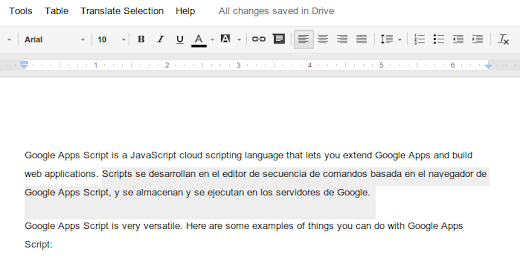
This Google Doc contains a simple script that uses Apps Script’s Language Service to translate selected text from English to Spanish through a custom menu item.


Here, it uses the getSelectedElements() method of the Selection class to get an array of selected elements:


var selection = DocumentApp.getActiveDocument().getSelection();
if (selection) {
var elements = selection.getSelectedElements();

Next, it loops through each element, performs the translation, and replaces the original text:


var translatedText = LanguageApp.translate(
element.asText().getText(), EN, ES);
element.asText().setText(translatedText);

Example #2: Bibliography App

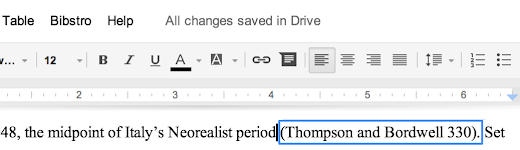
At Google I/O this year, Apps Script engineer Jonathan Rascher demonstrated Bibstro, a bibliography sample app for Google Docs that inserts inline citations at the cursor. Today, we’re releasing the source code for Bibstro; you can also try it out by making of copy of this Google Doc.


To insert text, the script calls the aptly named insertText() method of the Cursor object:


var cursor = DocumentApp.getActiveDocument().getCursor();
if (cursor) {
// Determine the text of the new inline citation to insert.
var citation = bibStrategy.getInlineCitationText(...);

var surroundingText = cursor.getSurroundingText().getText();
var surroundingTextOffset = cursor.getSurroundingTextOffset();

if (surroundingTextOffset > 0 &&
surroundingText.charAt(surroundingTextOffset - 1) != ) {
// If the cursor follows a non-space character, insert a space
// and then the citation.
cursor.insertText( + citation);
} else {
// Otherwise, just insert the citation.
cursor.insertText(citation);
}
}

You’ll also notice that the script uses the Cursor class’s getSurroundingText() method to determine whether to insert a space before the new inline citation.


Example #3: Cursor Inspector

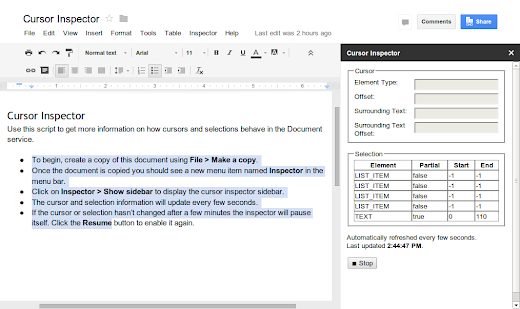
To help you become familiar with how cursor and selection work, weve also created a Cursor Inspector sample script. As you navigate through a document, the script displays up-to-date information about your cursor or selection in a custom sidebar. We’re also releasing the source code for Cursor Inspector on GitHub.


These new APIs are available immediately. We’re excited to see what kind of scripts you come up with!


Kalyan Reddy profile | Stack Overflow

Kalyan is a Developer Programs Engineer on the Google Apps Script team in New York City. He is committed to increasing developers’ productivity by helping them fully utilize the power of Apps Script. In his free time, he enjoys participating in the maker community and hacking together robots.

Monday, March 9, 2015

Time to Wow the Judges The Google Apps Developer Challenge is Ready for Submissions!

Are you an expert in the Drive API or Google Apps APIs? Are you an expert in Google Apps Script? If you are, then you must have been busy coding away for the Google Apps Developer Challenge since its launch earlier last month.


Now it’s time to wow the judges, as the Google Apps Developer Challenge is now open for submissions! If you would like to submit your application, please submit on the website using one of the three following categories:

  • Enterprise / Small Business Solutions e.g., Accounting, Sales, Workflow, Collaboration
  • Social / Personal Productivity / Games / Fun
  • Education / Not for Profit / Water / Food & Hunger / Health

If you are not ready, don’t worry -- as you still have time. The submission deadline is 24 August 2012 at 23:59:59 PT. Remember to use the many resources available to you in order to get ready. Ask questions on the Google+ Office Hours and Google Developers Live. Read up on Apps Script and the Drive and Apps APIs on Google Developers. Review the latest updates since Google I/O as well as the pre-submission checklist. Post questions and comments using the hashtag #gappschallenge on Google+. Review, and most importantly, finalize your application!

Best of luck!


Chukwuemeka Afigbo profile | blog

Chukwuemeka is a Program Manager at Google with the Emerging Markets Outreach team where he works closely with developers, startups, businesses and IT professionals in the region to successfully grow their business around Google Developer Tools and APIs. His current mission is to drive developer internet content in Sub Saharan Africa.

Even more Image Metadata for the Google Drive SDK

Lots of photographers, both professionals and amateurs, have started using Google Drive to store their photos online. We recently launched new features such as a way to quickly preview files and today I wanted to share more details about the image media metadata capabilities of the Drive SDK.

All digital cameras add some Exif information to the photos they take, and we exposed an initial set of Exif fields via the Google Drive API at the end of 2012. That set of metadata has now been expanded to include 9 new fields, such as the sensor type or the metering mode.

For instance, take a look at this recently taken photo:

Photo credit: Claudio Cherubino

What follows is the image media metadata as returned by the Drive API (in bold the new fields):


"imageMediaMetadata": {
"width": 2048,
"height": 1536,
"rotation": 0,
"date": "2013:02:18 12:51:51",
"cameraMake": "Panasonic",
"cameraModel": "DMC-GF2",
"exposureTime": 0.0025,
"aperture": 7.1,
"flashUsed": false,
"focalLength": 14.0,
"isoSpeed": 100,
"meteringMode": "Pattern",
"sensor": "One-chip color area",
"exposureMode": "Auto",
"colorSpace": "sRGB",
"whiteBalance": "Auto",
"exposureBias": 0.0,
"maxApertureValue": 3.6289062

}

You might have noticed that a number of fields have been added to the response while others (“subjectDistance” and “lens”) were not returned. This is expected as the camera doesn’t have to populate all Exif fields and in that case the corresponding properties will simply not be included in the API response.

For more information and to check the description of all metadata fields returned by the API, check the Files resource Reference Guide. If you have technical questions, please post them on Stack Overflow, my team monitors the google-drive-sdk tag and is happy to help.

Claudio Cherubino   profile | twitter | blog

Claudio is an engineer in the Google Drive Developer Relations team. Prior to Google, he worked as software developer, technology evangelist, community manager, consultant, technical translator and has contributed to many open-source projects. His current interests include Google APIs, new technologies and coffee.

Sunday, March 8, 2015

Doodles for your Google Apps domain

Since 1998, when the first doodle was released, they have been one of the most loved features of the Google home page. There have been doodles to celebrate all kinds of events, including national holidays, birthdays of artists and scientists, sports competitions, scientific discoveries and even video games! Also, doodles have evolved from simple static images to complex applications, such as the interactive electric guitar used to celebrate the birthday of Les Paul.

Want your company logo to change for selected events or holidays, just like doodles? The Admin Settings API allows domain administrators to write scripts to programmatically change the logo of their Google Apps domain, and Google App Engine offers the ability to configure regularly scheduled tasks, so that those scripts can run automatically every day.

With these two pieces combined, it is pretty easy to implement a complete solution to change the domain logo on a daily basis (assuming the graphic designers have prepared a doodle for each day), as in the following screenshot:

Let’s start with a Python App Engine script called doodleapps.py:

import gdata.apps.adminsettings.service
from google.appengine.ext import webapp
from google.appengine.ext.webapp import util
from datetime import date

class DoodleHandler(webapp.RequestHandler):
# list of available doodles
DOODLES = {
1-1: images/newyearsday.jpg,
2-14: images/valentinesday.jpg,
10-31: images/halloween.jpg,
12-25: images/christmas.jpg
}

# returns the path to the doodle corresponding to the date
# or None if no doodle is available
def getHolidayDoodle(self, date):
key = %s-%s % (date.month, date.day)
if key not in self.DOODLES:
return None

return self.DOODLES[key]

# handles HTTP requests by setting today’s doodle
def get(self):
doodle = self.getHolidayDoodle(date.today())
self.response.out.write(doodle)

if doodle:
service = gdata.apps.adminsettings.service.AdminSettingsService()
// replace domain, email and password with your credentials
// or change the authorization mechanism to use OAuth
service.domain = MYDOMAIN.COM
service.email = ADMIN@MYDOMAIN.COM
service.password = MYPASSWORD
service.source = DoodleApps
service.ProgrammaticLogin()

# reads the doodle image and update the domain logo
doodle_bytes = open(doodle, "rb").read()
service.UpdateDomainLogo(doodle_bytes)

# webapp initialization
def main():
application = webapp.WSGIApplication([(/, DoodleHandler)],
debug=True)
util.run_wsgi_app(application)


if __name__ == __main__:
main()

The script uses a set of predefined doodles which can be edited to match your list of images or replaced with more sophisticated logic, such as using the Google Calendar API to get the list of holidays in your country.

Every time the script is triggered by an incoming HTTP request, it will check whether a doodle for the date is available and, if there is one, update the domain logo using the Admin Settings API.

In order for this script to be deployed on App Engine, you need to to configure the application by defining a app.yaml file with the following content:

application: doodleapps
version: 1
runtime: python
api_version: 1

handlers:
- url: .*
script: doodleapps.py

We want the script to run automatically every 24 hours, without the need for the administrator to send a request, so we also have to define another configuration file called cron.yaml:

cron:
- description: daily doodle update
url: /
schedule: every 24 hours

Once the application is deployed on App Engine, it will run the script on a daily basis and update the logo.

The holiday season is upon us. Could there be a better time for your company to start using doodles?

Happy Holidays!

Claudio Cherubino   profile | twitter | blog

Claudio is a Developer Programs Engineer working on Google Apps APIs and the Google Apps Marketplace. Prior to Google, he worked as software developer, technology evangelist, community manager, consultant, technical translator and has contributed to many open-source projects, including MySQL, PHP, Wordpress, Songbird and Project Voldemort.