Showing posts with label for. Show all posts

Thursday, March 12, 2015

Building a Meeting Scheduler for Android using the new Calendar API

Though developers are quite comfortable thinking in abstractions, we still find a lot of value in code examples and fully developed sample applications. Judging by the volume of comments, tweets, and git checkouts of the Au-to-do sample code we released a few weeks ago, our readers agree.

For Google Apps API developers who want to get started writing mobile apps, here’s a great new resource: a sample application that integrates Google Calendar API v3 with Android and illustrates best practices for OAuth 2.0. This meeting scheduler app built by Alain Vongsouvanh gets the user’s contact list, lets users select attendees, and matches free/busy times to suggest available meeting times. It provides a simple Android UI for user actions such as attendee selection:


The sample code for Meeting Scheduler demonstrates many key aspects of developing with Google Apps APIs. After authorizing all required access using OAuth 2.0, the Meeting Scheduler makes requests to the Calendar API. For example, the class FreeBusyTimesRetriever queries the free/busy endpoint to find available meeting times:


FreeBusyRequest request = new FreeBusyRequest();

request.setTimeMin(getDateTime(startDate, 0));
request.setTimeMax(getDateTime(startDate, timeSpan));

for (String attendee : attendees) {
requestItems.add(new FreeBusyRequestItem().setId(attendee));
}
request.setItems(requestItems);

FreeBusyResponse busyTimes;
try {
Freebusy.Query query = service.freebusy().query(request);
// Use partial GET to retrieve only needed fields.
query.setFields("calendars");
busyTimes = query.execute();
// ...
} catch (IOException e) {
// ...
}

In this snippet above, note the use of a partial GET request. Calendar API v3, along with many other new Google APIs, provides partial response with GET and PATCH to retrieve or update only the data fields you need for a given request. Using these methods can help you streamline your code and conserve system resources.

For the full context of all calls that Meeting Scheduler makes, including OAuth 2.0 flow and the handling of expired access tokens, see Getting Started with the Calendar API v3 and OAuth 2.0 on Android. The project site provides all the source code and other resources, and there’s a related wiki page with important configuration details.

We hope you’ll have a look at the sample and let us know what you think in the Google Apps Calendar API forum. You’re welcome to create a clone of the source code and do some Meeting Scheduler development of your own. If you find a bug or have an idea for a feature, don’t hesitate to file it for evaluation.


Eric Gilmore  

Eric is a technical writer working with the Developer Relations group. Previously dedicated to Google Enterprise documentation, he is now busy writing about various Google Apps APIs, including Contacts, Calendar, and Provisioning.

Monday, March 9, 2015

Time to Wow the Judges The Google Apps Developer Challenge is Ready for Submissions!

Are you an expert in the Drive API or Google Apps APIs? Are you an expert in Google Apps Script? If you are, then you must have been busy coding away for the Google Apps Developer Challenge since its launch earlier last month.


Now it’s time to wow the judges, as the Google Apps Developer Challenge is now open for submissions! If you would like to submit your application, please submit on the website using one of the three following categories:

  • Enterprise / Small Business Solutions e.g., Accounting, Sales, Workflow, Collaboration
  • Social / Personal Productivity / Games / Fun
  • Education / Not for Profit / Water / Food & Hunger / Health

If you are not ready, don’t worry -- as you still have time. The submission deadline is 24 August 2012 at 23:59:59 PT. Remember to use the many resources available to you in order to get ready. Ask questions on the Google+ Office Hours and Google Developers Live. Read up on Apps Script and the Drive and Apps APIs on Google Developers. Review the latest updates since Google I/O as well as the pre-submission checklist. Post questions and comments using the hashtag #gappschallenge on Google+. Review, and most importantly, finalize your application!

Best of luck!


Chukwuemeka Afigbo profile | blog

Chukwuemeka is a Program Manager at Google with the Emerging Markets Outreach team where he works closely with developers, startups, businesses and IT professionals in the region to successfully grow their business around Google Developer Tools and APIs. His current mission is to drive developer internet content in Sub Saharan Africa.

Even more Image Metadata for the Google Drive SDK

Lots of photographers, both professionals and amateurs, have started using Google Drive to store their photos online. We recently launched new features such as a way to quickly preview files and today I wanted to share more details about the image media metadata capabilities of the Drive SDK.

All digital cameras add some Exif information to the photos they take, and we exposed an initial set of Exif fields via the Google Drive API at the end of 2012. That set of metadata has now been expanded to include 9 new fields, such as the sensor type or the metering mode.

For instance, take a look at this recently taken photo:

Photo credit: Claudio Cherubino

What follows is the image media metadata as returned by the Drive API (in bold the new fields):


"imageMediaMetadata": {
"width": 2048,
"height": 1536,
"rotation": 0,
"date": "2013:02:18 12:51:51",
"cameraMake": "Panasonic",
"cameraModel": "DMC-GF2",
"exposureTime": 0.0025,
"aperture": 7.1,
"flashUsed": false,
"focalLength": 14.0,
"isoSpeed": 100,
"meteringMode": "Pattern",
"sensor": "One-chip color area",
"exposureMode": "Auto",
"colorSpace": "sRGB",
"whiteBalance": "Auto",
"exposureBias": 0.0,
"maxApertureValue": 3.6289062

}

You might have noticed that a number of fields have been added to the response while others (“subjectDistance” and “lens”) were not returned. This is expected as the camera doesn’t have to populate all Exif fields and in that case the corresponding properties will simply not be included in the API response.

For more information and to check the description of all metadata fields returned by the API, check the Files resource Reference Guide. If you have technical questions, please post them on Stack Overflow, my team monitors the google-drive-sdk tag and is happy to help.

Claudio Cherubino   profile | twitter | blog

Claudio is an engineer in the Google Drive Developer Relations team. Prior to Google, he worked as software developer, technology evangelist, community manager, consultant, technical translator and has contributed to many open-source projects. His current interests include Google APIs, new technologies and coffee.

Sunday, March 8, 2015

Doodles for your Google Apps domain

Since 1998, when the first doodle was released, they have been one of the most loved features of the Google home page. There have been doodles to celebrate all kinds of events, including national holidays, birthdays of artists and scientists, sports competitions, scientific discoveries and even video games! Also, doodles have evolved from simple static images to complex applications, such as the interactive electric guitar used to celebrate the birthday of Les Paul.

Want your company logo to change for selected events or holidays, just like doodles? The Admin Settings API allows domain administrators to write scripts to programmatically change the logo of their Google Apps domain, and Google App Engine offers the ability to configure regularly scheduled tasks, so that those scripts can run automatically every day.

With these two pieces combined, it is pretty easy to implement a complete solution to change the domain logo on a daily basis (assuming the graphic designers have prepared a doodle for each day), as in the following screenshot:

Let’s start with a Python App Engine script called doodleapps.py:

import gdata.apps.adminsettings.service
from google.appengine.ext import webapp
from google.appengine.ext.webapp import util
from datetime import date

class DoodleHandler(webapp.RequestHandler):
# list of available doodles
DOODLES = {
1-1: images/newyearsday.jpg,
2-14: images/valentinesday.jpg,
10-31: images/halloween.jpg,
12-25: images/christmas.jpg
}

# returns the path to the doodle corresponding to the date
# or None if no doodle is available
def getHolidayDoodle(self, date):
key = %s-%s % (date.month, date.day)
if key not in self.DOODLES:
return None

return self.DOODLES[key]

# handles HTTP requests by setting today’s doodle
def get(self):
doodle = self.getHolidayDoodle(date.today())
self.response.out.write(doodle)

if doodle:
service = gdata.apps.adminsettings.service.AdminSettingsService()
// replace domain, email and password with your credentials
// or change the authorization mechanism to use OAuth
service.domain = MYDOMAIN.COM
service.email = ADMIN@MYDOMAIN.COM
service.password = MYPASSWORD
service.source = DoodleApps
service.ProgrammaticLogin()

# reads the doodle image and update the domain logo
doodle_bytes = open(doodle, "rb").read()
service.UpdateDomainLogo(doodle_bytes)

# webapp initialization
def main():
application = webapp.WSGIApplication([(/, DoodleHandler)],
debug=True)
util.run_wsgi_app(application)


if __name__ == __main__:
main()

The script uses a set of predefined doodles which can be edited to match your list of images or replaced with more sophisticated logic, such as using the Google Calendar API to get the list of holidays in your country.

Every time the script is triggered by an incoming HTTP request, it will check whether a doodle for the date is available and, if there is one, update the domain logo using the Admin Settings API.

In order for this script to be deployed on App Engine, you need to to configure the application by defining a app.yaml file with the following content:

application: doodleapps
version: 1
runtime: python
api_version: 1

handlers:
- url: .*
script: doodleapps.py

We want the script to run automatically every 24 hours, without the need for the administrator to send a request, so we also have to define another configuration file called cron.yaml:

cron:
- description: daily doodle update
url: /
schedule: every 24 hours

Once the application is deployed on App Engine, it will run the script on a daily basis and update the logo.

The holiday season is upon us. Could there be a better time for your company to start using doodles?

Happy Holidays!

Claudio Cherubino   profile | twitter | blog

Claudio is a Developer Programs Engineer working on Google Apps APIs and the Google Apps Marketplace. Prior to Google, he worked as software developer, technology evangelist, community manager, consultant, technical translator and has contributed to many open-source projects, including MySQL, PHP, Wordpress, Songbird and Project Voldemort.

Tuesday, March 3, 2015

April Fools Day Silly CVC Sentences A No Prep Game for the Smartboard!

Typically, the whole concept of April Fools Day goes right over my Kindergarten students heads!  People playing tricks on each other basically goes against all of the rules weve been working on.  Anyway... I finally thought of a way to celebrate April Fools Day with my Kinder kids... with a fun smartboard game!

My students love working on CVC sentences and I figured the addition of pictures to one of their favorite games couldnt hurt!  Im so excited that this game will work on their decoding and comprehension skills all at once... and I cant wait to see their faces when they read these crazy sentences on April Fools Day!

 April Fools Day Silly CVC Sentences (A No-Prep Game for the Smartboard!)

What silly things do you do to celebrate April Fools Day in the classroom?

Wednesday, February 25, 2015

SCIRUS For Scientific Information Only Niche Search

  • Link to Scirus


WHAT?
Scirus is the most comprehensive science-specific search engine on the Internet. Driven by the latest search engine technology, Scirus searches over 450 million science-specific Web pages, enabling you to quickly:

  • Pinpoint scientific, scholarly, technical and medical data on the Web.
  • Find the latest reports, peer-reviewed articles, patents, pre prints and journals that other search engines miss.
  • Offer unique functionalities designed for scientists and researchers.

JUICE?
So, what is so juicy about this search engine compared to for example Google Search? Or why should we use it (or explore it)? Because Scirus...

  • Filters out non-scientific sites. For example, if you search on REM, Google finds the rock group - Scirus finds information on sleep, among other things
  • Finds peer-reviewed articles such as PDF and PostScript files, which are often invisible to other search engines.
  • Searches the most comprehensive combination of web information, preprint servers, digital archives, repositories and patent and journal databases. Scirus goes deeper than the first two levels of a Web site, thereby revealing much more relevant information.

In addition, Scirus has a wide range of special features to help us pinpoint the scientific information we need ...more

After playing (or searching) around with Scirus for a few minutes, I simply fell in love with this search engines speed, simplicity, interface design, features and search results (Though, this might change after exploring it a bit more!). But for now, it looks good!

In other words, if you are frustrated with not finding relevant scientific, scholarly, technical and medical related stuff on Google (including Google Scholar), MSN, Yahoo or from your University/Organizations digital library (subscribing to Emerald, ProQuest, etc.), perhaps you should give Scirus a minute :)

Monday, February 16, 2015

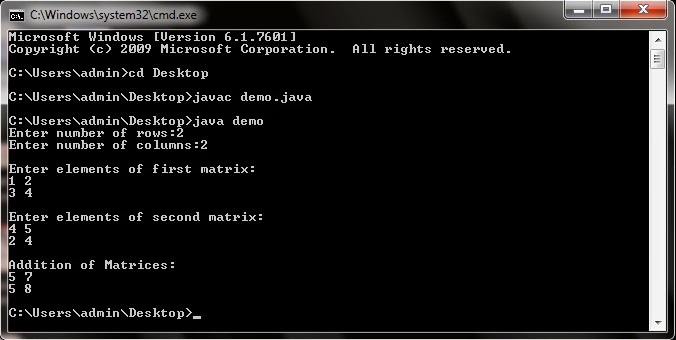
Java Program for Addition of two Matrices

import java.util.Scanner; //import Scanner class in our program

class demo
{
public static void main(String...s)
{
int i,j,n,m;
Scanner sc=new Scanner(System.in); //used to read from keyboard

System.out.print("Enter number of rows:");
m=sc.nextInt();
System.out.print("Enter number of columns:");
n=sc.nextInt();

int a1[][]=new int[m][n];
int a2[][]=new int[m][n];
int a3[][]=new int[m][n];

System.out.print("
Enter elements of first matrix:
");

for(i=0;i<m;++i)
for(j=0;j<n;++j)
a1[i][j]=sc.nextInt();

System.out.print("
Enter elements of second matrix:
");

for(i=0;i<m;++i)
for(j=0;j<n;++j)
a2[i][j]=sc.nextInt();

System.out.print("
Addition of Matrices:
");


for(i=0;i<m;++i)
{
for(j=0;j<n;++j)
{
a3[i][j]=a1[i][j]+a2[i][j];
System.out.print(a3[i][j]+" ");
}
System.out.print("
");

}


}
}

Java Program for Addition of two Matrices

Saturday, February 14, 2015

Top IT Certification Programs for Beginners in 2014

Top IT Certification Programs for Beginners in 2014

Getting certifications has been marked as a surefire approach to boost your career in the Information Technology industry. It does not matter if you work for the government, a small business, health care or merely for an enterprise that employs IT experts, your best bet to boost your career prospects is to validate your knowledge and skill set via a carefully picked combination of certification programs.

Constant new updates in technology give rise to fresh job opportunities and also become challenges for the leading companies in the world of Information Technology (IT). The organizations would do anything to maintain their high status by doing their best to adopt the latest networks and software. One way of doing so is to hire IT professionals and specialists who have the latest skills and knowledge in the IT world.

Also Read: Computer Networking Professional: Does This Sound Like You?

By taking about latest certifications with Selftest Training, It can be said that by getting these certifications an individual’s chance of getting a job in an excellent organization increases. It also helps him in attaining a better position in the company. Moreover, a significant rise in the employment rate of IT sector has been noticed and it has been reported that further acceleration will be witnessed in the future.

The Best IT certifications for Beginners in 2014
Here is a list of the best IT certifications for beginners that ensure a higher pay and an excellent job in the upcoming year.

1. CCNP or Cisco Certified Network Professional
The CCNP or Cisco certified network professional is a certification that acts as a verification for the skills and knowledge that are necessary for the designing application, troubleshooting and verification of wide and local area networks. Individuals who have this IT certification can take up positions as network engineers, system engineers, support engineers, or network technicians.

2. MCITP or Microsoft Certified Information Technology Professional
This IT certification makes use of the Microsoft technology to the fullest and employers give it high consideration, as it shows that an individual has the ability, skills and knowledge to perform complex tasks related to IT.

3. ITIL v3 Foundation
The demand for this IT certification is high in the IT market, so make sure to have it on your resume in the coming year. The professionals with this certification are highly paid. Furthermore, its demand will surely increase in the next year.

Also Read: List of Biggest and Popular Programming Contests

4. CCNA or Cisco Certified Network Associate
The Cisco certified Network associate or CCNA is an IT certification for beginners in the field of network engineering. In order to be an eligible candidate for this IT certification, a person must have three years of work experience as a network engineer. Those individuals who have this certification on their resume have the skills and knowledge that are necessary for the configuration, installation, operation, and troubleshooting of medium sized networks that use routers and switches. According to Selftest Training with this certification, you can get a job as a network specialist, network administrator or a support engineer in networking.

Author Bio:
The Author is well known blogger and writer, she is blogging from last 3 years, In her free time She loves to watch movies with her family, dancing and sometimes cooking.

Image Source: http://coretechnigeria.com/I.T%20TRAINING.html

Monday, February 2, 2015

Free PowerPoint add in to record lectures for flipped classroom and courses

WizIQ, an education platform that connects teachers and students online has released a free PowerPoint add-in called WizIQ Recordor. WizIQ Recordor lets teachers create video lectures (MP4) for offline consumption by students. Teachers can record their live audio along with PowerPoint slides and can either share video link with their students or add the video to their online course.

Recordor is an easy-to-use authoring tool that creates synchronized video lectures. The only disadvantage it has is that teachers can only record their audio and not their video(from webcam) or any pre-recorded audio or video file. Adding a functionality to let teachers sync any audio or video file with slides to create a synchronized video lecture would be a great thing to do since this functionality is missing in PowerPoint as well.