Showing posts with label a. Show all posts

Thursday, March 12, 2015

Building a Meeting Scheduler for Android using the new Calendar API

Though developers are quite comfortable thinking in abstractions, we still find a lot of value in code examples and fully developed sample applications. Judging by the volume of comments, tweets, and git checkouts of the Au-to-do sample code we released a few weeks ago, our readers agree.

For Google Apps API developers who want to get started writing mobile apps, here’s a great new resource: a sample application that integrates Google Calendar API v3 with Android and illustrates best practices for OAuth 2.0. This meeting scheduler app built by Alain Vongsouvanh gets the user’s contact list, lets users select attendees, and matches free/busy times to suggest available meeting times. It provides a simple Android UI for user actions such as attendee selection:


The sample code for Meeting Scheduler demonstrates many key aspects of developing with Google Apps APIs. After authorizing all required access using OAuth 2.0, the Meeting Scheduler makes requests to the Calendar API. For example, the class FreeBusyTimesRetriever queries the free/busy endpoint to find available meeting times:


FreeBusyRequest request = new FreeBusyRequest();

request.setTimeMin(getDateTime(startDate, 0));
request.setTimeMax(getDateTime(startDate, timeSpan));

for (String attendee : attendees) {
requestItems.add(new FreeBusyRequestItem().setId(attendee));
}
request.setItems(requestItems);

FreeBusyResponse busyTimes;
try {
Freebusy.Query query = service.freebusy().query(request);
// Use partial GET to retrieve only needed fields.
query.setFields("calendars");
busyTimes = query.execute();
// ...
} catch (IOException e) {
// ...
}

In this snippet above, note the use of a partial GET request. Calendar API v3, along with many other new Google APIs, provides partial response with GET and PATCH to retrieve or update only the data fields you need for a given request. Using these methods can help you streamline your code and conserve system resources.

For the full context of all calls that Meeting Scheduler makes, including OAuth 2.0 flow and the handling of expired access tokens, see Getting Started with the Calendar API v3 and OAuth 2.0 on Android. The project site provides all the source code and other resources, and there’s a related wiki page with important configuration details.

We hope you’ll have a look at the sample and let us know what you think in the Google Apps Calendar API forum. You’re welcome to create a clone of the source code and do some Meeting Scheduler development of your own. If you find a bug or have an idea for a feature, don’t hesitate to file it for evaluation.


Eric Gilmore  

Eric is a technical writer working with the Developer Relations group. Previously dedicated to Google Enterprise documentation, he is now busy writing about various Google Apps APIs, including Contacts, Calendar, and Provisioning.

Tuesday, March 3, 2015

April Fools Day Silly CVC Sentences A No Prep Game for the Smartboard!

Typically, the whole concept of April Fools Day goes right over my Kindergarten students heads!  People playing tricks on each other basically goes against all of the rules weve been working on.  Anyway... I finally thought of a way to celebrate April Fools Day with my Kinder kids... with a fun smartboard game!

My students love working on CVC sentences and I figured the addition of pictures to one of their favorite games couldnt hurt!  Im so excited that this game will work on their decoding and comprehension skills all at once... and I cant wait to see their faces when they read these crazy sentences on April Fools Day!

 April Fools Day Silly CVC Sentences (A No-Prep Game for the Smartboard!)

What silly things do you do to celebrate April Fools Day in the classroom?

How to Save a PowerPoint Slide as a Transparent Image!

I am so excited to write this post because it is my 100th post on my blog and my 20th Technology Tuesday post!  I never expected to write 100 posts in the five months Ive had this blog!  I really do enjoy it though!

Now, onto todays post... how to save a powerpoint slide with a transparent background!


This poll was a real nail biter!  I was really nervous it would end up being a tie!


Luckily, it wasnt a tie!  Im really excited to blog about this fantastic idea that Mercedes over at Surfing to Success gave to me!  She has a ton of technology tutorials on her blog also so you should definitely check it out!

Surfing to Success” style=

Now, onto the tutorial!


And of course, you can have those two cute star images for free!


To download this tutorial as a PDF, just click the button below.  I decided to host the files on Google Docs instead of TPT and hopefully Ill get the other posts up soon!

Note: This tutorial is hosted on Google Docs.  To save it from there, just open the file and click File > Download to save onto your computer!

For next weeks poll I had the hardest time picking what to add!  In my linky party below, the question came up as to how you add the HTML code to your blog when someone gives it to you.  Oops... I put the wrong thing on the poll!  I added how to make a collage of photos in any shape.  Ill add the HTML next week!  Be sure to vote for next week, and in the meantime, check out my linky party!

Back to School Jitters Linky Party

Monday, March 2, 2015

ZaidLearn Goes del icio us Takes a Break from Blogging!

  • Link to Zaidlearns del.icio.us Links
  • Digital Curator to the Stars & More on the Digital Curator (Jeff Cobb)
  • The Digital Curator in Your Future (Steve Rubel)
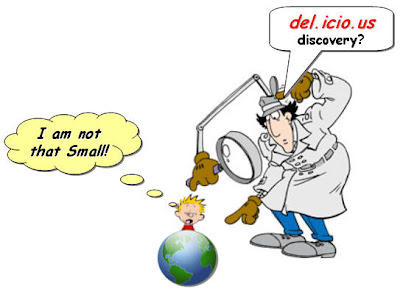
"...I do believe that Zaid Ali Algasoff is in the process of firmly establishing himself as the e-learning curator of Southeast Asia. His recent Any Free Hosted CMS or LMS? (Yes, Obama Says!) is just one piece of the accumulating evidence...(Source)" - Jeff Cobb

WOW! My self-actualizing e-Learning curator ego is reaching the top of Mount Everest! Hmm, what is a curator anyway?

CURATOR?
"A curator, in a cultural institution context, is a guardian or an overseer. According to Wikipedia, he/she "is a content specialist responsible for an institutions collections and their associated collections catalogs. The object of a curators concern necessarily involves tangible objects of some sort, whether it be inter alia artwork, collectibles, historic items or scientific collections (Source)."

"Rubel argues that, in order to manage the massive amounts of information now flowing across the Web, the world needs digital curators, “people who are selfless and willing to act as sherpas and guides. They’re identifiable subject matter experts who dive through mountains of digital information and distill it down to its most relevant, essential parts (Source).”

I can live with that! But to tell you the truth, if I am really the e-learning curator of Southeast Asia, we are in big trouble! First, most of my readers are not from Southeast Asia, but instead they are from United States, Canada, Europe, India, Australia and a few Brazilians that cant get enough of this blog.

Also, my messy informal learning repository adventure is not exactly the most efficient place to find what you are looking for. I suppose you might discover something juicy here, but it is probably more by accident, or through a Google search, rather than systematically searching ZaidLearn. Nothing wrong with that, But I believe now has come the time that I also embrace my left brain of organization, and by doing so, I will hopefully nurture the whole brain for efficient management of my learning discoveries, which will hopefully lead to more effective learning.

I really appreciate and respect Jeff Cobbs kind reflections, but I still have a green mile to travel, to live up to such a billing effectively. Though, I love the challenge and until other e-Learning curators do show up in Southeast Asia (or is known beyond!), I dont mind taking the lead. So, here is my plan to move on...

del.icio.us?
To be honest, I should have gone del.icio.us a long time back. Dont ask me why I didnt (Stubborn to unlearn!)? Instead you should explore and enjoy my growing juicy collection of del.icio.us links (+160 and growing fast!) , which will make it easier for readers to enjoy my arsenal of recommended free learning resources and tools. Here are my most prominent del.icio.us tags:

  • Favorite Tools
  • OER (Open Educational Resources)
  • OCW (OpenCourseWare)
  • Podcasts
  • ...more

Although, many of my del.icio.us learning resources perhaps should use multiple tags (e.g. MIT OCW, OER, Podcasts, etc.), I have tried as much as possible to use one appropriate tag for each resource, instead of giving them too many tags. I personally dont want to find the same learning resource in every tag (although it might correct!) while looking for stuff. Anyway, I am still learning the art of tagging, and hopefully it will improve as I embrace del.icio.us.

As I have been collecting juicy learning links (URLs) since 2001 (stored all over the place!), I have literally thousands of them to rediscover and add to del.icio.us. So, in the coming weeks I will be busy rediscovering, filtering (out!), and tagging my last seven years of learning, and creating my own little arsenal of del.icio.us learning resources and tools, which we all can enjoy.

A BREAK FROM BLOGGING?
In addition, I have decided to take a break from blogging for at least 2-3 weeks, so I can reflect (in peace!) what I have achieved and prepare for the second phase of ZaidLearn. Second phase?

I suppose anyone that has been reading my blog has probably been overwhelmed with all the learning resources and tools discussed and shared here. And to be honest, I am really getting bored simply talking about new resources and tools discovered, and believe that ZaidLearn needs to move on to focus more on what really matters in education. EFFECTIVE LEARNING!!!!!!

ZAIDLEARN 2.0
In the future, I will still share great resources and tools I discover, but that will del.icio.us take care of from now on. I suppose I will provide a weekly del.icio.us update on the juiciest stuff discovered.

So, what about the ZaidLearn blog? It will go on, but it will from the next post onwards (with the exception of weekly del.icio.us updates) focus on interesting topics and issues in relation to facilitating effective learning online. The posts will be short/long articles (500-2000 words) where I share my research, experiences, thoughts and ideas about learning (like I got much experience to share!). I predict that I will post 2-4 articles a month, meaning this blog will certainly not be as active as before, but it will hopefully be of better quality :).

My secret recipe (no longer!) for writing articles, will be roughly 4 days of research and reflection (in-between formal working activities), and then on the fifth day 1-4 hours of writing and editing, and Voila an article has been posted. I hope by using this formula, I can by year end (2008) compile these articles into an e-Book, which of course will be free to download (if anyone is interested!).

To put more pressure on myself (I love that!), I will challenge myself to write articles that are good enough to be published in the likes of Tomorrows Professor Blog (Stanford University) and New York Times (NYT). So, Rick Reis (Editor of Tomorrows Professor Blog) please consider my articles, although I am no professor (Need another 15 years for that one!). Anyway, all my articles will be published in ZaidLearn, and if they are really good, I am sure they will find their way to other interesting places, except peer reviewed journals. Why? I write with an unhealthy mix of emotion, logic, flavor, disruption and creativity beyond the scientific acceptance level of most peer reviewed journals.

Alright, enough! Have fun exploring my growing compilation of del.icio.us learning discoveries!

I WILL BE BACK! Soon! That is in 2-3 weeks time :)

Sunday, March 1, 2015

Got A New e Learning Job! Got Any Tips to Share


NEW LEARNING ADVENTURE

On June 15th (2009), I will embark on another e-learning adventure, and become the new e-Learning Manager at the International Medical University (IMU). I am looking forward to working with educators in the fields of Medicine, Dentistry, Pharmacy, Pharmaceutical Chemistry, Nursing, Medical Biotechnology, Nutrition & Dietetics, Biomedical Science and Psychology (my undergraduate roots! Cool!).

I am dreaming of conceptualizing and nurturing with IMU educators electrifying and sizzling e-learning environments (I suppose this only makes sense to The Rock!). In other words, conceptualizing and nurturing e-learning environments that are:
  • Relevant
  • Engaging
  • Fun
  • Interactive
  • Collaborative

That would be awesome! However, having experienced both sides of the learning continuum (Disaster to Success) during my career as an e-learning professional, I know for sure it wont be easy. But you know what, I am looking forward to the challenge, and hopefully it works out!

Interestingly, they are currently using Moodle as their main online teaching and learning platform, so that is great news. In the past, I have experienced a customized in-house developed e-learning platform (no so bad!), a customized commercial one (a total disaster!), and Moodle, which I promoted as an alternative learning space at UNITAR.

Whatever, e-learning platform or LMS (Learning Management System) one is using today, lets face it; learning will increasingly take place outside the LMS, in the forms of wikis, blogs, micro-blogs, virtual worlds, video channels (e.g. YouTube), social bookmarking, social networking, etc. Although, e-learning platforms (e.g. Moodle and Blackboard) often have such features and tools, they are usually not up to par with the specialized free learning tools available. But thanks to RSS and integration modules the information flow can still easily be captured and shared in the big old LMS. If it cant, then it better soon, or adios amigo! I suppose LMS will still be around for a few more years for student/course management, tracking, assessment, and some discussions, but I suppose most of the real learning will increasingly take place beyond it.

What about SCORM? That alien should be transferred back to the US military. Unless you are buying off-the-shelf courseware that has assessment you want to track, or you want to sell your self-developed courseware, it is seriously a disaster. I suppose in the corporate sector (where it is often needed for tracking purposes) one still mumbles about it, but in the University space not many learning professionals really talk about it anymore (it is there, but nobody cares! Relevant today?). Well, we have SCORM 2004, which really indicates the year that it stopped evolving. Reusable, Accessible, Interoperable, and Durable! What a joke, if you know what I mean :)


ANY TIPS?
I know that there are many exceptional learning professionals and educators that are reading (scanning or browsing) this blog, and it would be wonderful if some of you came (out of the passive learning mode) and shared with us some tips on e-learning in the medical fields (or other fields for that sake!), especially in terms of:
  • Online Facilitation
  • Content Development
  • Open Educational Resources
  • e-Learning Platform (features and tools to use?)
  • e-Learning 2.0 (any stories to share?)
  • Etc.
If you feel uncomfortable sharing in the comments section, I would truly appreciate any suggestions, or tips through other means, such as Twitter and e-mail.

Besides working on a few prototype courseware for John Hopkins University (Pediatric Sedation and Pain Management) in 2001, I have to admit I have a lot to learn about the medical fields. However, I am seriously looking forward to this new e-learning adventure, and hopefully my passion, knowledge, skills, and experience will assist in energizing IMU forward with e-learning that sizzles and electrifies (translation above!). And with your advice and tips, I am sure the road to success will be much smoother. Even a Good Luck note, would be appreciated. Thanks :)

P.S. I suppose my blog posts will be shorter and fewer in the comings weeks. IMU here I come :)

How to Embed Fonts in a Document on a PC!

Here we are again... its Technology Tuesday!  The winner of this weeks poll was How to Embed Fonts in Word and Powerpoint!


More than 2/3 of you voted for this option in the poll!


Unfortunately this is currently not possible to do on a Mac (unless you save as a PDF), but I included directions for how to do it on a PC and will keep my eye out for an update on the Macs that allow for it to happen!  Here are the directions:


You can download this tutorial as a PDF by clicking this picture!
Note: This tutorial is hosted on Google Docs.  To save it from there, just open the file and click File > Download to save onto your computer!

To grab a freebie I posted with an embedded font, click the picture below!


I have had so many requests come in on the "Technology Tuesday Request" above... thank you everyone!  Im going to try to knock out as many of these requests as I can!  For next weeks poll, Ill add one thats been requested by a few people... how to add a form to your website (just like the Technology Tuesday Request form!) I cant wait to see what you vote for!

Friday, February 27, 2015

50 Web 2 0 Ways to Tell a Story Alan Levine

  • 50 Web 2.0 Ways To Tell a Story
  • 50 Ways to Tell The Dominoe Story
  • SlideShare Presentation & Audio podcast (51.2 Mb MP3)
  • Alan Levines blog & CogDogBlog (About Instructional Technology)

WHAT?
"It was not long ago that producing multimedia digital content required expensive equipment and technical expertise; we are at a point now where we can create compelling content with nothing more complex than a web browser. This presentation reviews lessons learned in exploring 50 web sites (tools) for creating content via slideshows, timelines, media mixers, comic strips, and presentation makers—and shows how the same story can be told 50 different ways" - Alan Levine

Actually, Alan Levines presentation shows how the same story can be told 49 different ways, using 49 different free Web 2.0 tools (Amazingly useful anyway!)! If you are looking for free web 2.0 tools (to tell a story!) and reflections on using them, Alan Levines presentation below, is simply a great starting point (Click on the graphic below. Yes!).

JUICE?
WOW! I also like his formula for conducting a Digital Storytelling workshop using free web 2.0 tools, which goes something like this:

  1. Design a basic story concept that can be created in a web 2.0 tool using images, audio, and/or video.
  2. Create it quickly using one of 50 different web tools that are free to use (Dont force one particular tool upon the participants, but instead let them choose from a bunch!).
  3. Share all the created stuff (by participants) using a wiki site with reflections on the value of the tools used.

What about some guidelines and tips? It is as easy as 1-2-3! Here we go:

  1. Outline a Story Idea
  2. Find Some Media
    "The media files you use in your story have to be ones that are licensed or shared with permission to re-use; this is the only way you can safely then share your new creation knowing it does not contain any copyrighted material. So just finding a picture via Google is not satisfactory. For each media file you find, document the source by title and URL and find a person or organization to use to give credit." This link provides you links (URLs) to many excellent (free) media resource sites, if you are looking for multimedia, images, audio, and videos (e.g. Common Content, Pictures from Old Books, CC Hits, and Open Video Project).
  3. Pick a Tool to Build Your Story
    Here you will find more than 50 free web tools you can use to create a story. Here are several of those free tools identified by Alan Levine in a blitz:

    - Slideshow Tools: Bubbleshare, Fabrik and RockYou
    - Timeline Tools: Dandelife, OurStory and xtimeline
    - Mixer Tools: Voice Threads, VUVOX and FLEKTOR
    - Comic Tools: gnomz, ComicsSketch and Toondoo
    - Scrapbook Tools: Tabblo and Scrapblog
    - Map Tools: Mapwing, Google My Maps and Wayfaring
    - Flickr Tools: Flickr Tell a Story in 5 Frames and Flickr Six Word Story
    - Audio Tools: Podcast People and Blabberize
    - Video Tools: Jumpcut, Splashcast and eyespot
    - Presentation Tools: Slideshare, Google Presenter and Zoho Show

I cant imagine creating the same story using 49 different web 2.0 tools (I would go crazy!)! However, Alan Levine did it, and also made his adventure available to us in the shape of a SlideShare presentation (which perhaps reflects the power of this tool, too!). When a person goes to such lengths to explore the different free web 2.0 tools, we have to appreciate such great efforts, and of course spread the news, so that others can also learn from it.

It would be interesting to know, how many free web 2.0 (or content development/learning) tools we can find on the web today? I would probably start figuring this out by exploring Jane Knights growing directory of over 2,000 learning tools ranging from "traditional" course and content development tools through E-Learning 2.0 collaboration and sharing tools as well as tools for personal learning. Though, this directory combines freeware/open source and commercial tools, so we would need to do a bit of weeding and filtering to get some concrete numbers.

Looking at the amazing evolution of free web 2.0 tools, we can expect in the future increasingly more new great (and rubbish!) easy-to-use tools to explore, use, share, reflect and enjoy. I suppose we have reached a stage when at least one new free web 2.0 tool is launched every day. Thanks to online advertising and networking, being free could eventually mean big bucks (YouTube, MySpace, Facebook, Skype, etc.).

I suppose the real challenge is finding the right tool for the right occasion. Good luck... :)

Saturday, February 14, 2015

Create Dynamic Menu in ASP NET MVC A Complete How to Guide

A menu plays a significant role in lending an amazing UX by making an application easily navigable. It can be used to make accessibility to a particular section a breeze.

If you want to ensure a surefire application, it is essential that elements of your application must be accessed with ease. It must appear intuitive and intriguing, so that users can execute them with a flair. You may create multiple modules within a project and depending upon the users permissions, an appropriate menu can be implemented dynamically via ASP.NET.


Create Dynamic Menu in ASP.NET MVC - A Complete How to Guide

ASP.NET is an open source server side framework that augments web app development with great efficiency and precision. It is the core of the popular Content Management Systems (CRM), eCommerce, and so forth that deliver utile features.

Also Read: 5 Things You Must Consider Before Using ASP.NET Development

Here is a comprehensive guide that offers a complete tutorial for creating a user-friendly dynamic menu via ASP.NET MVC. The process is extremely simple with only 5 easy steps at a glance.

Lets distill the process and explore how dynamic menus can be created efficiently.

Create Dynamic Menu in ASP.NET MVC

Step 1: Create a database table

To create dynamic menus in ASP.NET MVC, the very first step is to generate a database table that can hold all the menu items in a designed hierarchy (if any). The database table can be created with a simple query as mentioned below.


Create Table Menus(ID int Primary Key Identity(1,1), ParentID int foreign key References Menus(ID), Title varchar(50), Description varchar(250))


This query will create a table Menus that will hold four values. These values are:

ID: is the primary key and auto generated
Parent ID: is the foreign key
Title: Name of the field
Description: is the information that you want to display when a user hovers over the menu.

With this, a desired table will be created in the database.


Step 2: Insert values into the table

A simple insert query can be used for adding the data into the table. Now, there are two possibilities, that is, your menu may possess multiple parent items that further possess child items or there may be parent items only. So, you must insert the values as per your app requirements.

Query to insert values into the table Menus.

Insert Into Menus(null, Item One, Desc) // First Parent Item
Insert Into Menus(null, Item Two, Desc) // Second Parent Item
Insert Into Menus(null, Item Three, Desc) // Third Parent Item

Insert Into Menus(1, Item Sub One, Desc) // Child of First Parent Item
Insert Into Menus(2, Item Sub Two, Desc) // Child of Second Parent Item
Insert Into Menus(3 Item Sub Three, Desc) // Child of Third Parent Item

By implementing the above mentioned queries, your Menus table will contain three items in the Menu and each item will further have a child item.


Step 3: Fetch the data from the table

Now, the next step is to fetch the menu items from the table Menus that was created in the step 1, and return a list of all the items.

For this, a GetMenus() function is created in MyMenu class. In this function, there is a loop that will help fetch the items of the Menu and return them via a list. The lines of code for the same is as follows.

Code Snippet for model:


public static class MyMenu
{
/// <summary>
/// Get List of All Menu Items from Database
/// </summary>
/// <returns>Returns List<Menus> object</returns>
public static List<Menus> GetMenus()
{
using(var context = new ProjectEntities())
{
return context.Menu.ToList();
}
}
}


Step 4: Display the created menu on the screen

Now, when the Menu items has been fetched from the database, it is the time to represent it in the view.

Code Snippet for View:


@{
List<Menus> myMenu = MyMenu.GetMenus();
var plist = myMenu.Where(m => m.ParentID == null).ToList(); // This will list main menu items on which well apply loop to display them.
if (plist != null && plist.Count > 0)
{
<ul class="nav">
@foreach (var pitem in plist)
{
<li>
<a href="{URL-Required} title="@Description">@pitem.Title</a>
@{
var clist = myMenu.Where(m => m.ParentID == pitem.ID).ToList();
if (clist != null && clist.Count > 0)
{
<ul>
@foreach (var citem in clist)
{
<li><a href="{URL-Required}"title="@Description">@citem.Title</a></li>
}
</ul>
}
}
</li>
}
</ul>
}
}

Here, ui and li HTML tags are used in the loop. This will help display the created menu in the view. Now, move to the next step.


Also Read: 5 Facile Yet Incredibly Valuable Ways to Enhance ASP.NET Developer’s Efficiency


Step 5: Beautify the menu to make it appear captivating

To ensure an enticing and easily readable menu, it is essential to make it appear visually appealing and intriguing. You may use the CSS appropriately to enhance the look and feel of the menu in a desired fashion. Here, I have incorporated the following chunk of code in the CSS file to boost the navigation ease and ensure an attractive Menu.

Code Snippet CSS:


ul, ol, li {list-style: outside none none;}
.nav {float: left;padding: 0;background-color: #5eab1f;}
.nav li {display: inline-block;position: relative;vertical-align: middle;}
.nav li:hover, .nav li.active {background-color: #4c9312;}
.nav li a {color: #fff;float: left;font-size: 15px;padding: 16px 14px; text-decoration: none;}
.nav li ul {background-color: #fff;border-radius: 0 0 5px 5px;box-shadow: 0 2px 3px #000;display: none;min-width: 200px;padding: 20px 0;position: absolute;top: 48px;z-index: 9999;}
.nav li ul:before {border-bottom: 8px solid #fff;border-left: 8px solid transparent;border-right: 8px solid transparent;content: "";left: 28%;position: absolute;top: -8px;}
.nav ul li {float: left;width: 100%;}
.nav ul li a {color: #333;float: left;font-size: 15px;padding: 10px 5%;width: 90%;}
.nav li:hover, .nav li.active {background-color: #4c9312;}

This CSS has been created considering a few requirements, you may develop it in a desired fashion to bring substantial changes in the visual appearance. Therefore, you may streamline the CSS as per your UX and design needs.


Wrapping Up

By following this absolute guide, you can efficiently create beautiful dynamic menus via the ASP.NET MVC. It is advisable to thoroughly go through each step and design desirable menu while ensuring utmost navigation ease.

Author Bio
Sarah Parker is an experienced PSD to WordPress service provider, and a web designer. She loves to share her thoughts on web design and web development trends.

Wednesday, February 11, 2015

C program to print a message on the screen

C program to print a message on the screen

#include<stdio.h>
#include<conio.h>

void main()
{
clrscr(); //to clear the screen
printf("


***** Welcome to C Programming *****");

getch(); //to stop the screen
}

Tuesday, February 10, 2015

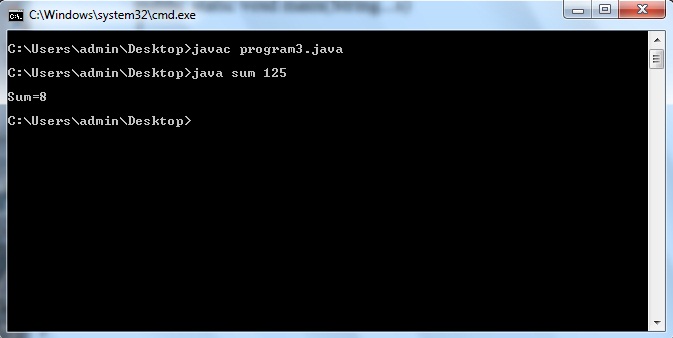
Java program to find sum of digits of a number

Java program to find sum of digits of a number

class sum
{
public static void main(String...s)
{
int n,i,sum=0;
n=Integer.parseInt(s[0]);

while(n!=0)
{
i=n%10;
sum+=i;
n/=10;
}

System.out.println(sum);
}
}

Thursday, February 5, 2015

Creating a Flex AIR text editor Part 59

In this tutorial we will add the ability to remove snippet categories.

When a category is deleted, all its contents also are to be deleted. Moreover, all the categories below the one thats deleted need to have their categoryPosition value updated.

First of all add a click listener for the bDeleteCategory button. Set the event handler to a function called deleteCategory().

<s:Button id="bDeleteCategory" label="Delete category with its contents" enabled="false" click="deleteCategory();" />

Now we fill this function with content. The first thing were going to do is declare 3 variables - currentID, currentPos and totalCategoriesBelow. On declaration, set the first two variables to the id and categoryPosition values of the trees selected item.

private function deleteCategory():void {
var currentID:int = snippetManageTree.selectedItem.@id;
var currentPos:int = snippetManageTree.selectedItem.@categoryPosition;
var totalCategoriesBelow:int;

}

Now we need to delete the category from the database. This is easy, since we all we need to do is call one statement and specify the id of the item:

// Delete category from database

var stat:SQLStatement = new SQLStatement();
stat.sqlConnection = categoryConnection;
stat.text = "DELETE FROM categories WHERE id=" + currentID;
stat.execute();

Now we delete all the snippets belonging to this category, also from the database.

// Delete all snippets belonging to this category

var stat2:SQLStatement = new SQLStatement();
stat2.sqlConnection = snippetConnection;
stat2.text = "DELETE FROM snippets WHERE categoryID=" + currentID;
stat2.execute();

Next, we can remove the category from the xml.

// Delete from the xml

delete treeData.category[currentPos];

Now we need to loop through the categories that are below this one and update their categoryPosition. This is done using a loop similar to the one from the previous tutorial:

// Increase categoryPosition of all categories below
totalCategoriesBelow = treeData.category.length() - currentPos;

for (var i:int = 0; i < totalCategoriesBelow; i++) {
treeData.category[currentPos + i].@categoryPosition = currentPos + i;

var stat3:SQLStatement = new SQLStatement();
stat3.sqlConnection = categoryConnection;
stat3.text = "UPDATE categories SET categoryPosition=@categoryPosition WHERE categoryPosition=" + (currentPos + i);
stat3.parameters["@categoryPosition"] = currentPos + i - 1;
stat3.execute();
}

Finally we disable all selection enabled things:

// Disable all selection enabled components

bSaveSnippet.enabled = false;
bDeleteSnippet.enabled = false;
bSaveCategory.enabled = false;
bDeleteCategory.enabled = false;
upCategory.enabled = false;
downCategory.enabled = false;
upSnippet.enabled = false;
downSnippet.enabled = false;

The full function code:

private function deleteCategory():void {
var currentID:int = snippetManageTree.selectedItem.@id;
var currentPos:int = snippetManageTree.selectedItem.@categoryPosition;
var totalCategoriesBelow:int;

// Delete category from database

var stat:SQLStatement = new SQLStatement();
stat.sqlConnection = categoryConnection;
stat.text = "DELETE FROM categories WHERE id=" + currentID;
stat.execute();

// Delete all snippets belonging to this category

var stat2:SQLStatement = new SQLStatement();
stat2.sqlConnection = snippetConnection;
stat2.text = "DELETE FROM snippets WHERE categoryID=" + currentID;
stat2.execute();

// Delete from the xml

delete treeData.category[currentPos];

// Increase categoryPosition of all categories below
totalCategoriesBelow = treeData.category.length() - currentPos;

for (var i:int = 0; i < totalCategoriesBelow; i++) {
treeData.category[currentPos + i].@categoryPosition = currentPos + i;

var stat3:SQLStatement = new SQLStatement();
stat3.sqlConnection = categoryConnection;
stat3.text = "UPDATE categories SET categoryPosition=@categoryPosition WHERE categoryPosition=" + (currentPos + i);
stat3.parameters["@categoryPosition"] = currentPos + i - 1;
stat3.execute();
}

// Disable all selection enabled components

bSaveSnippet.enabled = false;
bDeleteSnippet.enabled = false;
bSaveCategory.enabled = false;
bDeleteCategory.enabled = false;
upCategory.enabled = false;
downCategory.enabled = false;
upSnippet.enabled = false;
downSnippet.enabled = false;
}

And now SnippetWindow.mxml code:

<?xml version="1.0" encoding="utf-8"?>
<mx:Window xmlns:fx="http://ns.adobe.com/mxml/2009"
xmlns:s="library://ns.adobe.com/flex/spark"
xmlns:mx="library://ns.adobe.com/flex/mx"
xmlns:custom="*"
title="Snippet management" type="utility" width="500" height="730"
creationComplete="init();" showStatusBar="false" alwaysInFront="true" resizable="false" backgroundColor="#dddddd">

<fx:Script>
<![CDATA[
import flash.data.SQLConnection;
import flash.data.SQLResult;
import flash.data.SQLStatement;
import flash.events.Event;
import flash.net.Responder;
import mx.controls.Alert;

[Bindable]
public var treeData:XMLList;
private var snippetConnection:SQLConnection;
private var categoryConnection:SQLConnection;
[Bindable]
private var categories:Array = [];

private function init():void{
this.addEventListener(Event.CLOSING, onClose);
}

private function onClose(evt:Event):void {
this.visible = false;
evt.preventDefault();
}

public function setValues(xmlData:XMLList, conn1:SQLConnection, conn2:SQLConnection, createNewOnStart:Boolean = false, newText:String = ""):void {
snippetConnection = conn1;
categoryConnection = conn2;
treeData = xmlData;
newTextInput.text = newText;
newNameInput.text = "New snippet name here";
if (newText=="") {
newTextInput.text = "New snippet text here";
}
updateCategoryCombo();
}

private function addSnippet(name:String, text:String):void{
if (name != "" && text != "") {
var stat:SQLStatement = new SQLStatement();
stat.sqlConnection = snippetConnection;
stat.text = "INSERT INTO snippets (snippetName, snippetText, categoryID, snippetPosition) VALUES (@snippetName, @snippetText, @categoryID, @snippetPosition);"
stat.parameters["@snippetName"] = name;
stat.parameters["@snippetText"] = text;
stat.parameters["@categoryID"] = categoryCombo.selectedItem.ind;
stat.parameters["@snippetPosition"] = totalItemsIn(categoryCombo.selectedItem.ind);
stat.execute(-1, new Responder(addSnippetXML));
}else {
Alert.show("The name and text of the snippet must not be blank!","Oops!");
}
}

private function addSnippetXML(evt:SQLResult):void {
if (treeData.category.length() == 0 && treeData..snippet.length() == 0) {
treeData = new XMLList(<root></root>);
}
var aSnippet:XML = <snippet/>;
aSnippet.@id = evt.lastInsertRowID;
aSnippet.@label = newNameInput.text;
aSnippet.@categoryID = categoryCombo.selectedItem.ind;
aSnippet.@snippetPosition = totalItemsIn(categoryCombo.selectedItem.ind);
aSnippet.@isBranch = false;
if(aSnippet.@categoryID!=-1){
treeData.category.(@id == categoryCombo.selectedItem.ind).appendChild(aSnippet);
}else {
treeData[0].appendChild(aSnippet);
}
}

private function addCategory(name:String):void {
if (name != "") {
var stat:SQLStatement = new SQLStatement();
stat.sqlConnection = categoryConnection;
stat.text = "INSERT INTO categories (categoryName, categoryPosition) VALUES (@categoryName, @categoryPosition);"
stat.parameters["@categoryName"] = name;
stat.parameters["@categoryPosition"] = treeData.category.length();
stat.execute(-1, new Responder(addCategoryXML));
}else {
Alert.show("The name of the category must not be blank!","Oops!");
}
}

private function addCategoryXML(evt:SQLResult):void {
if (treeData.category.length() == 0 && treeData..snippet.length() == 0) {
treeData = new XMLList(<root></root>);
}
var aCategory:XML = <category/>;
aCategory.@id = evt.lastInsertRowID;
aCategory.@label = newCategoryInput.text;
aCategory.@categoryPosition = treeData.category.length();
aCategory.@isBranch = true;
if(treeData.category.length()>0){
var prevLastCategory:XML = treeData.category[treeData.category.length()-1];
treeData[0].insertChildAfter(prevLastCategory, aCategory);
} else
if(treeData[0].snippet.length()>0){
var firstSnippet:XML = treeData[0].snippet[0];
treeData[0].insertChildBefore(firstSnippet, aCategory);
} else {
treeData[0].appendChild(aCategory);
}
snippetManageTree.selectedItem = aCategory;
selectTree();
updateCategoryCombo();
}

private function updateCategoryCombo():void{
categories = [];
categories.push( { label:"No category", ind: -1 } );
for each (var cat:XML in treeData.category) {
categories.push({label:cat.@label, ind:cat.@id});
}
categoryCombo.selectedIndex = 0;
}

private function totalItemsIn(id:int):int {
var toRet:int;
if(id>=0){
toRet = treeData.category.(@id == id).children().length();
}
if (id == -1) {
toRet = treeData.snippet.length();
}
return toRet;
}

private function selectTree():void {
bSaveSnippet.enabled = false;
bDeleteSnippet.enabled = false;
bSaveCategory.enabled = false;
bDeleteCategory.enabled = false;
upCategory.enabled = false;
downCategory.enabled = false;
upSnippet.enabled = false;
downSnippet.enabled = false;

if (snippetManageTree.selectedItem.@isBranch == true) {
bSaveCategory.enabled = true;
bDeleteCategory.enabled = true;
upCategory.enabled = canCategoryUp();
downCategory.enabled = canCategoryDown();
newCategoryInput.text = snippetManageTree.selectedItem.@label;
} else {
bSaveSnippet.enabled = true;
bDeleteSnippet.enabled = true;
upSnippet.enabled = canSnippetUp();
downSnippet.enabled = canSnippetDown();
categoryCombo.selectedIndex = treeData.category.(@id == snippetManageTree.selectedItem.@categoryID).@categoryPosition + 1;
if (snippetManageTree.selectedItem.@categoryID == -1) {
categoryCombo.selectedIndex = 0;
}
var stat:SQLStatement = new SQLStatement();
stat.sqlConnection = snippetConnection;
stat.text = "SELECT snippetText FROM snippets WHERE id=" + snippetManageTree.selectedItem.@id;
stat.execute( -1, new Responder(loadSnippetText));
}
}

private function loadSnippetText(evt:SQLResult):void{
newNameInput.text = snippetManageTree.selectedItem.@label;
newTextInput.text = evt.data[0].snippetText;
}

private function canCategoryUp():Boolean {
var toRet:Boolean = true;
if (snippetManageTree.selectedItem.@categoryPosition == 0) {
toRet = false;
}
return toRet;
}

private function canCategoryDown():Boolean {
var toRet:Boolean = true;
if (snippetManageTree.selectedItem.@categoryPosition == (treeData.category.length()-1)) {
toRet = false;
}
return toRet;
}

private function canSnippetUp():Boolean {
var toRet:Boolean = true;
if (snippetManageTree.selectedItem.@snippetPosition == 0) {
toRet = false;
}
return toRet;
}

private function canSnippetDown():Boolean {
var toRet:Boolean = true;
if (snippetManageTree.selectedItem.@categoryID != -1 && snippetManageTree.selectedItem.@snippetPosition == (treeData.category.(@id == snippetManageTree.selectedItem.@categoryID).children().length()-1)) {
toRet = false;
}
if (snippetManageTree.selectedItem.@snippetPosition == (treeData.snippet.length()-1)) {
toRet = false;
}
return toRet;
}

private function categoryMove(dir:String):void{
var currentPos:int = snippetManageTree.selectedItem.@categoryPosition;
var currentId:int = snippetManageTree.selectedItem.@id;
var newPos:int = (dir=="up")?(currentPos - 1):(currentPos + 1);

// Databases:

// Set the above categorys position to current one
var stat:SQLStatement = new SQLStatement();
stat.sqlConnection = categoryConnection;
stat.text = "UPDATE categories SET categoryPosition=@currentPos WHERE categoryPosition=@newPos"
stat.parameters["@newPos"] = newPos;
stat.parameters["@currentPos"] = currentPos;
stat.execute();

// Set the current categorys position to the one above
var stat2:SQLStatement = new SQLStatement();
stat2.sqlConnection = categoryConnection;
stat2.text = "UPDATE categories SET categoryPosition=@newPos WHERE id=@currentId"
stat2.parameters["@newPos"] = newPos;
stat2.parameters["@currentId"] = currentId;
stat2.execute();

// XML:

var copy:XML = treeData.category[currentPos].copy();
delete treeData.category[currentPos];
if(dir=="up"){
treeData.insertChildBefore(treeData.category[newPos], copy);
}else {
treeData.insertChildAfter(treeData.category[currentPos], copy);
}
copy.@categoryPosition = newPos;
treeData.category[currentPos].@categoryPosition = currentPos;
snippetManageTree.selectedItem = copy;
selectTree();
}

private function snippetMove(dir:String):void{
var currentPos:int = snippetManageTree.selectedItem.@snippetPosition;
var currentId:int = snippetManageTree.selectedItem.@id;
var newPos:int = (dir == "up")?(currentPos - 1):(currentPos + 1);
var currentCategoryID:int = snippetManageTree.selectedItem.@categoryID;
var currentCategoryPos:int = NaN;

if (currentCategoryID != -1) {
currentCategoryPos = treeData.category.(@id == currentCategoryID).@categoryPosition;
}

// Databases:

// Set the above categorys position to current one
var stat:SQLStatement = new SQLStatement();
stat.sqlConnection = snippetConnection;
stat.text = "UPDATE snippets SET snippetPosition=@currentPos WHERE snippetPosition=@newPos"
stat.parameters["@newPos"] = newPos;
stat.parameters["@currentPos"] = currentPos;
stat.execute();

// Set the current categorys position to the one above
var stat2:SQLStatement = new SQLStatement();
stat2.sqlConnection = snippetConnection;
stat2.text = "UPDATE snippets SET snippetPosition=@newPos WHERE id=@currentId"
stat2.parameters["@newPos"] = newPos;
stat2.parameters["@currentId"] = currentId;
stat2.execute();

// XML:

var copy:XML = new XML();

if(currentCategoryID != -1){
copy = treeData.category[currentCategoryPos].snippet[currentPos].copy();
delete treeData.category[currentCategoryPos].snippet[currentPos];
if(dir=="up"){
treeData.category[currentCategoryPos].insertChildBefore(treeData.category[currentCategoryPos].snippet[newPos], copy);
}else {
treeData.category[currentCategoryPos].insertChildAfter(treeData.category[currentCategoryPos].snippet[currentPos], copy);
}
copy.@snippetPosition = newPos;
treeData.category[currentCategoryPos].snippet[currentPos].@snippetPosition = currentPos;
}

if(currentCategoryID == -1){
copy = treeData.snippet[currentPos].copy();
delete treeData.snippet[currentPos];
if(dir=="up"){
treeData.insertChildBefore(treeData.snippet[newPos], copy);
}else {
treeData.insertChildAfter(treeData.snippet[currentPos], copy);
}
copy.@snippetPosition = newPos;
treeData.snippet[currentPos].@snippetPosition = currentPos;
}

snippetManageTree.selectedItem = copy;
selectTree();
}

private function saveCategory():void {
var currentID:int = snippetManageTree.selectedItem.@id;

var stat:SQLStatement = new SQLStatement();
stat.sqlConnection = categoryConnection;
stat.text = "UPDATE categories SET categoryName=@categoryName WHERE id=" + currentID;
stat.parameters["@categoryName"] = newCategoryInput.text;
stat.execute();

treeData.category[snippetManageTree.selectedItem.@categoryPosition].@label = newCategoryInput.text;
updateCategoryCombo();
}

private function saveSnippet():void {
var currentID:int = snippetManageTree.selectedItem.@id;

var stat:SQLStatement = new SQLStatement();
stat.sqlConnection = snippetConnection;
stat.text = "UPDATE snippets SET snippetName=@snippetName, snippetText=@snippetText WHERE id=" + currentID;
stat.parameters["@snippetName"] = newNameInput.text;
stat.parameters["@snippetText"] = newTextInput.text;
stat.execute();

var currentPos:int = snippetManageTree.selectedItem.@snippetPosition;
var currentCategoryID:int = snippetManageTree.selectedItem.@categoryID;
var currentCategoryPos:int;

if (currentCategoryID != -1) {
currentCategoryPos = treeData.category.(@id == currentCategoryID).@categoryPosition;
treeData.category[currentCategoryPos].snippet[currentPos].@label = newNameInput.text;
}else {
treeData.snippet[currentPos].@label = newNameInput.text;
}

}

private function deleteSnippet():void {
var currentPos:int = snippetManageTree.selectedItem.@snippetPosition;
var currentId:int = snippetManageTree.selectedItem.@id;
var currentCategoryID:int = snippetManageTree.selectedItem.@categoryID;
var currentCategoryPos:int = NaN;

if (currentCategoryID != -1) {
currentCategoryPos = treeData.category.(@id == currentCategoryID).@categoryPosition;
}
var totalSnippetsBelow:int;

// Delete from the SQL database
var stat:SQLStatement = new SQLStatement();
stat.sqlConnection = snippetConnection;
stat.text = "DELETE FROM snippets WHERE id=" + currentId;
stat.execute();

// If in a category:
if (currentCategoryID != -1) {

// Delete from the XML
delete treeData.category[currentCategoryPos].snippet[currentPos];

// Increase snippetPosition of all snippets below
totalSnippetsBelow = treeData.category[currentCategoryPos].children().length() - currentPos;

for (var i:int = 0; i < totalSnippetsBelow; i++) {
treeData.category[currentCategoryPos].snippet[currentPos + i].@snippetPosition = currentPos + i;

var snipStat1:SQLStatement = new SQLStatement();
snipStat1.sqlConnection = snippetConnection;
snipStat1.text = "UPDATE snippets SET snippetPosition=@snippetPosition WHERE snippetPosition=" + (currentPos + i);
snipStat1.parameters["@snippetPosition"] = currentPos + i - 1;
snipStat1.execute();
}

}

// If in a root tags:
if (currentCategoryID == -1) {

// Delete from the XML
delete treeData.snippet[currentPos];

// Increase snippetPosition of all snippets below
totalSnippetsBelow = treeData.snippet.length() - currentPos;

for (var u:int = 0; u < totalSnippetsBelow; u++) {
treeData.snippet[currentPos + u].@snippetPosition = currentPos + u;

var snipStat2:SQLStatement = new SQLStatement();
snipStat2.sqlConnection = snippetConnection;
snipStat2.text = "UPDATE snippets SET snippetPosition=@snippetPosition WHERE snippetPosition=" + (currentPos + u);
snipStat2.parameters["@snippetPosition"] = currentPos + u - 1;
snipStat2.execute();
}

}

// Disable all selection enabled components

bSaveSnippet.enabled = false;
bDeleteSnippet.enabled = false;
bSaveCategory.enabled = false;
bDeleteCategory.enabled = false;
upCategory.enabled = false;
downCategory.enabled = false;
upSnippet.enabled = false;
downSnippet.enabled = false;
}

private function deleteCategory():void {
var currentID:int = snippetManageTree.selectedItem.@id;
var currentPos:int = snippetManageTree.selectedItem.@categoryPosition;
var totalCategoriesBelow:int;

// Delete category from database

var stat:SQLStatement = new SQLStatement();
stat.sqlConnection = categoryConnection;
stat.text = "DELETE FROM categories WHERE id=" + currentID;
stat.execute();

// Delete all snippets belonging to this category

var stat2:SQLStatement = new SQLStatement();
stat2.sqlConnection = snippetConnection;
stat2.text = "DELETE FROM snippets WHERE categoryID=" + currentID;
stat2.execute();

// Delete from the xml

delete treeData.category[currentPos];

// Increase categoryPosition of all categories below
totalCategoriesBelow = treeData.category.length() - currentPos;

for (var i:int = 0; i < totalCategoriesBelow; i++) {
treeData.category[currentPos + i].@categoryPosition = currentPos + i;

var stat3:SQLStatement = new SQLStatement();
stat3.sqlConnection = categoryConnection;
stat3.text = "UPDATE categories SET categoryPosition=@categoryPosition WHERE categoryPosition=" + (currentPos + i);
stat3.parameters["@categoryPosition"] = currentPos + i - 1;
stat3.execute();
}

// Disable all selection enabled components

bSaveSnippet.enabled = false;
bDeleteSnippet.enabled = false;
bSaveCategory.enabled = false;
bDeleteCategory.enabled = false;
upCategory.enabled = false;
downCategory.enabled = false;
upSnippet.enabled = false;
downSnippet.enabled = false;
}
]]>
</fx:Script>

<s:VGroup paddingLeft="5" paddingRight="5" paddingTop="5" paddingBottom="5">
<s:Label text="Snippet creation and management: " />
<s:HGroup>
<s:TextInput id="newNameInput" text="New snippet name" width="240" />
<mx:ComboBox id="categoryCombo" width="240" dataProvider="{categories}" />
</s:HGroup>
<s:TextArea id="newTextInput" width="490" height="200" text="Snippet text" />
<s:HGroup>
<s:Button id="bAddSnippet" label="Add snippet" click="addSnippet(newNameInput.text, newTextInput.text);" />
<s:Button id="bSaveSnippet" label="Save changes" enabled="false" />
<s:Button id="bDeleteSnippet" label="Delete snippet" enabled="false" click="deleteSnippet();" />
<custom:IconButton id="upSnippet" icon="@Embed(../lib/arrow_up.png)" toolTip="Move up" enabled="false" click="snippetMove(up);" />
<custom:IconButton id="downSnippet" icon="@Embed(../lib/arrow_down.png)" toolTip="Move down" enabled="false" click="snippetMove(down);" />
</s:HGroup>

<s:Label text="" />

<s:Label text="Category creation and management: " />
<s:TextInput id="newCategoryInput" text="New category name" width="490" />
<s:HGroup>
<s:Button id="bAddCategory" label="Add category" click="addCategory(newCategoryInput.text);"/>
<s:Button id="bSaveCategory" label="Save changes" enabled="false" click="saveCategory();" />
<s:Button id="bDeleteCategory" label="Delete category with its contents" enabled="false" click="deleteCategory();" />
<custom:IconButton id="upCategory" icon="@Embed(../lib/arrow_up.png)" toolTip="Move up" enabled="false" click="categoryMove(up);" />
<custom:IconButton id="downCategory" icon="@Embed(../lib/arrow_down.png)" toolTip="Move down" enabled="false" click="categoryMove(down);" />
</s:HGroup>

<s:Label text="" />

<mx:Tree id="snippetManageTree" dataProvider="{treeData}" width="490" height="300" showRoot="false" labelField="@label" itemClick="selectTree();" />
</s:VGroup>

</mx:Window>

Thanks for reading!

Wednesday, February 4, 2015

SlideShare tell a story in 30 slides contest


Tell A Story in 30 Slides: SlideShare Contest

Posted: 27 May 2009 05:29 PM PDT


SlideShare announced the very interesting Tell A Story in 30 Slides contest that invites participants to submit a story about themselves, their travels, or something they love. Just tell it with words and pictures and in 30 slides.

Everyone who enters the contest gets a free Fuze Meeting account ($270 value). Learn more about how to enter contest here...

Tell A Story in 30 Slides: SlideShare Contest

Jonathan Boutelle of SlideShare adds: "We launched a new contest yesterday that will be of interest to your readers. The theme is "tell a story", and the top prize is $5000. The judges include Om Malik, Pete Cashmere (Mashable), Ann Handley, Don Tapscott, and Tony Hsieh (Zappos). Theres already some really nice entries up, and I think the theme is going to elicit some very interesting work this time (PowerPoint as narrative device).


Tuesday, February 3, 2015

Creating a Flex AIR Screenshot app Part 20

In this tutorial we will keep improving our crop selection functionality.

Right now, we can only select by dragging from the initial position (the coordinates that we pressed our mouse at) to bottom right. The code doesnt allow us to drag in any other direction, thanks to a conditional Ive put in the previous tutorial.

I did that, because if we create the selection into any other direction, we wont be able to drag it properly anymore. This is because the code we have right now assumes that the top left corner of the selection box coordinates are drawingRect[0] and drawingRect[1]. Instead of rewriting that code, we can just make sure that no matter what direction the selection is created, the top left corner will always be that point with those coordinates.

We can do that by adding 4 conditionals to the drawMove() function inside the if(drawing) conditional. They might look confusing at first glance, but they are pretty straight forward and there isnt much to explain from what is already written in the code. Ill just say that we will achieve our goal if we check which direction the user drags, and according to that value, set the 4 values of drawingRect accordingly, where 0 and 1 elements are always the x and y of the whole selection and represent the top left point in the rectangle.

if (drawing) {
// bottom - right
if (evt.target.mouseX > drawPreviousX && evt.target.mouseY > drawPreviousY) {
drawingRect[0] = drawPreviousX;
drawingRect[1] = drawPreviousY;
drawingRect[2] = evt.target.mouseX - drawPreviousX;
drawingRect[3] = evt.target.mouseY - drawPreviousY;
drawRectangle();
}
// bottom - left
if (evt.target.mouseX < drawPreviousX && evt.target.mouseY > drawPreviousY) {
drawingRect[0] = evt.target.mouseX;
drawingRect[1] = drawPreviousY;
drawingRect[2] = drawPreviousX - evt.target.mouseX;
drawingRect[3] = evt.target.mouseY - drawPreviousY;
drawRectangle();
}
// top - right
if (evt.target.mouseX > drawPreviousX && evt.target.mouseY < drawPreviousY) {
drawingRect[0] = drawPreviousX;
drawingRect[1] = evt.target.mouseY;
drawingRect[2] = evt.target.mouseX - drawPreviousX;
drawingRect[3] = drawPreviousY - evt.target.mouseY;
drawRectangle();
}
// top - left
if (evt.target.mouseX < drawPreviousX && evt.target.mouseY < drawPreviousY) {
drawingRect[0] = evt.target.mouseX;
drawingRect[1] = evt.target.mouseY;
drawingRect[2] = drawPreviousX - evt.target.mouseX;
drawingRect[3] = drawPreviousY - evt.target.mouseY;
drawRectangle();
}
}

Now we can create it in any direction and it will work just fine. We are also able to drag the created selection around.

One little problem remains, that might be really annoying and irritating - its the fact that when we drag our selection around and near the edges, it often gets "stuck", because sometimes the mouse goes a few pixels too far in a direction, which would make the selection cross the borders. Right now, if the program sees that by moving the selection it will not fit in the frame, it just doesnt move it at all. Lets change it a bit - make it actually move the selection to the very edge of the area. This will make it seem much more user-friendly and clean.

To do that, go to the drawMove() function and in the if(dragging) function, remove the long conditional checking for intersection with borders. Just set the coordinates to newX and newY. Then, call a function called validSelectionPositionCheck().

if (dragging) {
var newX:int = evt.target.mouseX - dragOffsetX;
var newY:int = evt.target.mouseY - dragOffsetY;
drawingRect[0] = newX;
drawingRect[1] = newY;
validSelectionPositionCheck();
drawRectangle();
}

This function checks if the position of the selection crosses the borders. If it does, move it to very edge, but inside.

private function validSelectionPositionCheck():void {
if (drawingRect[0] < 0) {
drawingRect[0] = 0;
}
if (drawingRect[0] > drawArea.width - drawingRect[2]) {
drawingRect[0] = drawArea.width - drawingRect[2];
}
if (drawingRect[1] < 0) {
drawingRect[1] = 0;
}
if (drawingRect[1] > drawArea.height - drawingRect[3]) {
drawingRect[1] = drawArea.height - drawingRect[3];
}
}

Thats all for today.

Full code:

<?xml version="1.0" encoding="utf-8"?>
<s:WindowedApplication xmlns:fx="http://ns.adobe.com/mxml/2009"
xmlns:s="library://ns.adobe.com/flex/spark"
xmlns:custom="*"
xmlns:mx="library://ns.adobe.com/flex/mx" showStatusBar="false"
width="550" height="600" creationComplete="init();">


<fx:Declarations>
<mx:ArrayCollection id="headerTitles">
<fx:Object step="Step one:" description="load a web page." />
<fx:Object step="Loading..." description="please wait." />
<fx:Object step="Step two:" description="set your export preferences." />
<fx:Object step="Step two:" description="select the area you wish to crop." />
<fx:Object step="Step three:" description="set your export preferences for the cropped image." />
<fx:Object step="Exporting:" description="please wait." />
</mx:ArrayCollection>
</fx:Declarations>

<fx:Style>
@namespace s "library://ns.adobe.com/flex/spark";
@namespace mx "library://ns.adobe.com/flex/mx";

.descriptionText{
fontSize: 24;
color: #fff;
}

.descriptionText2{
fontSize: 16;
color: #fff;
}

.settingText{
fontSize: 16;
color: #fff;
}

#headStep{
fontSize: 30;
fontWeight: bold;
color: #ffffbb;
}

#headDesc{
fontSize: 30;
color: #ffffff;
}
</fx:Style>

<fx:Script>
<![CDATA[
import flash.display.Bitmap;
import flash.display.BitmapData;
import flash.events.Event;
import flash.events.MouseEvent;
import flash.events.TimerEvent;
import flash.filesystem.File;
import flash.filesystem.FileStream;
import flash.filters.GlowFilter;
import flash.geom.Point;
import flash.geom.Rectangle;
import flash.net.URLRequest;
import flash.utils.ByteArray;
import flash.utils.Timer;
import mx.controls.HTML;
import mx.core.FlexHTMLLoader;
import mx.events.FlexNativeWindowBoundsEvent;
import mx.controls.Alert;
import mx.events.ResizeEvent;
import mx.graphics.codec.IImageEncoder;
import mx.graphics.codec.JPEGEncoder;
import mx.graphics.codec.PNGEncoder;
import mx.graphics.ImageSnapshot;
import spark.components.Scroller;
import spark.primitives.BitmapImage;
import flash.filesystem.FileMode;
import mx.managers.PopUpManager;

[Bindable]
private var urlString:String;
private var tempHTML:HTML = new HTML();

private var preferences:SharedObject = SharedObject.getLocal("kirshotPreferences");
[Bindable]
private var pref_screensizes:Array;
[Bindable]
private var pref_format:String;
[Bindable]
private var pref_quality:int;
[Bindable]
private var pref_folder:Boolean;
[Bindable]
private var pref_destination:String;
[Bindable]
private var exportText:String;
private var screenGo:String;
private var drawing:Boolean = false;
private var dragging:Boolean = false;
private var inDragArea:Boolean = false;
private var drawingRect:Array = [];
private var dragOffsetX:int = 0;
private var dragOffsetY:int = 0;
private var drawPreviousX:int = 0;
private var drawPreviousY:int = 0;

[Embed(source="../lib/cursor_crop.png")]
private var cropCursor:Class;

[Embed(source="../lib/cursor_move.png")]
private var dragCursor:Class;

private var screenSettings:Array;

private function init():void {
//preferences.data.firsttime = null;

// Set preferences if loaded for the first time
if (preferences.data.firsttime == null) {
preferences.data.firsttime = true;
preferences.data.screensizes = [
{ checked:true },
{ checked:true, w:1280, h:1024 },
{ checked:true, w:1280, h:800 },
{ checked:true, w:1024, h:768 },
{ checked:false, w:"", h:"" },
{ checked:false, w:"", h:"" } ];
preferences.data.format = "JPEG";
preferences.data.quality = 100;
preferences.data.folder = true;
preferences.data.destination = File.documentsDirectory.nativePath;
preferences.flush();
}

// Set preferences loaded from local storage
pref_screensizes = preferences.data.screensizes;
pref_format = preferences.data.format;
pref_quality = preferences.data.quality;
pref_folder = preferences.data.folder;
pref_destination = preferences.data.destination;

addElement(tempHTML);
removeElement(tempHTML);
}

private function doBrowse():void{
var file:File = new File();
file.addEventListener(Event.SELECT, browseSelect);
file.browseForOpen("Load a webpage");

function browseSelect(evt:Event):void {
urlInput.text = file.nativePath;
}
}

private function goScreenshot(screen:String):void {
screenGo = screen;
stack.selectedChild = screenshotloading;
urlString = urlInput.text;

addElement(tempHTML);
tempHTML.htmlLoader.useCache = false;
tempHTML.horizontalScrollPolicy = "off";
tempHTML.verticalScrollPolicy = "off";
tempHTML.visible = false;
tempHTML.addEventListener(Event.COMPLETE, onTempLoad);
tempHTML.htmlLoader.load(new URLRequest(urlString));
}

private function onTempLoad(evt:Event):void {
tempHTML.removeEventListener(Event.COMPLETE, onTempLoad);
if(screenGo=="screenshot"){
stack.selectedChild = screenshotsettings;
}
if (screenGo == "crop") {
if(tempHTML.contentWidth <= 4096 && tempHTML.contentHeight <= 4096){
var t:Timer = new Timer(1000, 1);
t.addEventListener(TimerEvent.TIMER_COMPLETE, tComplete);
t.start();
tempHTML.width = tempHTML.contentWidth;
tempHTML.height = tempHTML.contentHeight;
function tComplete(evt:TimerEvent):void {
stack.selectedChild = crop;
}
}else {
Alert.show("Dimensions of a screenshot cannot exceed 4096 pixels.", "Sorry...");
stack.selectedChild = loadpage;
}
}
}

private function cancelLoading():void {
tempHTML.removeEventListener(Event.COMPLETE, onTempLoad);
tempHTML.cancelLoad();
stack.selectedChild = loadpage;
removeElement(tempHTML);
}

private function screenshotBack():void {
saveScreenshotSettings();
stack.selectedChild = loadpage;
removeElement(tempHTML);
}

private function changeState():void {
if (stack.selectedChild == loadpage) {
contentBox.setStyle("horizontalAlign", "center");
urlInput.text = urlString;
tempHTML.width = 1;
tempHTML.height = 1;
tempHTML.removeEventListener(Event.COMPLETE, onTempLoad);
tempHTML.htmlLoader.loadString("<html></html>");
}
if (stack.selectedChild == crop) {
maximize();
contentBox.setStyle("horizontalAlign", "left");
var bd:BitmapData = new BitmapData(tempHTML.width, tempHTML.height, false);
bd.draw(tempHTML);
var b:Bitmap = new Bitmap(bd, "auto", true);
cropHTML.source = b;
drawArea.addEventListener(MouseEvent.MOUSE_DOWN, drawDown);
addEventListener(MouseEvent.MOUSE_UP, drawUp);
drawArea.addEventListener(MouseEvent.MOUSE_MOVE, drawMove);
displayWidth.filters = [new GlowFilter(0xffffff, 1, 3, 3, 50)];
displayHeight.filters = [new GlowFilter(0xffffff, 1, 3, 3, 50)];
drawArea.addEventListener(MouseEvent.MOUSE_OVER, drawOver);
drawArea.addEventListener(MouseEvent.MOUSE_OUT, drawOut);
displayHeight.text = "";
displayWidth.text = "";
cropDraw.graphics.clear();
}
if (stack.selectedChild == screenshotsettings) {
screenSettings = [set2, set3, set4, set5, set6, set7];
contSize.text = "Full size (" + tempHTML.contentWidth + "x" + tempHTML.contentHeight + ")";
loadScreenshotSettings();
}
}

private function loadScreenshotSettings():void {
set1checkbox.selected = pref_screensizes[0].checked;

for (var i:int = 0; i < screenSettings.length; i++) {
screenSettings[i].checked = pref_screensizes[i + 1].checked;
screenSettings[i].w = pref_screensizes[i + 1].w;
screenSettings[i].h = pref_screensizes[i + 1].h;
}

if (pref_format == "JPEG") {
screenRadioJPEG.selected = true;
} else {
screenRadioPNG.selected = true;
}
}

private function saveScreenshotSettings():void {
pref_screensizes[0].checked = set1checkbox.selected;

for (var i:int = 0; i < screenSettings.length; i++) {
pref_screensizes[i + 1].checked = screenSettings[i].checked;
pref_screensizes[i + 1].w = screenSettings[i].w;
pref_screensizes[i + 1].h = screenSettings[i].h;
}

if (screenRadioJPEG.selected == true) {
pref_format == "JPEG";
} else {
pref_format == "PNG";
}

preferences.data.screensizes = pref_screensizes;
preferences.data.format = pref_format;
preferences.data.quality = pref_quality;
preferences.data.folder = pref_folder;
preferences.data.destination = pref_destination;
preferences.flush();
}

private function formatChange(newformat:String):void {
pref_format = newformat;
}

private function startExportScreenshot():void {
var canExport:Boolean = true;

for (var i:int = 0; i < screenSettings.length; i++) {
if (screenSettings[i].checked && ((screenSettings[i].w == "" || screenSettings[i].w == 0) || (screenSettings[i].h == "" || screenSettings[i].h == 0))) {
canExport = false;
}
}

if (canExport) {
if ((pref_folder && folderField.text != "") || !pref_folder) {
saveScreenshotSettings();
exportScreen();
}else {
Alert.show("Folder name should not be blank!", "Oops...");
}
}else {
Alert.show("One or more selected screen sizes are not entered or are invalid!", "Oops...");
}
}

private function screenshotDestination():void {
var newDestination:File = new File(pref_destination);
newDestination.browseForDirectory("Select directory");
newDestination.addEventListener(Event.SELECT, destinationSelect);

function destinationSelect(evt:Event):void {
pref_destination = newDestination.nativePath;
}
}

private function exportScreen():void {
var encoder:IImageEncoder;
var bd:BitmapData;
var byteArray:ByteArray;
var folderName:String = (pref_folder)?(folderField.text):("");
var fileName:String;
var file:File;
var fileStream:FileStream;
var screensToExport:Array = [];
stack.selectedChild = export;

if (pref_format == "JPEG") {
encoder = new JPEGEncoder(pref_quality);
}
if (pref_format == "PNG") {
encoder = new PNGEncoder();
}

// add full-size screen to array if checked
if (pref_screensizes[0].checked) {
screensToExport = [ { w:tempHTML.contentWidth, h: tempHTML.contentHeight, full:true} ];
}

// add the rest screens to array if checked
for (var i:int = 0; i < screenSettings.length; i++) {
if (pref_screensizes[i + 1].checked) {
screensToExport.push( { w: pref_screensizes[i + 1].w, h:pref_screensizes[i + 1].h } );
}
}

// if nothing is checked, go to first page and stop code
if (screensToExport.length == 0) {
removeElement(tempHTML);
stack.selectedChild = loadpage;
return;
}

// create a timer that repeats itself as many times as many items there are in the array
var timer:Timer = new Timer(2000, screensToExport.length);
timer.addEventListener(TimerEvent.TIMER, onTimer);
// set sizes to the first size of the array
if (screensToExport[0].full) {
tempHTML.horizontalScrollPolicy = "off";
tempHTML.verticalScrollPolicy = "off";
}else {
tempHTML.horizontalScrollPolicy = "auto";
tempHTML.verticalScrollPolicy = "auto";
}
if(screensToExport[0].h <= 4096 && screensToExport[0].w <= 4096){
tempHTML.height = screensToExport[0].h;
tempHTML.width = screensToExport[0].w;
}
updateExportText(screensToExport[0].w, screensToExport[0].h, 1, screensToExport.length);
timer.start();

function onTimer(evt:TimerEvent):void {
// do export for the current size
if(screensToExport[timer.currentCount-1].h <= 4096 && screensToExport[timer.currentCount-1].w <= 4096){
timer.stop();
doExport();
timer.start();
}else {
Alert.show("Cannot export " + screensToExport[timer.currentCount-1].w + "x" + screensToExport[timer.currentCount-1].h + " - dimensions of a screenshot cannot extend 4096.","Sorry");
}
// change the size if this was not the last size in the array
if (timer.currentCount != screensToExport.length) {
tempHTML.horizontalScrollPolicy = "auto";
tempHTML.verticalScrollPolicy = "auto";
if(screensToExport[timer.currentCount].h <= 4096 && screensToExport[timer.currentCount].w <= 4096){
tempHTML.height = screensToExport[timer.currentCount].h;
tempHTML.width = screensToExport[timer.currentCount].w;
}
updateExportText(screensToExport[timer.currentCount].w, screensToExport[timer.currentCount].h, timer.currentCount+1, screensToExport.length);
}else {
// if it was the last size in the array, return to first page
timer.stop();
removeElement(tempHTML);
stack.selectedChild = loadpage;
}
}

function doExport():void {
bd = new BitmapData(tempHTML.width, tempHTML.height, false);
bd.draw(tempHTML, null, null, null, null, true);
byteArray = encoder.encode(bd);
fileName = pref_destination + File.separator + folderName + File.separator + tempHTML.width + "x" + tempHTML.height + "." + pref_format;
file = new File(fileName);
fileStream = new FileStream();
fileStream.open(file, FileMode.WRITE);
fileStream.writeBytes(byteArray);
fileStream.close();
}

function updateExportText(w:int, h:int, current:int, total:int):void {
exportText = "Exporting " + w + "x" + h + "." + pref_format + " (" + current + "/" + total + ")";
}
}

private function drawDown(evt:MouseEvent):void {
if(!inDragArea){
drawing = true;
drawingRect = [evt.target.mouseX, evt.target.mouseY, 0, 0];
drawPreviousX = evt.target.mouseX;
drawPreviousY = evt.target.mouseY;
drawRectangle();
}
if (inDragArea) {
dragging = true;
dragOffsetX = evt.target.mouseX - drawingRect[0];
dragOffsetY = evt.target.mouseY - drawingRect[1];
}
}

private function drawUp(evt:MouseEvent):void{
drawing = false;
dragging = false;
}

private function drawMove(evt:MouseEvent):void{
if (drawing) {
// bottom - right
if (evt.target.mouseX > drawPreviousX && evt.target.mouseY > drawPreviousY) {
drawingRect[0] = drawPreviousX;
drawingRect[1] = drawPreviousY;
drawingRect[2] = evt.target.mouseX - drawPreviousX;
drawingRect[3] = evt.target.mouseY - drawPreviousY;
drawRectangle();
}
// bottom - left
if (evt.target.mouseX < drawPreviousX && evt.target.mouseY > drawPreviousY) {
drawingRect[0] = evt.target.mouseX;
drawingRect[1] = drawPreviousY;
drawingRect[2] = drawPreviousX - evt.target.mouseX;
drawingRect[3] = evt.target.mouseY - drawPreviousY;
drawRectangle();
}
// top - right
if (evt.target.mouseX > drawPreviousX && evt.target.mouseY < drawPreviousY) {
drawingRect[0] = drawPreviousX;
drawingRect[1] = evt.target.mouseY;
drawingRect[2] = evt.target.mouseX - drawPreviousX;
drawingRect[3] = drawPreviousY - evt.target.mouseY;
drawRectangle();
}
// top - left
if (evt.target.mouseX < drawPreviousX && evt.target.mouseY < drawPreviousY) {
drawingRect[0] = evt.target.mouseX;
drawingRect[1] = evt.target.mouseY;
drawingRect[2] = drawPreviousX - evt.target.mouseX;
drawingRect[3] = drawPreviousY - evt.target.mouseY;
drawRectangle();
}
}

if (dragging) {
var newX:int = evt.target.mouseX - dragOffsetX;
var newY:int = evt.target.mouseY - dragOffsetY;
drawingRect[0] = newX;
drawingRect[1] = newY;
validSelectionPositionCheck();
drawRectangle();
}

if (!drawing && !dragging){
cursorManager.removeAllCursors();

if (evt.target.mouseX > drawingRect[0] && evt.target.mouseX < drawingRect[0] + drawingRect[2] && evt.target.mouseY > drawingRect[1] && evt.target.mouseY < drawingRect[1] + drawingRect[3]) {
cursorManager.setCursor(dragCursor, 2, -9, -9);
inDragArea = true;
}else {
cursorManager.setCursor(cropCursor, 2, -9, -9);
inDragArea = false;
}
}
}

private function drawRectangle():void {
displayWidth.x = drawingRect[0];
if (displayWidth.x + displayWidth.width > cropDraw.width) {
displayWidth.x -= displayWidth.width;
}
displayWidth.y = drawingRect[1] - 12;
if (displayWidth.y < 0) {
displayWidth.y += displayWidth.height;
}
displayWidth.text = Math.abs(drawingRect[2]) + "px";
displayHeight.x = drawingRect[0] + drawingRect[2] + 4;
if (displayHeight.x + displayHeight.width > cropDraw.width) {
displayHeight.x -= (displayHeight.width + 4);
}
displayHeight.y = drawingRect[1] + drawingRect[3] - 12;
if (displayHeight.y < 0) {
displayHeight.y += displayHeight.height;
}
displayHeight.text = Math.abs(drawingRect[3]) + "px";
cropDraw.graphics.clear();
cropDraw.graphics.lineStyle(1, 0xff0000);
cropDraw.graphics.beginFill(0x00ff00, 0.15);
cropDraw.graphics.drawRect(drawingRect[0], drawingRect[1], drawingRect[2], drawingRect[3]);
cropDraw.graphics.endFill();
}

private function drawOver(evt:MouseEvent):void {
if (dragging) {
cursorManager.setCursor(dragCursor, 2, -9, -9);
}else {
cursorManager.setCursor(cropCursor, 2, -9, -9);
}
}

private function drawOut(evt:MouseEvent):void {
cursorManager.removeAllCursors();
}

private function validSelectionPositionCheck():void {
if (drawingRect[0] < 0) {
drawingRect[0] = 0;
}
if (drawingRect[0] > drawArea.width - drawingRect[2]) {
drawingRect[0] = drawArea.width - drawingRect[2];
}
if (drawingRect[1] < 0) {
drawingRect[1] = 0;
}
if (drawingRect[1] > drawArea.height - drawingRect[3]) {
drawingRect[1] = drawArea.height - drawingRect[3];
}
}
]]>
</fx:Script>

<s:VGroup width="100%" height="100%" gap="0">
<mx:HBox backgroundColor="#333333" height="46" width="100%" paddingTop="10" paddingLeft="10">
<s:Label id="headStep" text="{headerTitles.getItemAt(stack.selectedIndex).step}" />
<s:Label id="headDesc" text="{headerTitles.getItemAt(stack.selectedIndex).description}" />
</mx:HBox>
<mx:Box backgroundColor="#666666" width="100%" height="100%" id="contentBox" horizontalAlign="center">
<mx:ViewStack id="stack" change="changeState();">
<s:NavigatorContent id="loadpage">
<s:VGroup width="100%" horizontalAlign="center" paddingTop="20">
<s:Label styleName="descriptionText">Enter the link to the page:</s:Label>
<s:HGroup>
<s:TextInput width="250" id="urlInput" text="http://" /><s:Button label="Browse local..." click="doBrowse();" />
</s:HGroup>
<s:HGroup>
<custom:ImageButton img="@Embed(../lib/b_screenshot.png)" over="@Embed(../lib/b_screenshot_over.png)" toolTip="Take screenshots" click="goScreenshot(screenshot);" buttonMode="true" enabled="{urlInput.text!=}" />
<custom:ImageButton img="@Embed(../lib/b_cut.png)" over="@Embed(../lib/b_cut_over.png)" toolTip="Crop area" click="goScreenshot(crop);" buttonMode="true" enabled="{urlInput.text!=}" />
</s:HGroup>
</s:VGroup>
</s:NavigatorContent>

<s:NavigatorContent id="screenshotloading">
<s:VGroup width="100%" horizontalAlign="center" paddingTop="20">
<s:Label styleName="descriptionText">The page is being loaded...</s:Label>
<s:Button label="Cancel" click="cancelLoading();" />
</s:VGroup>
</s:NavigatorContent>

<s:NavigatorContent id="screenshotsettings">
<s:VGroup width="100%" horizontalAlign="center" paddingTop="20">
<s:Label styleName="descriptionText2">Select screenshot screen sizes:</s:Label>
<s:SkinnableContainer backgroundColor="#999999" width="310" height="18" >
<s:CheckBox toolTip="Use this screen size" x="4" id="set1checkbox" />
<s:Label id="contSize" styleName="settingText" x="22" y="3" />
</s:SkinnableContainer>
<custom:ScreenSetting id="set2" />
<custom:ScreenSetting id="set3" />
<custom:ScreenSetting id="set4" />
<custom:ScreenSetting id="set5" />
<custom:ScreenSetting id="set6" />
<custom:ScreenSetting id="set7" />

<s:Label/>

<s:Label styleName="descriptionText2">Export as:</s:Label>
<s:HGroup>
<s:RadioButton id="screenRadioJPEG" label="JPEG" groupName="screenshotFormat" change="formatChange(JPEG);" styleName="descriptionText2" />
<s:RadioButton id="screenRadioPNG" label="PNG" groupName="screenshotFormat" change="formatChange(PNG);" styleName="descriptionText2" />
</s:HGroup>
<s:Label styleName="descriptionText2">Quality:</s:Label>
<s:HSlider id="screenQualitySlider" width="310" minimum="1" maximum="100" liveDragging="true" enabled="{pref_format==JPEG}" value="@{pref_quality}" />

<s:Label/>

<s:Label styleName="descriptionText2">Export destination:</s:Label>
<s:HGroup width="310">
<s:TextInput editable="false" width="100%" toolTip="Destination" text="{pref_destination}" />
<s:Button label="Browse" click="screenshotDestination();" />
</s:HGroup>
<s:CheckBox id="folderCheckbox" label="Create new folder with exported images" styleName="descriptionText2" selected="@{pref_folder}" />
<s:TextInput id="folderField" width="100%" toolTip="Folder name" maxChars="200" enabled="{folderCheckbox.selected}" restrict="a-zA-Z0-9._-=+" />
<s:HGroup>
<s:Button label="Back" click="screenshotBack();" />
<s:Button label="Export" click="startExportScreenshot();" />
</s:HGroup>
</s:VGroup>
</s:NavigatorContent>

<s:NavigatorContent id="crop">
<s:VGroup width="{contentBox.width}" height="100%" gap="0" horizontalAlign="center">
<mx:HBox backgroundColor="#999999" width="100%" height="24" verticalScrollPolicy="off" verticalAlign="middle" paddingLeft="2">
<s:Button label="Back" click="{stack.selectedChild = loadpage;}" />
<s:Button label="Export selection" enabled="false" />
</mx:HBox>
<s:Scroller width="{(contentBox.width>cropHTML.width+15)?(cropHTML.width+15):(contentBox.width)}" height="{contentBox.height-24}" id="scrollHTML">
<s:Group>
<s:BitmapImage id="cropHTML" />
<s:SpriteVisualElement id="cropDraw" width="{cropHTML.width}" height="{cropHTML.height}" />
<mx:Box width="{cropHTML.width}" height="{cropHTML.height}" alpha="0" id="drawArea" backgroundColor="#000000"/>
<s:Label id="displayWidth" color="#000000" mouseEnabled="false" />
<s:Label id="displayHeight" color="#000000" mouseEnabled="false" />
</s:Group>
</s:Scroller>
</s:VGroup>
</s:NavigatorContent>

<s:NavigatorContent id="cropsettings">

</s:NavigatorContent>

<s:NavigatorContent id="export">
<s:VGroup width="100%" horizontalAlign="center" paddingTop="20">
<s:Label styleName="descriptionText" text="{exportText}" />
</s:VGroup>
</s:NavigatorContent>
</mx:ViewStack>
</mx:Box>
</s:VGroup>

</s:WindowedApplication>

Thanks for reading!