Showing posts with label part. Show all posts

Saturday, February 28, 2015

Is PowerPoint Evil Part 3

  • ZaidLearns Del.icio.us PowerPoint Links

"Its the way people depend on all those bells and whistles that come with the software to try to shore up a weak presentation." - Chris Oakes (1998)
 
"...To critics, PowerPoint serves largely the same role in the classroom as pre-processed snack food does in the lunchroom: a conveniently packaged morsel that looks good but doesnt match the intellectual or corporeal nourishment of, say, a critical essay or a plate of steamed spinach." - Joanna Glasner (2002)

"The practical conclusions are clear. PowerPoint is a competent slide manager and projector. But rather than supplementing a presentation, it has become a substitute for it. Such misuse ignores the most important rule of speaking: Respect your audience." - Edward Tufte (2003)

"The use of the PowerPoint presentation has been a disaster...It should be ditched." - Professor Sweller (2007)


IS POWERPOINT EVIL?
Edward Tufte (2003) even explains in his "The Visual Display of Quantitative Information" book, how PowerPoint caused the destruction of the space shuttle Columbia in 2003. I suppose PowerPoint is evil! Wait a minute! Isnt also the Internet evil! What about chocolate? Yes, cars are certainly evil! Motor bikes are even worse! Certainly, sex is evil! Actually, everything I can think of is evil!

Should we blame PowerPoint on our own failure to create compelling content and engage students to learn? Or perhaps PowerPoint is the problem as it lacks the features needed to enable us to express ourselves effectively (Perhaps we should use Apples Keynote)? Or is it a combination? Perhaps we could blame the students? We could probably ask questions and argue all day long without getting anywhere. If I was a psychologist, I would probably use the famous statement that is practically used for every argument: "It depends." And for this case, I would probably have to agree.

But instead of getting into a logical and/or emotional argument about the constructiveness or destructiveness of PowerPoint, I will instead put on my student experience goggles, immerse myself into my learning mind, and transport myself back to a blended learning graduate course I took a few years back entitled System Analysis & Design, which was a learning experience worth sharing and reflecting. For the name protection sake, I will simply call my lecturer, Dr. PowerPoint.
READING SLIDES
"...Lecturers who know nothing else except their PowerPoint slides...They are just PowerPoint notes, not process. They have no stories, no biographies, no histories..." - Professor Bajunid (2005)

As this was a blended learning course, we only had eight (8) 2-hour tutorials with Dr. PowerPoint. Four tutorials were conducted online (using Centra) and four were conducted face-to-face (F2F). Interestingly, we had to cover 17 topics in this System Analysis & Design course, which means theoretically we had to cover around 2 topics per class. Although, we had 17 topics to cover, it was relieving to know that we had PowerPoint to rescue us from the giant book (It takes you one page to fall asleep!).

As usual, Dr. PowerPoint would always be late for the F2F tutorials (4 out of 4!). The great thing was that we always finished classes early, too. Start late, finish early! Please, tell me a student who wouldnt love that? ME! I remember one class, she was around 15 minutes late, and managed to cover 3 topics and complete the tutorial (or lecture!) 15 minutes before time. It was amazing; it was like watching Speedy Gonzales swoosh through the slides.

What is wrong with that? Just imagine. We come to class, and then we watch Dr. PowerPoint read the bullets out loud for 1 1/2 hour. As she was late and had to cover 3 topics this time, she rushed more than usual. The best part was when we reached areas in the slides that she thought we could read on our own. She would ironically say, "Oh, this part is easy! You can read this at home!" One poor student had to travel for 3 hours to attend these tutorials, and that is what he gets. Come on! This is a graduate course (Masters!), and that is what we get!

And you know what, several of my graduate courses that I took, followed the same PowerPoint reading routine and pattern. If the PowerPoint slides were more attractive, engaging and stimulating, it would at least provide some fun during the learning process. Just watching bullets and text can get kind of boring after a while, especially if the lecturer cant read properly. Actually, that part was really funny. Sometimes we would come to certain parts of the slides, which Dr. PowerPoint read out incorrectly, or seemed not to understand what she read. How is that possible? Well, since all the topics of the book come with slides, I suppose the lecturer conveniently used them (guessing here!). Come on, be prepared at least!
Today it is so easy to be a lecturer, if we use this formula:
  1. No need to prepare content (slides come with the book)
  2. Come to class
  3. Read the slides out loud
  4. Ask at the end of the class: "Any questions?"
  5. No questions (needed, students got the PowerPoint slides!)
  6. The END (of learning!)
Come on! In short, PowerPoint is evil! Wait a minute! Can we blame PowerPoint for this?

MEMORIZING SLIDES
Does reading and memorizing PowerPoint slides facilitate learning? How do you measure learning? Assessment! If we use written exams as a measure, I can share with you that with some of the subjects I took; I could amazingly score an A by basically reading and memorizing the slides. Why bother reading the book, when we can score good grades by simply reading and memorizing the PowerPoint slides! Strangely, when I engrossed myself in a subject (reading and reflecting the book and required materials), my exam results seemed to suffer. I suppose information overload enabled me to forget the key points needed to score an A.

Luckily I learned a few tricks from my Bosnian friend. This guy never really studied, and he always did very well on exams. What was his secret? When he saw me one day stressed out preparing for exams, he told me to read a book that would unleash the genius in me (or help me score good grades without much effort): Quantum Learning. After reading that book, I learned a few cool tricks (Not telling! read it!) and exams became a breeze, but learning seemed to suffer. In the end, I decided to sacrifice a few As for the sake of learning. Not kidding!

If we were required to take the same exam again a few months (or weeks!) after the semester was completed, it wouldnt surprise me if we fail, or at least get a much worse grade. It is strange! I thought that when you learned something, it sticks (for a while!). Just like learning to ride a bicycle. I suppose some formal courses are more complex.


THE FIVE MINUTE UNIVERSITY!
The idea is that in five minutes you learn what the average college graduate remembers five years after he or she has graduated. Father Guido Sarduccis Five Minute University (video) is probably applicable until today for some courses out there (Too much focus on memorization!). If it is still happening in some of your courses, use this incredibly funny video to spice up the discussion about effective learning.
Father Guido Sarduccis Five Minute University video could bring to light the seriousness with a bit of laughter. Actually, I have now watched it more than a dozen times, and I am still laughing (and crying!). Then, we can together laugh a bit at ourselves, and move on to more effective teaching, facilitation and learning.


EFFECTIVE LEARNING?

Today, millions of people around the world use presentation tools like PowerPoint to create content to persuade, explain, illustrate and facilitate learning. So, until something better comes along that appeal to the masses, we might as well do the best with what we have. Anyway, if you ask me, I would argue that PowerPoint is actually a constructive tool to facilitate learning, if you know how to use it (Still learning!). If you dont know how to use it, it can also be a very destructive tool (Same goes for any other learning tool!).

Now, I am not going to give you a written lecture on how to get it right. The reason is that I want you to learn from the real masters in preparing and giving presentations (or lectures). Learn from them, and then reflect, adapt, and do your own thing. First, here are a few wonderful PowerPoint resource sites to explore:
  • PowerPoint - On-Line Technology Practice Modules
    A comprehensive directory of links (URLs) to tutorials, sites, game templates and articles on how to use PowerPoint effectively.
  • Sonia Colemans Digital Studio
    Free PowerPoint templates and tutorials!
  • PowerPoint 2007 Tutorials (Florida Gulf Coast University)
    Including graphics, tables, charts, formatting text, printing and slide effects.
  • PowerPoint Tutorials (Wikivid)
    PowerPoint tutorials are broken down by topic so that you can navigate the list to find exactly what you need or watch them all from start to finish to become a PowerPoint expert.
Alright, that is the macro stuff. What about some super tips on creating compelling presentation slides?

Have you heard of Tom Kuhlmann? Check out his Rapid eLearning Blog, which shares practical tips and tricks on creating excellent presentation slides. Also, download his free 46-page ebook: The Insiders Guide to Becoming a Rapid E-Learning Pro. It is an amazing resource that could spark your slides to life. He has already more than 21,000 subscribed readers (free!), so perhaps it is time to become one, too!

Great, but I want to see one example of great presentation slides? Death by PowerPoint (Alexei Kapterev). Also, you might want to check out an example of presentation slides for a full-blown course: Critical Thinking (links to all the slides are included in the article). Oops, that is my article and slides. Just had to! It is not great, but I am kind of satisfied with it. I think you will actually find it quite interesting, too :)

To see many more examples, I would advise you to explore Slideshare, which is an amazing repository of both excellent and poor presentation slides. If you need some inspiration to create engaging slides, that is a great starting point.

Alright, great stuff! But, I want a learning resource to inspire me to become a great presenter?

Have you heard of Garr Reynolds? Check this out: Google Talk - Presentation Zen. Presentation Zen challenges the conventional wisdom of making "slide presentations" in todays world and encourages you to think differently and more creatively about the preparation, design, and delivery of your presentations. Watch and Learn!
Did you like it? If you did, you could always explore his juicy blog for further nourishment: Presentation Zen

By the way, PowerPoint Extreme Makeover by Dean Shareski, is another excellent recorded lecture worth watching a couple of times (At least 3!). While you are getting into the groove, you could also watch: How To Create a Great PowerPoint without Breaking the Law, by Alvin Trusty.

That is cool! But what if I dont want to use presentation slides, and simply want to inspire my students to learn. Any examples to benchmark myself with? Do Schools Kill Creativity?, by Ken Robinson is one great example. If you want many more, TED Talks is simply an amazing learning adventure.

Here are two incredible TED talks by Hans Rosling that I wouldnt want to miss:
  • Debunks Myths about the so-called "Developing World" (2006)
  • New Insights on Poverty and Life around the World (2007)
Now, if you are teaching statistics or need to visualize your data, Hans Rosling with his Gapminder is certainly a great role model or benchmark. Although, Gapminder is a great data visualization tool, it was Hans Roslings passionate, energetic, and inspirational talk that really blew me away (I mean in learning terms!). He is what I call a great presenter!

While you are at TED talks, check out Jill Bolte Taylors inspiring talk: Stroke of insight. She uses a real brain to make a point. I am not kidding! Now, that is an attention (brain) grabber!
Wait a minute! I am a lecturer, and I teach physics. I mean, how engaging can you be with such an inherently boring course? Well, perhaps Professor Lewin could teach you a trick or two.
Whether you use PowerPoint (Windows), Keynote (Apple), OpenOffice, or no presentation tool at all, there are endless of possibilities of what you can do to create compelling content, and engage the students mind to learn.

Yes, PowerPoint or presentation slides can be destructive (and perhaps even evil at times!). But with a bit of creativity and flavor, I believe presentation slides can assist in facilitating effective learning, and awaken our creative side to express ourselves beyond words.

However, if your content is poor, no fancy design or flying dogs are going to save you. Get the substance content right, be creative and passionate, and engage your students with a lot of relevant and challenging learning activities and mind boggling puzzles (embed them within the presentation slides). However, remember: If you are hopeless (Cant read, write or talk!), teaching is going to get tough, no matter how cool your slides are. Even if you are a hopeless teacher, dont worry! If you have the desire and passion to learn, you can overcome all your weaknesses, and nurture them into strengths. Learn, practice, reflect, improve, practice, reflect, etc.

So, is PowerPoint evil? I dont know, and I dont care (Got better things to reflect)! Since we are stuck with it for now until something better comes along (I kind of like it anyway, so no worries mate!), we better focus instead on how to make the most of it to facilitate engaging and effective learning :)
"Of course, PowerPoint is not inherently evil, it is just poorly used..."
- Stephen Downes


5-PART SERIES
  • Part 1 - Whiteboard And I Are One! 
  • Part 2 - I Have Bragging Rights, Because I Am … 
  • Part 3 - Is PowerPoint Evil? 
  • Part 4 - No Stupid Questions! I am Serious! 
  • Part 5 - Show Up to Throw Up! 21st Century Thinking?

Friday, February 13, 2015

String in C Part 2

Read: String in C - Part 1

In the last tutorial I gave you an overview of the strings in C language. I told you about the basic programs to print the elements inside a string. In today’s tutorial I will tell you about the best way to print the string on the screen. I will also tell you about the limitation of scanf() function with strings. So lets get started.


String in C

Text manipulation is one of the most frequently used function in any language. In the last program I have printed the string elements by accessing them one by one. However in serious programing it is very difficult to run loops when you have to print some string of characters on screen. To overcome this problem Dennis Ritchie introduced %s format specifier. It turns out to be very handy while printing the string on the go. Lets make one program to understand it.


#include<stdio.h>

void main()
{
char name[]="TheCrazyProgrammer";
printf("%s",name);
}


Output
TheCrazyProgrammer

Above program is self explanatory. I have only used %s format specifier to print the name string.


Reading String from User

So far I told you about printing the output on the screen. However taking input from the user to a string is equally important too. To perform this task, first answer that will hit your mind is scanf() function. Yes scanf() can be used to take the input. But it is not perfect for this task. Lets understand it with one program


#include<stdio.h>

void main( )
{
char name[100];
printf("Enter one word
");
scanf("%s",name);
printf("%s
",name);
printf("
Enter at least two words
");
scanf("%s",name);
printf("%s",name);
}

Output

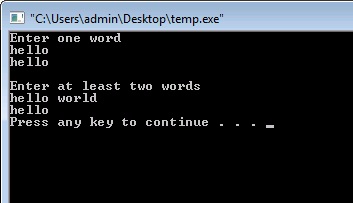
Reading String from User

Explanation
As you can see I have used scanf() function two times. First time I have asked the user to enter only one word. So scanf() function is able to perform that task easily. But in the second time I have asked the user to enter at least two words. But in that case printf() has only printed “I”. Well the reason behind it is that, scanf() function can only take single word. It closes the string when it founds any blank space. To overcome this problem we have to use another function.


gets() function in C

This function is used to take the input from the user to the string. It overcomes the problem of storing only single word. With the usage of this function user can store any number of words or even sentences. Lets understand it with one program.


#include<stdio.h>

void main( )
{
char name[100];
printf("Enter at least two words
");
gets(name);
printf("Now its working fine: %s",name);
}

Output

gets() function in C

In the above program I have replaced scanf() function with gets function. As you can see now everything is working fine.


puts() function in C

As its name suggest puts() function is a counter part of gets(). It is used to print one string at a time on the screen. Remember we can only use one string at a time to print it on the screen. On the other hand printf() function can be used to print any number of strings. Lets make one simple program to understand its working.


#include<stdio.h>

void main()
{
char name[100]="Hello World!!!";
puts(name);
}

Output
Hello World!!!

Thursday, February 5, 2015

Creating a Flex AIR text editor Part 59

In this tutorial we will add the ability to remove snippet categories.

When a category is deleted, all its contents also are to be deleted. Moreover, all the categories below the one thats deleted need to have their categoryPosition value updated.

First of all add a click listener for the bDeleteCategory button. Set the event handler to a function called deleteCategory().

<s:Button id="bDeleteCategory" label="Delete category with its contents" enabled="false" click="deleteCategory();" />

Now we fill this function with content. The first thing were going to do is declare 3 variables - currentID, currentPos and totalCategoriesBelow. On declaration, set the first two variables to the id and categoryPosition values of the trees selected item.

private function deleteCategory():void {
var currentID:int = snippetManageTree.selectedItem.@id;
var currentPos:int = snippetManageTree.selectedItem.@categoryPosition;
var totalCategoriesBelow:int;

}

Now we need to delete the category from the database. This is easy, since we all we need to do is call one statement and specify the id of the item:

// Delete category from database

var stat:SQLStatement = new SQLStatement();
stat.sqlConnection = categoryConnection;
stat.text = "DELETE FROM categories WHERE id=" + currentID;
stat.execute();

Now we delete all the snippets belonging to this category, also from the database.

// Delete all snippets belonging to this category

var stat2:SQLStatement = new SQLStatement();
stat2.sqlConnection = snippetConnection;
stat2.text = "DELETE FROM snippets WHERE categoryID=" + currentID;
stat2.execute();

Next, we can remove the category from the xml.

// Delete from the xml

delete treeData.category[currentPos];

Now we need to loop through the categories that are below this one and update their categoryPosition. This is done using a loop similar to the one from the previous tutorial:

// Increase categoryPosition of all categories below
totalCategoriesBelow = treeData.category.length() - currentPos;

for (var i:int = 0; i < totalCategoriesBelow; i++) {
treeData.category[currentPos + i].@categoryPosition = currentPos + i;

var stat3:SQLStatement = new SQLStatement();
stat3.sqlConnection = categoryConnection;
stat3.text = "UPDATE categories SET categoryPosition=@categoryPosition WHERE categoryPosition=" + (currentPos + i);
stat3.parameters["@categoryPosition"] = currentPos + i - 1;
stat3.execute();
}

Finally we disable all selection enabled things:

// Disable all selection enabled components

bSaveSnippet.enabled = false;
bDeleteSnippet.enabled = false;
bSaveCategory.enabled = false;
bDeleteCategory.enabled = false;
upCategory.enabled = false;
downCategory.enabled = false;
upSnippet.enabled = false;
downSnippet.enabled = false;

The full function code:

private function deleteCategory():void {
var currentID:int = snippetManageTree.selectedItem.@id;
var currentPos:int = snippetManageTree.selectedItem.@categoryPosition;
var totalCategoriesBelow:int;

// Delete category from database

var stat:SQLStatement = new SQLStatement();
stat.sqlConnection = categoryConnection;
stat.text = "DELETE FROM categories WHERE id=" + currentID;
stat.execute();

// Delete all snippets belonging to this category

var stat2:SQLStatement = new SQLStatement();
stat2.sqlConnection = snippetConnection;
stat2.text = "DELETE FROM snippets WHERE categoryID=" + currentID;
stat2.execute();

// Delete from the xml

delete treeData.category[currentPos];

// Increase categoryPosition of all categories below
totalCategoriesBelow = treeData.category.length() - currentPos;

for (var i:int = 0; i < totalCategoriesBelow; i++) {
treeData.category[currentPos + i].@categoryPosition = currentPos + i;

var stat3:SQLStatement = new SQLStatement();
stat3.sqlConnection = categoryConnection;
stat3.text = "UPDATE categories SET categoryPosition=@categoryPosition WHERE categoryPosition=" + (currentPos + i);
stat3.parameters["@categoryPosition"] = currentPos + i - 1;
stat3.execute();
}

// Disable all selection enabled components

bSaveSnippet.enabled = false;
bDeleteSnippet.enabled = false;
bSaveCategory.enabled = false;
bDeleteCategory.enabled = false;
upCategory.enabled = false;
downCategory.enabled = false;
upSnippet.enabled = false;
downSnippet.enabled = false;
}

And now SnippetWindow.mxml code:

<?xml version="1.0" encoding="utf-8"?>
<mx:Window xmlns:fx="http://ns.adobe.com/mxml/2009"
xmlns:s="library://ns.adobe.com/flex/spark"
xmlns:mx="library://ns.adobe.com/flex/mx"
xmlns:custom="*"
title="Snippet management" type="utility" width="500" height="730"
creationComplete="init();" showStatusBar="false" alwaysInFront="true" resizable="false" backgroundColor="#dddddd">

<fx:Script>
<![CDATA[
import flash.data.SQLConnection;
import flash.data.SQLResult;
import flash.data.SQLStatement;
import flash.events.Event;
import flash.net.Responder;
import mx.controls.Alert;

[Bindable]
public var treeData:XMLList;
private var snippetConnection:SQLConnection;
private var categoryConnection:SQLConnection;
[Bindable]
private var categories:Array = [];

private function init():void{
this.addEventListener(Event.CLOSING, onClose);
}

private function onClose(evt:Event):void {
this.visible = false;
evt.preventDefault();
}

public function setValues(xmlData:XMLList, conn1:SQLConnection, conn2:SQLConnection, createNewOnStart:Boolean = false, newText:String = ""):void {
snippetConnection = conn1;
categoryConnection = conn2;
treeData = xmlData;
newTextInput.text = newText;
newNameInput.text = "New snippet name here";
if (newText=="") {
newTextInput.text = "New snippet text here";
}
updateCategoryCombo();
}

private function addSnippet(name:String, text:String):void{
if (name != "" && text != "") {
var stat:SQLStatement = new SQLStatement();
stat.sqlConnection = snippetConnection;
stat.text = "INSERT INTO snippets (snippetName, snippetText, categoryID, snippetPosition) VALUES (@snippetName, @snippetText, @categoryID, @snippetPosition);"
stat.parameters["@snippetName"] = name;
stat.parameters["@snippetText"] = text;
stat.parameters["@categoryID"] = categoryCombo.selectedItem.ind;
stat.parameters["@snippetPosition"] = totalItemsIn(categoryCombo.selectedItem.ind);
stat.execute(-1, new Responder(addSnippetXML));
}else {
Alert.show("The name and text of the snippet must not be blank!","Oops!");
}
}

private function addSnippetXML(evt:SQLResult):void {
if (treeData.category.length() == 0 && treeData..snippet.length() == 0) {
treeData = new XMLList(<root></root>);
}
var aSnippet:XML = <snippet/>;
aSnippet.@id = evt.lastInsertRowID;
aSnippet.@label = newNameInput.text;
aSnippet.@categoryID = categoryCombo.selectedItem.ind;
aSnippet.@snippetPosition = totalItemsIn(categoryCombo.selectedItem.ind);
aSnippet.@isBranch = false;
if(aSnippet.@categoryID!=-1){
treeData.category.(@id == categoryCombo.selectedItem.ind).appendChild(aSnippet);
}else {
treeData[0].appendChild(aSnippet);
}
}

private function addCategory(name:String):void {
if (name != "") {
var stat:SQLStatement = new SQLStatement();
stat.sqlConnection = categoryConnection;
stat.text = "INSERT INTO categories (categoryName, categoryPosition) VALUES (@categoryName, @categoryPosition);"
stat.parameters["@categoryName"] = name;
stat.parameters["@categoryPosition"] = treeData.category.length();
stat.execute(-1, new Responder(addCategoryXML));
}else {
Alert.show("The name of the category must not be blank!","Oops!");
}
}

private function addCategoryXML(evt:SQLResult):void {
if (treeData.category.length() == 0 && treeData..snippet.length() == 0) {
treeData = new XMLList(<root></root>);
}
var aCategory:XML = <category/>;
aCategory.@id = evt.lastInsertRowID;
aCategory.@label = newCategoryInput.text;
aCategory.@categoryPosition = treeData.category.length();
aCategory.@isBranch = true;
if(treeData.category.length()>0){
var prevLastCategory:XML = treeData.category[treeData.category.length()-1];
treeData[0].insertChildAfter(prevLastCategory, aCategory);
} else
if(treeData[0].snippet.length()>0){
var firstSnippet:XML = treeData[0].snippet[0];
treeData[0].insertChildBefore(firstSnippet, aCategory);
} else {
treeData[0].appendChild(aCategory);
}
snippetManageTree.selectedItem = aCategory;
selectTree();
updateCategoryCombo();
}

private function updateCategoryCombo():void{
categories = [];
categories.push( { label:"No category", ind: -1 } );
for each (var cat:XML in treeData.category) {
categories.push({label:cat.@label, ind:cat.@id});
}
categoryCombo.selectedIndex = 0;
}

private function totalItemsIn(id:int):int {
var toRet:int;
if(id>=0){
toRet = treeData.category.(@id == id).children().length();
}
if (id == -1) {
toRet = treeData.snippet.length();
}
return toRet;
}

private function selectTree():void {
bSaveSnippet.enabled = false;
bDeleteSnippet.enabled = false;
bSaveCategory.enabled = false;
bDeleteCategory.enabled = false;
upCategory.enabled = false;
downCategory.enabled = false;
upSnippet.enabled = false;
downSnippet.enabled = false;

if (snippetManageTree.selectedItem.@isBranch == true) {
bSaveCategory.enabled = true;
bDeleteCategory.enabled = true;
upCategory.enabled = canCategoryUp();
downCategory.enabled = canCategoryDown();
newCategoryInput.text = snippetManageTree.selectedItem.@label;
} else {
bSaveSnippet.enabled = true;
bDeleteSnippet.enabled = true;
upSnippet.enabled = canSnippetUp();
downSnippet.enabled = canSnippetDown();
categoryCombo.selectedIndex = treeData.category.(@id == snippetManageTree.selectedItem.@categoryID).@categoryPosition + 1;
if (snippetManageTree.selectedItem.@categoryID == -1) {
categoryCombo.selectedIndex = 0;
}
var stat:SQLStatement = new SQLStatement();
stat.sqlConnection = snippetConnection;
stat.text = "SELECT snippetText FROM snippets WHERE id=" + snippetManageTree.selectedItem.@id;
stat.execute( -1, new Responder(loadSnippetText));
}
}

private function loadSnippetText(evt:SQLResult):void{
newNameInput.text = snippetManageTree.selectedItem.@label;
newTextInput.text = evt.data[0].snippetText;
}

private function canCategoryUp():Boolean {
var toRet:Boolean = true;
if (snippetManageTree.selectedItem.@categoryPosition == 0) {
toRet = false;
}
return toRet;
}

private function canCategoryDown():Boolean {
var toRet:Boolean = true;
if (snippetManageTree.selectedItem.@categoryPosition == (treeData.category.length()-1)) {
toRet = false;
}
return toRet;
}

private function canSnippetUp():Boolean {
var toRet:Boolean = true;
if (snippetManageTree.selectedItem.@snippetPosition == 0) {
toRet = false;
}
return toRet;
}

private function canSnippetDown():Boolean {
var toRet:Boolean = true;
if (snippetManageTree.selectedItem.@categoryID != -1 && snippetManageTree.selectedItem.@snippetPosition == (treeData.category.(@id == snippetManageTree.selectedItem.@categoryID).children().length()-1)) {
toRet = false;
}
if (snippetManageTree.selectedItem.@snippetPosition == (treeData.snippet.length()-1)) {
toRet = false;
}
return toRet;
}

private function categoryMove(dir:String):void{
var currentPos:int = snippetManageTree.selectedItem.@categoryPosition;
var currentId:int = snippetManageTree.selectedItem.@id;
var newPos:int = (dir=="up")?(currentPos - 1):(currentPos + 1);

// Databases:

// Set the above categorys position to current one
var stat:SQLStatement = new SQLStatement();
stat.sqlConnection = categoryConnection;
stat.text = "UPDATE categories SET categoryPosition=@currentPos WHERE categoryPosition=@newPos"
stat.parameters["@newPos"] = newPos;
stat.parameters["@currentPos"] = currentPos;
stat.execute();

// Set the current categorys position to the one above
var stat2:SQLStatement = new SQLStatement();
stat2.sqlConnection = categoryConnection;
stat2.text = "UPDATE categories SET categoryPosition=@newPos WHERE id=@currentId"
stat2.parameters["@newPos"] = newPos;
stat2.parameters["@currentId"] = currentId;
stat2.execute();

// XML:

var copy:XML = treeData.category[currentPos].copy();
delete treeData.category[currentPos];
if(dir=="up"){
treeData.insertChildBefore(treeData.category[newPos], copy);
}else {
treeData.insertChildAfter(treeData.category[currentPos], copy);
}
copy.@categoryPosition = newPos;
treeData.category[currentPos].@categoryPosition = currentPos;
snippetManageTree.selectedItem = copy;
selectTree();
}

private function snippetMove(dir:String):void{
var currentPos:int = snippetManageTree.selectedItem.@snippetPosition;
var currentId:int = snippetManageTree.selectedItem.@id;
var newPos:int = (dir == "up")?(currentPos - 1):(currentPos + 1);
var currentCategoryID:int = snippetManageTree.selectedItem.@categoryID;
var currentCategoryPos:int = NaN;

if (currentCategoryID != -1) {
currentCategoryPos = treeData.category.(@id == currentCategoryID).@categoryPosition;
}

// Databases:

// Set the above categorys position to current one
var stat:SQLStatement = new SQLStatement();
stat.sqlConnection = snippetConnection;
stat.text = "UPDATE snippets SET snippetPosition=@currentPos WHERE snippetPosition=@newPos"
stat.parameters["@newPos"] = newPos;
stat.parameters["@currentPos"] = currentPos;
stat.execute();

// Set the current categorys position to the one above
var stat2:SQLStatement = new SQLStatement();
stat2.sqlConnection = snippetConnection;
stat2.text = "UPDATE snippets SET snippetPosition=@newPos WHERE id=@currentId"
stat2.parameters["@newPos"] = newPos;
stat2.parameters["@currentId"] = currentId;
stat2.execute();

// XML:

var copy:XML = new XML();

if(currentCategoryID != -1){
copy = treeData.category[currentCategoryPos].snippet[currentPos].copy();
delete treeData.category[currentCategoryPos].snippet[currentPos];
if(dir=="up"){
treeData.category[currentCategoryPos].insertChildBefore(treeData.category[currentCategoryPos].snippet[newPos], copy);
}else {
treeData.category[currentCategoryPos].insertChildAfter(treeData.category[currentCategoryPos].snippet[currentPos], copy);
}
copy.@snippetPosition = newPos;
treeData.category[currentCategoryPos].snippet[currentPos].@snippetPosition = currentPos;
}

if(currentCategoryID == -1){
copy = treeData.snippet[currentPos].copy();
delete treeData.snippet[currentPos];
if(dir=="up"){
treeData.insertChildBefore(treeData.snippet[newPos], copy);
}else {
treeData.insertChildAfter(treeData.snippet[currentPos], copy);
}
copy.@snippetPosition = newPos;
treeData.snippet[currentPos].@snippetPosition = currentPos;
}

snippetManageTree.selectedItem = copy;
selectTree();
}

private function saveCategory():void {
var currentID:int = snippetManageTree.selectedItem.@id;

var stat:SQLStatement = new SQLStatement();
stat.sqlConnection = categoryConnection;
stat.text = "UPDATE categories SET categoryName=@categoryName WHERE id=" + currentID;
stat.parameters["@categoryName"] = newCategoryInput.text;
stat.execute();

treeData.category[snippetManageTree.selectedItem.@categoryPosition].@label = newCategoryInput.text;
updateCategoryCombo();
}

private function saveSnippet():void {
var currentID:int = snippetManageTree.selectedItem.@id;

var stat:SQLStatement = new SQLStatement();
stat.sqlConnection = snippetConnection;
stat.text = "UPDATE snippets SET snippetName=@snippetName, snippetText=@snippetText WHERE id=" + currentID;
stat.parameters["@snippetName"] = newNameInput.text;
stat.parameters["@snippetText"] = newTextInput.text;
stat.execute();

var currentPos:int = snippetManageTree.selectedItem.@snippetPosition;
var currentCategoryID:int = snippetManageTree.selectedItem.@categoryID;
var currentCategoryPos:int;

if (currentCategoryID != -1) {
currentCategoryPos = treeData.category.(@id == currentCategoryID).@categoryPosition;
treeData.category[currentCategoryPos].snippet[currentPos].@label = newNameInput.text;
}else {
treeData.snippet[currentPos].@label = newNameInput.text;
}

}

private function deleteSnippet():void {
var currentPos:int = snippetManageTree.selectedItem.@snippetPosition;
var currentId:int = snippetManageTree.selectedItem.@id;
var currentCategoryID:int = snippetManageTree.selectedItem.@categoryID;
var currentCategoryPos:int = NaN;

if (currentCategoryID != -1) {
currentCategoryPos = treeData.category.(@id == currentCategoryID).@categoryPosition;
}
var totalSnippetsBelow:int;

// Delete from the SQL database
var stat:SQLStatement = new SQLStatement();
stat.sqlConnection = snippetConnection;
stat.text = "DELETE FROM snippets WHERE id=" + currentId;
stat.execute();

// If in a category:
if (currentCategoryID != -1) {

// Delete from the XML
delete treeData.category[currentCategoryPos].snippet[currentPos];

// Increase snippetPosition of all snippets below
totalSnippetsBelow = treeData.category[currentCategoryPos].children().length() - currentPos;

for (var i:int = 0; i < totalSnippetsBelow; i++) {
treeData.category[currentCategoryPos].snippet[currentPos + i].@snippetPosition = currentPos + i;

var snipStat1:SQLStatement = new SQLStatement();
snipStat1.sqlConnection = snippetConnection;
snipStat1.text = "UPDATE snippets SET snippetPosition=@snippetPosition WHERE snippetPosition=" + (currentPos + i);
snipStat1.parameters["@snippetPosition"] = currentPos + i - 1;
snipStat1.execute();
}

}

// If in a root tags:
if (currentCategoryID == -1) {

// Delete from the XML
delete treeData.snippet[currentPos];

// Increase snippetPosition of all snippets below
totalSnippetsBelow = treeData.snippet.length() - currentPos;

for (var u:int = 0; u < totalSnippetsBelow; u++) {
treeData.snippet[currentPos + u].@snippetPosition = currentPos + u;

var snipStat2:SQLStatement = new SQLStatement();
snipStat2.sqlConnection = snippetConnection;
snipStat2.text = "UPDATE snippets SET snippetPosition=@snippetPosition WHERE snippetPosition=" + (currentPos + u);
snipStat2.parameters["@snippetPosition"] = currentPos + u - 1;
snipStat2.execute();
}

}

// Disable all selection enabled components

bSaveSnippet.enabled = false;
bDeleteSnippet.enabled = false;
bSaveCategory.enabled = false;
bDeleteCategory.enabled = false;
upCategory.enabled = false;
downCategory.enabled = false;
upSnippet.enabled = false;
downSnippet.enabled = false;
}

private function deleteCategory():void {
var currentID:int = snippetManageTree.selectedItem.@id;
var currentPos:int = snippetManageTree.selectedItem.@categoryPosition;
var totalCategoriesBelow:int;

// Delete category from database

var stat:SQLStatement = new SQLStatement();
stat.sqlConnection = categoryConnection;
stat.text = "DELETE FROM categories WHERE id=" + currentID;
stat.execute();

// Delete all snippets belonging to this category

var stat2:SQLStatement = new SQLStatement();
stat2.sqlConnection = snippetConnection;
stat2.text = "DELETE FROM snippets WHERE categoryID=" + currentID;
stat2.execute();

// Delete from the xml

delete treeData.category[currentPos];

// Increase categoryPosition of all categories below
totalCategoriesBelow = treeData.category.length() - currentPos;

for (var i:int = 0; i < totalCategoriesBelow; i++) {
treeData.category[currentPos + i].@categoryPosition = currentPos + i;

var stat3:SQLStatement = new SQLStatement();
stat3.sqlConnection = categoryConnection;
stat3.text = "UPDATE categories SET categoryPosition=@categoryPosition WHERE categoryPosition=" + (currentPos + i);
stat3.parameters["@categoryPosition"] = currentPos + i - 1;
stat3.execute();
}

// Disable all selection enabled components

bSaveSnippet.enabled = false;
bDeleteSnippet.enabled = false;
bSaveCategory.enabled = false;
bDeleteCategory.enabled = false;
upCategory.enabled = false;
downCategory.enabled = false;
upSnippet.enabled = false;
downSnippet.enabled = false;
}
]]>
</fx:Script>

<s:VGroup paddingLeft="5" paddingRight="5" paddingTop="5" paddingBottom="5">
<s:Label text="Snippet creation and management: " />
<s:HGroup>
<s:TextInput id="newNameInput" text="New snippet name" width="240" />
<mx:ComboBox id="categoryCombo" width="240" dataProvider="{categories}" />
</s:HGroup>
<s:TextArea id="newTextInput" width="490" height="200" text="Snippet text" />
<s:HGroup>
<s:Button id="bAddSnippet" label="Add snippet" click="addSnippet(newNameInput.text, newTextInput.text);" />
<s:Button id="bSaveSnippet" label="Save changes" enabled="false" />
<s:Button id="bDeleteSnippet" label="Delete snippet" enabled="false" click="deleteSnippet();" />
<custom:IconButton id="upSnippet" icon="@Embed(../lib/arrow_up.png)" toolTip="Move up" enabled="false" click="snippetMove(up);" />
<custom:IconButton id="downSnippet" icon="@Embed(../lib/arrow_down.png)" toolTip="Move down" enabled="false" click="snippetMove(down);" />
</s:HGroup>

<s:Label text="" />

<s:Label text="Category creation and management: " />
<s:TextInput id="newCategoryInput" text="New category name" width="490" />
<s:HGroup>
<s:Button id="bAddCategory" label="Add category" click="addCategory(newCategoryInput.text);"/>
<s:Button id="bSaveCategory" label="Save changes" enabled="false" click="saveCategory();" />
<s:Button id="bDeleteCategory" label="Delete category with its contents" enabled="false" click="deleteCategory();" />
<custom:IconButton id="upCategory" icon="@Embed(../lib/arrow_up.png)" toolTip="Move up" enabled="false" click="categoryMove(up);" />
<custom:IconButton id="downCategory" icon="@Embed(../lib/arrow_down.png)" toolTip="Move down" enabled="false" click="categoryMove(down);" />
</s:HGroup>

<s:Label text="" />

<mx:Tree id="snippetManageTree" dataProvider="{treeData}" width="490" height="300" showRoot="false" labelField="@label" itemClick="selectTree();" />
</s:VGroup>

</mx:Window>

Thanks for reading!

Creating EasyKeyboard class Part 9

In this tutorial well add the ability to configure the Timed listeners more.

Right now, if you test the timed listeners, youll see that as long as you hold the needed key, the timed event gets dispatched forever until you release the key. Sometimes, it might be needed to only dispatch the event once.

To enable this, well add a new parameter to the addTimedListener function, that is a repeat boolean.

Based on the booleans value, well pass another value to TimedListener object. That value will not be a boolean, though - its going to be an integer. Lets refer to this value as repeat stage from now on. There are 3 possible values - 0, 1 and 2. If the repeat flag is true, then the repeat stage will be 0 and stay 0 forever.

If repeat is set to false, the stage becomes 1 at first, and stays like that until the first timed event gets dispatched. When the event fires, we change the stage to 2 and keep it like that until the key is released. The event wont be fired as long as the stage is 2.

So, the repeat stages are:

0 - repeat is true - allow repeating every second, the flag doesnt change.
1 - repeat is false - allow listening to the even for the first delay period, then set to 2.
2 - the event doesnt trigger, but once the key is released - the value becomes 1 once again.

Back in addTimedListener() function, check if repeat value is true, and pass 0 if so. If it is false, pass 1:

/**
* Add event timed listener for a single key using a keycode.
* @paramkeyCode Key code of the key.
* @paramdelay Delay in milliseconds of how long the key needs to be held down for the event to be registered.
* @paramhandler Function to execute when the key has been held for the specified amount of time.
* @paramrepeat Set to true if you want to dispatch the event forever until the key is released. If you only want to dispatch it once, set to false.
*/

public function addTimedListener(keyCode:int, delay:int, handler:Function, repeat:Boolean = true):void {
var rep:int = 1;
if (repeat == true) rep = 0;
var delayTimer:Timer = new Timer(delay, 1);
listeners.push(new TimedListener(keyCode, delayTimer, handler, rep));
}

Go to TimedListener class now. Add a new property "repeat", set its value to the received fourth parameters value. In the onTimer() function, only execute the handler if repeat is 0 or 1. Then, check if repeat is 1 - and set it to 2.

package com.kircode.EasyKeyboard 
{
import flash.events.TimerEvent;
import flash.utils.Timer;
/**
* ...
* @author Kirill Poletaev
*/
public class TimedListener
{

public var keyCode:int;
public var handler:Function;
public var delayTimer:Timer;
public var repeat:int;

public function TimedListener(code:int, timer:Timer, func:Function, rep:int)
{
repeat = rep;
keyCode = code;
handler = func;
delayTimer = timer;
delayTimer.addEventListener(TimerEvent.TIMER_COMPLETE, onTimer);
}

private function onTimer(evt:TimerEvent):void {
if (repeat==0 || repeat==1){
if (handler != null) handler.call();
if (repeat == 1) repeat = 2;
}
}

}

}

Back in EasyKeyboard.as we need to go to kUp() function and add a new if..statement inside the TimedListener if..statement, which checks if repeat value of the listener is 2, in which case we set it to 1.

private function kUp(evt:KeyboardEvent):void {
var u:int = 0;
for (var i:int = 0; i < listeners.length; i++) {
if (listeners[i] is KeyListener && evt.keyCode == listeners[i].keyCode && evt.altKey == listeners[i].alt && evt.ctrlKey == listeners[i].ctrl && evt.shiftKey == listeners[i].shift) {
if (listeners[i].handlerU) listeners[i].handlerU.call();
}
if (listeners[i] is HoldListener && evt.keyCode == listeners[i].keyCode) {
listeners[i].flag = false;
}
if (listeners[i] is ComboListener) {
for (u = 0; u < listeners[i].keyCodes.length; u++) {
if (listeners[i].keyCodes[u] == evt.keyCode) {
listeners[i].flags[u] = false;
}
}
}
if (listeners[i] is TimedListener && evt.keyCode == listeners[i].keyCode) {
if (listeners[i].delayTimer.running) {
listeners[i].delayTimer.reset();
if (listeners[i].repeat == 2) listeners[i].repeat = 1;
}
}
}
}

Now add a function addEasyTimedListener, where key name is passed instead of key code. Like usual, we compare the retreived key name with each label from the array, and retreive the key code:

/**
* Add event timed listener for a single key using a keyname.
* @paramkeyName Name of the key.
* @paramdelay Delay in milliseconds of how long the key needs to be held down for the event to be registered.
* @paramhandler Function to execute when the key has been held for the specified amount of time.
* @paramrepeat Set to true if you want to dispatch the event forever until the key is released. If you only want to dispatch it once, set to false.
*/

public function addEasyTimedListener(keyName:String, delay:int, handler:Function, repeat:Boolean = true):void {
var rep:int = 1;
if (repeat == true) rep = 0;
var delayTimer:Timer = new Timer(delay, 1);
var code:int = -1;
for (var i:int = 0; i < keyLabels.length; i++) {
if (keyLabels[i] == keyName) {
code = i;
break;
}
}
if (code == -1) {
throw new Error(Incorrect key string value specified - no " + keyName + " key found.);
return;
}
listeners.push(new TimedListener(code, delayTimer, handler, rep));
}

Full EasyKeyboard.as code now:

package com.kircode.EasyKeyboard 
{
import flash.display.Stage;
import flash.events.Event;
import flash.events.KeyboardEvent;
import flash.utils.Timer;

/**
* Utility for easy keyboard listener management.
* @author Kirill Poletaev
*/
public class EasyKeyboard
{
public var listeners:Array = [];
private var keyLabels:Array = ["0","1","2","3","4","5","6","7","Backspace","Tab","10","11","Center","Enter","14","15","Shift","Control","Alt","Pause","Caps Lock","21","22","23","24","25","26","27","28","29","30","31","Space","Page Up","Page Down","End","Home","Left","Up","Right","Down","41","42","43","44","Insert","Delete","47","0","1","2","3","4","5","6","7","8","9","58","59","60","61","62","63","64","A","B","C","D","E","F","G","H","I","J","K","L","M","N","O","P","Q","R","S","T","U","V","W","X","Y","Z","Windows","Windows","Menu","94","95","Num 0","Num 1","Num 2","Num 3","Num 4","Num 5","Num 6","Num 7","Num 8","Num 9","Num *","Num +","108","Num -","Num .","Num /","F1","F2","F3","F4","F5","F6","F7","F8","F9","F10","F11","F12","124","125","126","127","128","129","130","131","132","133","134","135","136","137","138","139","140","141","142","143","Num Lock","Scroll Lock","146","147","148","149","150","151","152","153","154","155","156","157","158","159","160","161","162","163","164","165","166","167","168","169","170","171","172","173","174","175","176","177","178","179","180","181","182","183","184","185",";","+",",","-",".","/","~","193","194","195","196","197","198","199","200","201","202","203","204","205","206","207","208","209","210","211","212","213","214","215","216","217","218","[","\","]","","223","224","225","226","227","228","229","230","231","232","233","234","235","236","237","238","239","240","241","242","243","244","245","246","247","248","249","250","251","252","253","254","255"];
private var st:Stage;

public function EasyKeyboard(stage:Stage)
{
stage.addEventListener(KeyboardEvent.KEY_DOWN, kDown);
stage.addEventListener(KeyboardEvent.KEY_UP, kUp);
stage.addEventListener(Event.ENTER_FRAME, frame);
st = stage;
}

private function frame(evt:Event):void {
for (var i:int = 0; i < listeners.length; i++) {
if (listeners[i] is HoldListener && listeners[i].flag) {
if (listeners[i].handler != null) listeners[i].handler.call();
}
}
}

/**
* Call this before nullifying the class instance to remove all the listeners.
*/

public function kill():void {
st.removeEventListener(KeyboardEvent.KEY_DOWN, kDown);
st.removeEventListener(KeyboardEvent.KEY_UP, kUp);
st.addEventListener(Event.ENTER_FRAME, frame);
}

/**
* Add event listener for a single key using a keycode.
* @paramkeyCode Key code of the key.
* @paramhandlerDown Function to be called when the key is pressed down.
* @paramhandlerUp Function to be called when the key is released.
* @paramalt Used in combination with the alt key.
* @paramctrl Used in combination with the ctrl key.
* @paramshift Used in combination with the shift key.
*/

public function addListener(keyCode:int, handlerDown:Function = null, handlerUp:Function = null, alt:Boolean = false, ctrl:Boolean = false, shift:Boolean = false):void {
listeners.push(new KeyListener(keyCode, handlerDown, handlerUp, alt, ctrl, shift));
}

/**
* Add event listener for a single key using a keycode.
* @paramkeyCode Key code of the key.
* @paramhandler Function to execute while the key is held every frame.
*/

public function addHoldListener(keyCode:int, handler:Function):void {
listeners.push(new HoldListener(keyCode, handler, false));
}


/**
* Add event listener for a combination of keys using key codes.
* @paramkeyCodes Array of key codes for the combination.
* @paramhandler Function to execute when the combination is held.
*/

public function addComboListener(keyCodes:Array, handler:Function):void {
var flags:Array = [];
for (var i:int = 0; i < keyCodes.length; i++) {
if (isNaN(keyCodes[i])) {
throw new Error(Incorrect key code value specified - " + keyCodes[i] + " is not a number.);
return;
}
flags.push(false);
}
listeners.push(new ComboListener(keyCodes, handler, flags));
}

/**
* Add event timed listener for a single key using a keycode.
* @paramkeyCode Key code of the key.
* @paramdelay Delay in milliseconds of how long the key needs to be held down for the event to be registered.
* @paramhandler Function to execute when the key has been held for the specified amount of time.
* @paramrepeat Set to true if you want to dispatch the event forever until the key is released. If you only want to dispatch it once, set to false.
*/

public function addTimedListener(keyCode:int, delay:int, handler:Function, repeat:Boolean = true):void {
var rep:int = 1;
if (repeat == true) rep = 0;
var delayTimer:Timer = new Timer(delay, 1);
listeners.push(new TimedListener(keyCode, delayTimer, handler, rep));
}

/**
* Add event listener for a single key using key string value.
* @paramkeyName String name of the key.
* @paramhandlerDown Function to be called when the key is pressed down.
* @paramhandlerUp Function to be called when the key is released.
* @paramalt Used in combination with the alt key.
* @paramctrl Used in combination with the ctrl key.
* @paramshift Used in combination with the shift key.
*/

public function addEasyListener(keyName:String, handlerDown:Function = null, handlerUp:Function = null, alt:Boolean = false, ctrl:Boolean = false, shift:Boolean = false):void {
var code:int = -1;
for (var i:int = 0; i < keyLabels.length; i++) {
if (keyLabels[i] == keyName) {
code = i;
break;
}
}
if (code == -1) {
throw new Error(Incorrect key string value specified - no " + keyName + " key found.);
return;
}
addListener(code, handlerDown, handlerUp, alt, ctrl, shift);
}

/**
* Add hold listener for a single key using key string value.
* @paramkeyName String name of the key.
* @paramhandler Function to execute while the key is held every frame.
*/

public function addEasyHoldListener(keyName:String, handler:Function):void {
var code:int = -1;
for (var i:int = 0; i < keyLabels.length; i++) {
if (keyLabels[i] == keyName) {
code = i;
break;
}
}
if (code == -1) {
throw new Error(Incorrect key string value specified - no " + keyName + " key found.);
return;
}
addHoldListener(code, handler);
}

/**
* Add event listener for a combination of keys using key names.
* @paramkeyNames Array of key names for the combination.
* @paramhandler Function to execute when the combination is held.
*/

public function addEasyComboListener(keyNames:Array, handler:Function):void {
var flags:Array = [];
var keyCodes:Array = [];
var u:int;
var i:int;
var code:int = -1;
var keyName:String;

for (u = 0; u < keyNames.length; u++) {
flags.push(false);
code = -1;
keyName = keyNames[u];
for (i = 0; i < keyLabels.length; i++) {
if (keyLabels[i] == keyName) {
code = i;
break;
}
}
if (code == -1) {
throw new Error(Incorrect key string value specified - no " + keyName + " key found.);
return;
}
}

listeners.push(new ComboListener(keyCodes, handler, flags));
}

/**
* Add event timed listener for a single key using a keyname.
* @paramkeyName Name of the key.
* @paramdelay Delay in milliseconds of how long the key needs to be held down for the event to be registered.
* @paramhandler Function to execute when the key has been held for the specified amount of time.
* @paramrepeat Set to true if you want to dispatch the event forever until the key is released. If you only want to dispatch it once, set to false.
*/

public function addEasyTimedListener(keyName:String, delay:int, handler:Function, repeat:Boolean = true):void {
var rep:int = 1;
if (repeat == true) rep = 0;
var delayTimer:Timer = new Timer(delay, 1);
var code:int = -1;
for (var i:int = 0; i < keyLabels.length; i++) {
if (keyLabels[i] == keyName) {
code = i;
break;
}
}
if (code == -1) {
throw new Error(Incorrect key string value specified - no " + keyName + " key found.);
return;
}
listeners.push(new TimedListener(code, delayTimer, handler, rep));
}

private function kDown(evt:KeyboardEvent):void {
var u:int = 0;
var comboKeys:int = 0;
for (var i:int = 0; i < listeners.length; i++) {
if (listeners[i] is KeyListener && evt.keyCode == listeners[i].keyCode && evt.altKey == listeners[i].alt && evt.ctrlKey == listeners[i].ctrl && evt.shiftKey == listeners[i].shift) {
if (listeners[i].handlerD) listeners[i].handlerD.call();
}
if (listeners[i] is HoldListener && evt.keyCode == listeners[i].keyCode) {
listeners[i].flag = true;
}
if (listeners[i] is ComboListener) {
comboKeys = 0;
for (u = 0; u < listeners[i].keyCodes.length; u++) {
if (listeners[i].keyCodes[u] == evt.keyCode) {
listeners[i].flags[u] = true;
}
if (listeners[i].flags[u] == true) comboKeys++;
}
if (comboKeys == listeners[i].keyCodes.length) {
if (listeners[i].handler) listeners[i].handler.call();
}
}
if (listeners[i] is TimedListener && evt.keyCode == listeners[i].keyCode) {
if (!listeners[i].delayTimer.running) {
listeners[i].delayTimer.start();
}
}
}
}

private function kUp(evt:KeyboardEvent):void {
var u:int = 0;
for (var i:int = 0; i < listeners.length; i++) {
if (listeners[i] is KeyListener && evt.keyCode == listeners[i].keyCode && evt.altKey == listeners[i].alt && evt.ctrlKey == listeners[i].ctrl && evt.shiftKey == listeners[i].shift) {
if (listeners[i].handlerU) listeners[i].handlerU.call();
}
if (listeners[i] is HoldListener && evt.keyCode == listeners[i].keyCode) {
listeners[i].flag = false;
}
if (listeners[i] is ComboListener) {
for (u = 0; u < listeners[i].keyCodes.length; u++) {
if (listeners[i].keyCodes[u] == evt.keyCode) {
listeners[i].flags[u] = false;
}
}
}
if (listeners[i] is TimedListener && evt.keyCode == listeners[i].keyCode) {
if (listeners[i].delayTimer.running) {
listeners[i].delayTimer.reset();
if (listeners[i].repeat == 2) listeners[i].repeat = 1;
}
}
}
}

}

}

Now, you can go to main.as and write this:

keyboard = new EasyKeyboard(stage);
keyboard.addEasyTimedListener("A", 1000, function() { trace("A key held for a second!"); }, false);

When you test the code, youll see that holding A key for a second dispatches an event, but if you keep holding it - no more events are dispatched.

Thanks for reading!

Tuesday, February 3, 2015

Android beginner tutorial Part 72 Editing contacts

In this tutorial well make it possible to select and edit contacts in the database.

First of all, declare 2 new variables - editDialog and cursor:

private AlertDialog editDialog;
private Cursor cursor;

Now go to updateList() and instead of declaring a new Cursor each time, reuse the cursor variable:

public void updateList(){
String[] columns = new String[] {myDbHelper._ID, myDbHelper.NAME, myDbHelper.PHONE};
ContentResolver resolver = getContentResolver();
cursor = resolver.query(CONTENT_URI, columns, null, null, null);

final ListAdapter adapter = new SimpleCursorAdapter(this, R.layout.customrow, cursor, new String[] {myDbHelper.NAME, myDbHelper.PHONE}, new int[] {R.id.t_name, R.id.t_phone}, 0);
ListView list = (ListView)findViewById(R.id.contactList);
list.setAdapter(adapter);
}

Another change well make is move all the code that creates the "Add contact" dialog into the dialogAdd() function:

public void dialogAdd(){
AlertDialog.Builder builder = new AlertDialog.Builder(MainActivity.this);

LayoutInflater inflater = LayoutInflater.from(getApplicationContext());
alertView = inflater.inflate(R.layout.add_window, null);
builder.setView(alertView);

builder.setTitle("Add contact");

builder.setPositiveButton("OK", new DialogInterface.OnClickListener() {

@Override
public void onClick(DialogInterface dialog, int which) {
EditText t_name = (EditText)alertView.findViewById(R.id.inp_name);
EditText t_phone = (EditText)alertView.findViewById(R.id.inp_phone);
String new_name = t_name.getText().toString();
String new_phone = t_phone.getText().toString();
ContentValues values = new ContentValues();
values.put(myDbHelper.NAME, new_name);
values.put(myDbHelper.PHONE, new_phone);
getContentResolver().insert(CONTENT_URI, values);
updateList();
}
});

builder.setCancelable(true);
addDialog = builder.create();

addDialog.show();
}

Now go to onCreate() function and add an OnItemClickListener listener to our list. Call dialogEdit() function when an item is selected. It is important to pass 2 values as parameters to that function, those are the position and id of the current item.

@Override
protected void onCreate(Bundle savedInstanceState) {
super.onCreate(savedInstanceState);
setContentView(R.layout.activity_main);

ListView list = (ListView)findViewById(R.id.contactList);
list.setOnItemClickListener(new OnItemClickListener() {
public void onItemClick(AdapterView<?> parent, View view, int position, long id) {
dialogEdit(position, id);
}
});

updateList();
}

Create the dialogEdit() function. Create an AlertDialog just like it was done with the "Add contact" window. Instead of using the insert() method of your ContentResolver, use update(). Moreover, we need to set the default values of the text fields when the window is opened. This can be done using the position value we receive as one of the parameters and the cursor object:

public void dialogEdit(final int position, final long id){
AlertDialog.Builder builder = new AlertDialog.Builder(MainActivity.this);

LayoutInflater inflater = LayoutInflater.from(getApplicationContext());
alertView = inflater.inflate(R.layout.add_window, null);
builder.setView(alertView);

builder.setTitle("Edit contact");

builder.setPositiveButton("Save", new DialogInterface.OnClickListener() {

@Override
public void onClick(DialogInterface dialog, int which) {
EditText t_name = (EditText)alertView.findViewById(R.id.inp_name);
EditText t_phone = (EditText)alertView.findViewById(R.id.inp_phone);
String new_name = t_name.getText().toString();
String new_phone = t_phone.getText().toString();
ContentValues values = new ContentValues();
values.put(myDbHelper.NAME, new_name);
values.put(myDbHelper.PHONE, new_phone);
getContentResolver().update(CONTENT_URI, values, myDbHelper._ID+"="+id, null);
updateList();
}
});

builder.setCancelable(true);

EditText t_name = (EditText)alertView.findViewById(R.id.inp_name);
EditText t_phone = (EditText)alertView.findViewById(R.id.inp_phone);
cursor.moveToPosition(position);
t_name.setText(cursor.getString(1));
t_phone.setText(cursor.getString(2));

editDialog = builder.create();
editDialog.show();
}

Full code so far:

package com.kircode.codeforfood_test;

import android.app.Activity;
import android.app.AlertDialog;
import android.content.ContentResolver;
import android.content.ContentValues;
import android.content.DialogInterface;
import android.database.Cursor;
import android.net.Uri;
import android.os.Bundle;
import android.support.v4.widget.SimpleCursorAdapter;
import android.view.LayoutInflater;
import android.view.Menu;
import android.view.MenuItem;
import android.view.View;
import android.widget.AdapterView;
import android.widget.AdapterView.OnItemClickListener;
import android.widget.EditText;
import android.widget.ListAdapter;
import android.widget.ListView;

public class MainActivity extends Activity{

private static final Uri CONTENT_URI = Uri.parse("content://com.kircode.codeforfood_test.mycontentprovider/contacts");
private static final int IDM_ADD = 101;

private AlertDialog addDialog;
private AlertDialog editDialog;
private View alertView;
private Cursor cursor;

@Override
protected void onCreate(Bundle savedInstanceState) {
super.onCreate(savedInstanceState);
setContentView(R.layout.activity_main);

ListView list = (ListView)findViewById(R.id.contactList);
list.setOnItemClickListener(new OnItemClickListener() {
public void onItemClick(AdapterView<?> parent, View view, int position, long id) {
dialogEdit(position, id);
}
});

updateList();
}

@Override
public boolean onCreateOptionsMenu(Menu menu){
menu.add(Menu.NONE, IDM_ADD, Menu.NONE, "Add");
return(super.onCreateOptionsMenu(menu));
}

@Override
public boolean onOptionsItemSelected(MenuItem item){
switch(item.getItemId()){
case IDM_ADD:
dialogAdd();
break;
}
return(super.onOptionsItemSelected(item));
}

public void dialogAdd(){
AlertDialog.Builder builder = new AlertDialog.Builder(MainActivity.this);

LayoutInflater inflater = LayoutInflater.from(getApplicationContext());
alertView = inflater.inflate(R.layout.add_window, null);
builder.setView(alertView);

builder.setTitle("Add contact");

builder.setPositiveButton("OK", new DialogInterface.OnClickListener() {

@Override
public void onClick(DialogInterface dialog, int which) {
EditText t_name = (EditText)alertView.findViewById(R.id.inp_name);
EditText t_phone = (EditText)alertView.findViewById(R.id.inp_phone);
String new_name = t_name.getText().toString();
String new_phone = t_phone.getText().toString();
ContentValues values = new ContentValues();
values.put(myDbHelper.NAME, new_name);
values.put(myDbHelper.PHONE, new_phone);
getContentResolver().insert(CONTENT_URI, values);
updateList();
}
});

builder.setCancelable(true);
addDialog = builder.create();

addDialog.show();
}

public void dialogEdit(final int position, final long id){
AlertDialog.Builder builder = new AlertDialog.Builder(MainActivity.this);

LayoutInflater inflater = LayoutInflater.from(getApplicationContext());
alertView = inflater.inflate(R.layout.add_window, null);
builder.setView(alertView);

builder.setTitle("Edit contact");

builder.setPositiveButton("Save", new DialogInterface.OnClickListener() {

@Override
public void onClick(DialogInterface dialog, int which) {
EditText t_name = (EditText)alertView.findViewById(R.id.inp_name);
EditText t_phone = (EditText)alertView.findViewById(R.id.inp_phone);
String new_name = t_name.getText().toString();
String new_phone = t_phone.getText().toString();
ContentValues values = new ContentValues();
values.put(myDbHelper.NAME, new_name);
values.put(myDbHelper.PHONE, new_phone);
getContentResolver().update(CONTENT_URI, values, myDbHelper._ID+"="+id, null);
updateList();
}
});

builder.setCancelable(true);

EditText t_name = (EditText)alertView.findViewById(R.id.inp_name);
EditText t_phone = (EditText)alertView.findViewById(R.id.inp_phone);
cursor.moveToPosition(position);
t_name.setText(cursor.getString(1));
t_phone.setText(cursor.getString(2));

editDialog = builder.create();
editDialog.show();
}

public void updateList(){
String[] columns = new String[] {myDbHelper._ID, myDbHelper.NAME, myDbHelper.PHONE};
ContentResolver resolver = getContentResolver();
cursor = resolver.query(CONTENT_URI, columns, null, null, null);

final ListAdapter adapter = new SimpleCursorAdapter(this, R.layout.customrow, cursor, new String[] {myDbHelper.NAME, myDbHelper.PHONE}, new int[] {R.id.t_name, R.id.t_phone}, 0);
ListView list = (ListView)findViewById(R.id.contactList);
list.setAdapter(adapter);
}

}

Thanks for reading!

Creating a Flex AIR Screenshot app Part 20

In this tutorial we will keep improving our crop selection functionality.

Right now, we can only select by dragging from the initial position (the coordinates that we pressed our mouse at) to bottom right. The code doesnt allow us to drag in any other direction, thanks to a conditional Ive put in the previous tutorial.

I did that, because if we create the selection into any other direction, we wont be able to drag it properly anymore. This is because the code we have right now assumes that the top left corner of the selection box coordinates are drawingRect[0] and drawingRect[1]. Instead of rewriting that code, we can just make sure that no matter what direction the selection is created, the top left corner will always be that point with those coordinates.

We can do that by adding 4 conditionals to the drawMove() function inside the if(drawing) conditional. They might look confusing at first glance, but they are pretty straight forward and there isnt much to explain from what is already written in the code. Ill just say that we will achieve our goal if we check which direction the user drags, and according to that value, set the 4 values of drawingRect accordingly, where 0 and 1 elements are always the x and y of the whole selection and represent the top left point in the rectangle.

if (drawing) {
// bottom - right
if (evt.target.mouseX > drawPreviousX && evt.target.mouseY > drawPreviousY) {
drawingRect[0] = drawPreviousX;
drawingRect[1] = drawPreviousY;
drawingRect[2] = evt.target.mouseX - drawPreviousX;
drawingRect[3] = evt.target.mouseY - drawPreviousY;
drawRectangle();
}
// bottom - left
if (evt.target.mouseX < drawPreviousX && evt.target.mouseY > drawPreviousY) {
drawingRect[0] = evt.target.mouseX;
drawingRect[1] = drawPreviousY;
drawingRect[2] = drawPreviousX - evt.target.mouseX;
drawingRect[3] = evt.target.mouseY - drawPreviousY;
drawRectangle();
}
// top - right
if (evt.target.mouseX > drawPreviousX && evt.target.mouseY < drawPreviousY) {
drawingRect[0] = drawPreviousX;
drawingRect[1] = evt.target.mouseY;
drawingRect[2] = evt.target.mouseX - drawPreviousX;
drawingRect[3] = drawPreviousY - evt.target.mouseY;
drawRectangle();
}
// top - left
if (evt.target.mouseX < drawPreviousX && evt.target.mouseY < drawPreviousY) {
drawingRect[0] = evt.target.mouseX;
drawingRect[1] = evt.target.mouseY;
drawingRect[2] = drawPreviousX - evt.target.mouseX;
drawingRect[3] = drawPreviousY - evt.target.mouseY;
drawRectangle();
}
}

Now we can create it in any direction and it will work just fine. We are also able to drag the created selection around.

One little problem remains, that might be really annoying and irritating - its the fact that when we drag our selection around and near the edges, it often gets "stuck", because sometimes the mouse goes a few pixels too far in a direction, which would make the selection cross the borders. Right now, if the program sees that by moving the selection it will not fit in the frame, it just doesnt move it at all. Lets change it a bit - make it actually move the selection to the very edge of the area. This will make it seem much more user-friendly and clean.

To do that, go to the drawMove() function and in the if(dragging) function, remove the long conditional checking for intersection with borders. Just set the coordinates to newX and newY. Then, call a function called validSelectionPositionCheck().

if (dragging) {
var newX:int = evt.target.mouseX - dragOffsetX;
var newY:int = evt.target.mouseY - dragOffsetY;
drawingRect[0] = newX;
drawingRect[1] = newY;
validSelectionPositionCheck();
drawRectangle();
}

This function checks if the position of the selection crosses the borders. If it does, move it to very edge, but inside.

private function validSelectionPositionCheck():void {
if (drawingRect[0] < 0) {
drawingRect[0] = 0;
}
if (drawingRect[0] > drawArea.width - drawingRect[2]) {
drawingRect[0] = drawArea.width - drawingRect[2];
}
if (drawingRect[1] < 0) {
drawingRect[1] = 0;
}
if (drawingRect[1] > drawArea.height - drawingRect[3]) {
drawingRect[1] = drawArea.height - drawingRect[3];
}
}

Thats all for today.

Full code:

<?xml version="1.0" encoding="utf-8"?>
<s:WindowedApplication xmlns:fx="http://ns.adobe.com/mxml/2009"
xmlns:s="library://ns.adobe.com/flex/spark"
xmlns:custom="*"
xmlns:mx="library://ns.adobe.com/flex/mx" showStatusBar="false"
width="550" height="600" creationComplete="init();">


<fx:Declarations>
<mx:ArrayCollection id="headerTitles">
<fx:Object step="Step one:" description="load a web page." />
<fx:Object step="Loading..." description="please wait." />
<fx:Object step="Step two:" description="set your export preferences." />
<fx:Object step="Step two:" description="select the area you wish to crop." />
<fx:Object step="Step three:" description="set your export preferences for the cropped image." />
<fx:Object step="Exporting:" description="please wait." />
</mx:ArrayCollection>
</fx:Declarations>

<fx:Style>
@namespace s "library://ns.adobe.com/flex/spark";
@namespace mx "library://ns.adobe.com/flex/mx";

.descriptionText{
fontSize: 24;
color: #fff;
}

.descriptionText2{
fontSize: 16;
color: #fff;
}

.settingText{
fontSize: 16;
color: #fff;
}

#headStep{
fontSize: 30;
fontWeight: bold;
color: #ffffbb;
}

#headDesc{
fontSize: 30;
color: #ffffff;
}
</fx:Style>

<fx:Script>
<![CDATA[
import flash.display.Bitmap;
import flash.display.BitmapData;
import flash.events.Event;
import flash.events.MouseEvent;
import flash.events.TimerEvent;
import flash.filesystem.File;
import flash.filesystem.FileStream;
import flash.filters.GlowFilter;
import flash.geom.Point;
import flash.geom.Rectangle;
import flash.net.URLRequest;
import flash.utils.ByteArray;
import flash.utils.Timer;
import mx.controls.HTML;
import mx.core.FlexHTMLLoader;
import mx.events.FlexNativeWindowBoundsEvent;
import mx.controls.Alert;
import mx.events.ResizeEvent;
import mx.graphics.codec.IImageEncoder;
import mx.graphics.codec.JPEGEncoder;
import mx.graphics.codec.PNGEncoder;
import mx.graphics.ImageSnapshot;
import spark.components.Scroller;
import spark.primitives.BitmapImage;
import flash.filesystem.FileMode;
import mx.managers.PopUpManager;

[Bindable]
private var urlString:String;
private var tempHTML:HTML = new HTML();

private var preferences:SharedObject = SharedObject.getLocal("kirshotPreferences");
[Bindable]
private var pref_screensizes:Array;
[Bindable]
private var pref_format:String;
[Bindable]
private var pref_quality:int;
[Bindable]
private var pref_folder:Boolean;
[Bindable]
private var pref_destination:String;
[Bindable]
private var exportText:String;
private var screenGo:String;
private var drawing:Boolean = false;
private var dragging:Boolean = false;
private var inDragArea:Boolean = false;
private var drawingRect:Array = [];
private var dragOffsetX:int = 0;
private var dragOffsetY:int = 0;
private var drawPreviousX:int = 0;
private var drawPreviousY:int = 0;

[Embed(source="../lib/cursor_crop.png")]
private var cropCursor:Class;

[Embed(source="../lib/cursor_move.png")]
private var dragCursor:Class;

private var screenSettings:Array;

private function init():void {
//preferences.data.firsttime = null;

// Set preferences if loaded for the first time
if (preferences.data.firsttime == null) {
preferences.data.firsttime = true;
preferences.data.screensizes = [
{ checked:true },
{ checked:true, w:1280, h:1024 },
{ checked:true, w:1280, h:800 },
{ checked:true, w:1024, h:768 },
{ checked:false, w:"", h:"" },
{ checked:false, w:"", h:"" } ];
preferences.data.format = "JPEG";
preferences.data.quality = 100;
preferences.data.folder = true;
preferences.data.destination = File.documentsDirectory.nativePath;
preferences.flush();
}

// Set preferences loaded from local storage
pref_screensizes = preferences.data.screensizes;
pref_format = preferences.data.format;
pref_quality = preferences.data.quality;
pref_folder = preferences.data.folder;
pref_destination = preferences.data.destination;

addElement(tempHTML);
removeElement(tempHTML);
}

private function doBrowse():void{
var file:File = new File();
file.addEventListener(Event.SELECT, browseSelect);
file.browseForOpen("Load a webpage");

function browseSelect(evt:Event):void {
urlInput.text = file.nativePath;
}
}

private function goScreenshot(screen:String):void {
screenGo = screen;
stack.selectedChild = screenshotloading;
urlString = urlInput.text;

addElement(tempHTML);
tempHTML.htmlLoader.useCache = false;
tempHTML.horizontalScrollPolicy = "off";
tempHTML.verticalScrollPolicy = "off";
tempHTML.visible = false;
tempHTML.addEventListener(Event.COMPLETE, onTempLoad);
tempHTML.htmlLoader.load(new URLRequest(urlString));
}

private function onTempLoad(evt:Event):void {
tempHTML.removeEventListener(Event.COMPLETE, onTempLoad);
if(screenGo=="screenshot"){
stack.selectedChild = screenshotsettings;
}
if (screenGo == "crop") {
if(tempHTML.contentWidth <= 4096 && tempHTML.contentHeight <= 4096){
var t:Timer = new Timer(1000, 1);
t.addEventListener(TimerEvent.TIMER_COMPLETE, tComplete);
t.start();
tempHTML.width = tempHTML.contentWidth;
tempHTML.height = tempHTML.contentHeight;
function tComplete(evt:TimerEvent):void {
stack.selectedChild = crop;
}
}else {
Alert.show("Dimensions of a screenshot cannot exceed 4096 pixels.", "Sorry...");
stack.selectedChild = loadpage;
}
}
}

private function cancelLoading():void {
tempHTML.removeEventListener(Event.COMPLETE, onTempLoad);
tempHTML.cancelLoad();
stack.selectedChild = loadpage;
removeElement(tempHTML);
}

private function screenshotBack():void {
saveScreenshotSettings();
stack.selectedChild = loadpage;
removeElement(tempHTML);
}

private function changeState():void {
if (stack.selectedChild == loadpage) {
contentBox.setStyle("horizontalAlign", "center");
urlInput.text = urlString;
tempHTML.width = 1;
tempHTML.height = 1;
tempHTML.removeEventListener(Event.COMPLETE, onTempLoad);
tempHTML.htmlLoader.loadString("<html></html>");
}
if (stack.selectedChild == crop) {
maximize();
contentBox.setStyle("horizontalAlign", "left");
var bd:BitmapData = new BitmapData(tempHTML.width, tempHTML.height, false);
bd.draw(tempHTML);
var b:Bitmap = new Bitmap(bd, "auto", true);
cropHTML.source = b;
drawArea.addEventListener(MouseEvent.MOUSE_DOWN, drawDown);
addEventListener(MouseEvent.MOUSE_UP, drawUp);
drawArea.addEventListener(MouseEvent.MOUSE_MOVE, drawMove);
displayWidth.filters = [new GlowFilter(0xffffff, 1, 3, 3, 50)];
displayHeight.filters = [new GlowFilter(0xffffff, 1, 3, 3, 50)];
drawArea.addEventListener(MouseEvent.MOUSE_OVER, drawOver);
drawArea.addEventListener(MouseEvent.MOUSE_OUT, drawOut);
displayHeight.text = "";
displayWidth.text = "";
cropDraw.graphics.clear();
}
if (stack.selectedChild == screenshotsettings) {
screenSettings = [set2, set3, set4, set5, set6, set7];
contSize.text = "Full size (" + tempHTML.contentWidth + "x" + tempHTML.contentHeight + ")";
loadScreenshotSettings();
}
}

private function loadScreenshotSettings():void {
set1checkbox.selected = pref_screensizes[0].checked;

for (var i:int = 0; i < screenSettings.length; i++) {
screenSettings[i].checked = pref_screensizes[i + 1].checked;
screenSettings[i].w = pref_screensizes[i + 1].w;
screenSettings[i].h = pref_screensizes[i + 1].h;
}

if (pref_format == "JPEG") {
screenRadioJPEG.selected = true;
} else {
screenRadioPNG.selected = true;
}
}

private function saveScreenshotSettings():void {
pref_screensizes[0].checked = set1checkbox.selected;

for (var i:int = 0; i < screenSettings.length; i++) {
pref_screensizes[i + 1].checked = screenSettings[i].checked;
pref_screensizes[i + 1].w = screenSettings[i].w;
pref_screensizes[i + 1].h = screenSettings[i].h;
}

if (screenRadioJPEG.selected == true) {
pref_format == "JPEG";
} else {
pref_format == "PNG";
}

preferences.data.screensizes = pref_screensizes;
preferences.data.format = pref_format;
preferences.data.quality = pref_quality;
preferences.data.folder = pref_folder;
preferences.data.destination = pref_destination;
preferences.flush();
}

private function formatChange(newformat:String):void {
pref_format = newformat;
}

private function startExportScreenshot():void {
var canExport:Boolean = true;

for (var i:int = 0; i < screenSettings.length; i++) {
if (screenSettings[i].checked && ((screenSettings[i].w == "" || screenSettings[i].w == 0) || (screenSettings[i].h == "" || screenSettings[i].h == 0))) {
canExport = false;
}
}

if (canExport) {
if ((pref_folder && folderField.text != "") || !pref_folder) {
saveScreenshotSettings();
exportScreen();
}else {
Alert.show("Folder name should not be blank!", "Oops...");
}
}else {
Alert.show("One or more selected screen sizes are not entered or are invalid!", "Oops...");
}
}

private function screenshotDestination():void {
var newDestination:File = new File(pref_destination);
newDestination.browseForDirectory("Select directory");
newDestination.addEventListener(Event.SELECT, destinationSelect);

function destinationSelect(evt:Event):void {
pref_destination = newDestination.nativePath;
}
}

private function exportScreen():void {
var encoder:IImageEncoder;
var bd:BitmapData;
var byteArray:ByteArray;
var folderName:String = (pref_folder)?(folderField.text):("");
var fileName:String;
var file:File;
var fileStream:FileStream;
var screensToExport:Array = [];
stack.selectedChild = export;

if (pref_format == "JPEG") {
encoder = new JPEGEncoder(pref_quality);
}
if (pref_format == "PNG") {
encoder = new PNGEncoder();
}

// add full-size screen to array if checked
if (pref_screensizes[0].checked) {
screensToExport = [ { w:tempHTML.contentWidth, h: tempHTML.contentHeight, full:true} ];
}

// add the rest screens to array if checked
for (var i:int = 0; i < screenSettings.length; i++) {
if (pref_screensizes[i + 1].checked) {
screensToExport.push( { w: pref_screensizes[i + 1].w, h:pref_screensizes[i + 1].h } );
}
}

// if nothing is checked, go to first page and stop code
if (screensToExport.length == 0) {
removeElement(tempHTML);
stack.selectedChild = loadpage;
return;
}

// create a timer that repeats itself as many times as many items there are in the array
var timer:Timer = new Timer(2000, screensToExport.length);
timer.addEventListener(TimerEvent.TIMER, onTimer);
// set sizes to the first size of the array
if (screensToExport[0].full) {
tempHTML.horizontalScrollPolicy = "off";
tempHTML.verticalScrollPolicy = "off";
}else {
tempHTML.horizontalScrollPolicy = "auto";
tempHTML.verticalScrollPolicy = "auto";
}
if(screensToExport[0].h <= 4096 && screensToExport[0].w <= 4096){
tempHTML.height = screensToExport[0].h;
tempHTML.width = screensToExport[0].w;
}
updateExportText(screensToExport[0].w, screensToExport[0].h, 1, screensToExport.length);
timer.start();

function onTimer(evt:TimerEvent):void {
// do export for the current size
if(screensToExport[timer.currentCount-1].h <= 4096 && screensToExport[timer.currentCount-1].w <= 4096){
timer.stop();
doExport();
timer.start();
}else {
Alert.show("Cannot export " + screensToExport[timer.currentCount-1].w + "x" + screensToExport[timer.currentCount-1].h + " - dimensions of a screenshot cannot extend 4096.","Sorry");
}
// change the size if this was not the last size in the array
if (timer.currentCount != screensToExport.length) {
tempHTML.horizontalScrollPolicy = "auto";
tempHTML.verticalScrollPolicy = "auto";
if(screensToExport[timer.currentCount].h <= 4096 && screensToExport[timer.currentCount].w <= 4096){
tempHTML.height = screensToExport[timer.currentCount].h;
tempHTML.width = screensToExport[timer.currentCount].w;
}
updateExportText(screensToExport[timer.currentCount].w, screensToExport[timer.currentCount].h, timer.currentCount+1, screensToExport.length);
}else {
// if it was the last size in the array, return to first page
timer.stop();
removeElement(tempHTML);
stack.selectedChild = loadpage;
}
}

function doExport():void {
bd = new BitmapData(tempHTML.width, tempHTML.height, false);
bd.draw(tempHTML, null, null, null, null, true);
byteArray = encoder.encode(bd);
fileName = pref_destination + File.separator + folderName + File.separator + tempHTML.width + "x" + tempHTML.height + "." + pref_format;
file = new File(fileName);
fileStream = new FileStream();
fileStream.open(file, FileMode.WRITE);
fileStream.writeBytes(byteArray);
fileStream.close();
}

function updateExportText(w:int, h:int, current:int, total:int):void {
exportText = "Exporting " + w + "x" + h + "." + pref_format + " (" + current + "/" + total + ")";
}
}

private function drawDown(evt:MouseEvent):void {
if(!inDragArea){
drawing = true;
drawingRect = [evt.target.mouseX, evt.target.mouseY, 0, 0];
drawPreviousX = evt.target.mouseX;
drawPreviousY = evt.target.mouseY;
drawRectangle();
}
if (inDragArea) {
dragging = true;
dragOffsetX = evt.target.mouseX - drawingRect[0];
dragOffsetY = evt.target.mouseY - drawingRect[1];
}
}

private function drawUp(evt:MouseEvent):void{
drawing = false;
dragging = false;
}

private function drawMove(evt:MouseEvent):void{
if (drawing) {
// bottom - right
if (evt.target.mouseX > drawPreviousX && evt.target.mouseY > drawPreviousY) {
drawingRect[0] = drawPreviousX;
drawingRect[1] = drawPreviousY;
drawingRect[2] = evt.target.mouseX - drawPreviousX;
drawingRect[3] = evt.target.mouseY - drawPreviousY;
drawRectangle();
}
// bottom - left
if (evt.target.mouseX < drawPreviousX && evt.target.mouseY > drawPreviousY) {
drawingRect[0] = evt.target.mouseX;
drawingRect[1] = drawPreviousY;
drawingRect[2] = drawPreviousX - evt.target.mouseX;
drawingRect[3] = evt.target.mouseY - drawPreviousY;
drawRectangle();
}
// top - right
if (evt.target.mouseX > drawPreviousX && evt.target.mouseY < drawPreviousY) {
drawingRect[0] = drawPreviousX;
drawingRect[1] = evt.target.mouseY;
drawingRect[2] = evt.target.mouseX - drawPreviousX;
drawingRect[3] = drawPreviousY - evt.target.mouseY;
drawRectangle();
}
// top - left
if (evt.target.mouseX < drawPreviousX && evt.target.mouseY < drawPreviousY) {
drawingRect[0] = evt.target.mouseX;
drawingRect[1] = evt.target.mouseY;
drawingRect[2] = drawPreviousX - evt.target.mouseX;
drawingRect[3] = drawPreviousY - evt.target.mouseY;
drawRectangle();
}
}

if (dragging) {
var newX:int = evt.target.mouseX - dragOffsetX;
var newY:int = evt.target.mouseY - dragOffsetY;
drawingRect[0] = newX;
drawingRect[1] = newY;
validSelectionPositionCheck();
drawRectangle();
}

if (!drawing && !dragging){
cursorManager.removeAllCursors();

if (evt.target.mouseX > drawingRect[0] && evt.target.mouseX < drawingRect[0] + drawingRect[2] && evt.target.mouseY > drawingRect[1] && evt.target.mouseY < drawingRect[1] + drawingRect[3]) {
cursorManager.setCursor(dragCursor, 2, -9, -9);
inDragArea = true;
}else {
cursorManager.setCursor(cropCursor, 2, -9, -9);
inDragArea = false;
}
}
}

private function drawRectangle():void {
displayWidth.x = drawingRect[0];
if (displayWidth.x + displayWidth.width > cropDraw.width) {
displayWidth.x -= displayWidth.width;
}
displayWidth.y = drawingRect[1] - 12;
if (displayWidth.y < 0) {
displayWidth.y += displayWidth.height;
}
displayWidth.text = Math.abs(drawingRect[2]) + "px";
displayHeight.x = drawingRect[0] + drawingRect[2] + 4;
if (displayHeight.x + displayHeight.width > cropDraw.width) {
displayHeight.x -= (displayHeight.width + 4);
}
displayHeight.y = drawingRect[1] + drawingRect[3] - 12;
if (displayHeight.y < 0) {
displayHeight.y += displayHeight.height;
}
displayHeight.text = Math.abs(drawingRect[3]) + "px";
cropDraw.graphics.clear();
cropDraw.graphics.lineStyle(1, 0xff0000);
cropDraw.graphics.beginFill(0x00ff00, 0.15);
cropDraw.graphics.drawRect(drawingRect[0], drawingRect[1], drawingRect[2], drawingRect[3]);
cropDraw.graphics.endFill();
}

private function drawOver(evt:MouseEvent):void {
if (dragging) {
cursorManager.setCursor(dragCursor, 2, -9, -9);
}else {
cursorManager.setCursor(cropCursor, 2, -9, -9);
}
}

private function drawOut(evt:MouseEvent):void {
cursorManager.removeAllCursors();
}

private function validSelectionPositionCheck():void {
if (drawingRect[0] < 0) {
drawingRect[0] = 0;
}
if (drawingRect[0] > drawArea.width - drawingRect[2]) {
drawingRect[0] = drawArea.width - drawingRect[2];
}
if (drawingRect[1] < 0) {
drawingRect[1] = 0;
}
if (drawingRect[1] > drawArea.height - drawingRect[3]) {
drawingRect[1] = drawArea.height - drawingRect[3];
}
}
]]>
</fx:Script>

<s:VGroup width="100%" height="100%" gap="0">
<mx:HBox backgroundColor="#333333" height="46" width="100%" paddingTop="10" paddingLeft="10">
<s:Label id="headStep" text="{headerTitles.getItemAt(stack.selectedIndex).step}" />
<s:Label id="headDesc" text="{headerTitles.getItemAt(stack.selectedIndex).description}" />
</mx:HBox>
<mx:Box backgroundColor="#666666" width="100%" height="100%" id="contentBox" horizontalAlign="center">
<mx:ViewStack id="stack" change="changeState();">
<s:NavigatorContent id="loadpage">
<s:VGroup width="100%" horizontalAlign="center" paddingTop="20">
<s:Label styleName="descriptionText">Enter the link to the page:</s:Label>
<s:HGroup>
<s:TextInput width="250" id="urlInput" text="http://" /><s:Button label="Browse local..." click="doBrowse();" />
</s:HGroup>
<s:HGroup>
<custom:ImageButton img="@Embed(../lib/b_screenshot.png)" over="@Embed(../lib/b_screenshot_over.png)" toolTip="Take screenshots" click="goScreenshot(screenshot);" buttonMode="true" enabled="{urlInput.text!=}" />
<custom:ImageButton img="@Embed(../lib/b_cut.png)" over="@Embed(../lib/b_cut_over.png)" toolTip="Crop area" click="goScreenshot(crop);" buttonMode="true" enabled="{urlInput.text!=}" />
</s:HGroup>
</s:VGroup>
</s:NavigatorContent>

<s:NavigatorContent id="screenshotloading">
<s:VGroup width="100%" horizontalAlign="center" paddingTop="20">
<s:Label styleName="descriptionText">The page is being loaded...</s:Label>
<s:Button label="Cancel" click="cancelLoading();" />
</s:VGroup>
</s:NavigatorContent>

<s:NavigatorContent id="screenshotsettings">
<s:VGroup width="100%" horizontalAlign="center" paddingTop="20">
<s:Label styleName="descriptionText2">Select screenshot screen sizes:</s:Label>
<s:SkinnableContainer backgroundColor="#999999" width="310" height="18" >
<s:CheckBox toolTip="Use this screen size" x="4" id="set1checkbox" />
<s:Label id="contSize" styleName="settingText" x="22" y="3" />
</s:SkinnableContainer>
<custom:ScreenSetting id="set2" />
<custom:ScreenSetting id="set3" />
<custom:ScreenSetting id="set4" />
<custom:ScreenSetting id="set5" />
<custom:ScreenSetting id="set6" />
<custom:ScreenSetting id="set7" />

<s:Label/>

<s:Label styleName="descriptionText2">Export as:</s:Label>
<s:HGroup>
<s:RadioButton id="screenRadioJPEG" label="JPEG" groupName="screenshotFormat" change="formatChange(JPEG);" styleName="descriptionText2" />
<s:RadioButton id="screenRadioPNG" label="PNG" groupName="screenshotFormat" change="formatChange(PNG);" styleName="descriptionText2" />
</s:HGroup>
<s:Label styleName="descriptionText2">Quality:</s:Label>
<s:HSlider id="screenQualitySlider" width="310" minimum="1" maximum="100" liveDragging="true" enabled="{pref_format==JPEG}" value="@{pref_quality}" />

<s:Label/>

<s:Label styleName="descriptionText2">Export destination:</s:Label>
<s:HGroup width="310">
<s:TextInput editable="false" width="100%" toolTip="Destination" text="{pref_destination}" />
<s:Button label="Browse" click="screenshotDestination();" />
</s:HGroup>
<s:CheckBox id="folderCheckbox" label="Create new folder with exported images" styleName="descriptionText2" selected="@{pref_folder}" />
<s:TextInput id="folderField" width="100%" toolTip="Folder name" maxChars="200" enabled="{folderCheckbox.selected}" restrict="a-zA-Z0-9._-=+" />
<s:HGroup>
<s:Button label="Back" click="screenshotBack();" />
<s:Button label="Export" click="startExportScreenshot();" />
</s:HGroup>
</s:VGroup>
</s:NavigatorContent>

<s:NavigatorContent id="crop">
<s:VGroup width="{contentBox.width}" height="100%" gap="0" horizontalAlign="center">
<mx:HBox backgroundColor="#999999" width="100%" height="24" verticalScrollPolicy="off" verticalAlign="middle" paddingLeft="2">
<s:Button label="Back" click="{stack.selectedChild = loadpage;}" />
<s:Button label="Export selection" enabled="false" />
</mx:HBox>
<s:Scroller width="{(contentBox.width>cropHTML.width+15)?(cropHTML.width+15):(contentBox.width)}" height="{contentBox.height-24}" id="scrollHTML">
<s:Group>
<s:BitmapImage id="cropHTML" />
<s:SpriteVisualElement id="cropDraw" width="{cropHTML.width}" height="{cropHTML.height}" />
<mx:Box width="{cropHTML.width}" height="{cropHTML.height}" alpha="0" id="drawArea" backgroundColor="#000000"/>
<s:Label id="displayWidth" color="#000000" mouseEnabled="false" />
<s:Label id="displayHeight" color="#000000" mouseEnabled="false" />
</s:Group>
</s:Scroller>
</s:VGroup>
</s:NavigatorContent>

<s:NavigatorContent id="cropsettings">

</s:NavigatorContent>

<s:NavigatorContent id="export">
<s:VGroup width="100%" horizontalAlign="center" paddingTop="20">
<s:Label styleName="descriptionText" text="{exportText}" />
</s:VGroup>
</s:NavigatorContent>
</mx:ViewStack>
</mx:Box>
</s:VGroup>

</s:WindowedApplication>

Thanks for reading!