Showing posts with label 2. Show all posts

Wednesday, March 11, 2015

Using OAuth 2 0 with the Provisioning API in Python

Google Apps domain administrators can programmatically create and manage users, groups, nicknames and organization units using the Provisioning API.

Support for OAuth 2.0 in the Provisioning API allows Google Apps domain administrators to authorize access to the API without sharing their passwords. After the administrator agrees to grant access, an OAuth 2.0 token makes sure that an application gets access to the right scope of resources for API calls.

We have recently added a new sample to the Python client library to demonstrate authorization with OAuth 2.0 for an application combining the Provisioning API and the Email Settings API. This sample app iterates through each user on a domain and creates an e-mail filter to mark all messages from outside the domain as “read.” For a step-by-step walkthrough of the sample, have a look at our new article: OAuth 2.0 with the Provisioning and the Email Settings API.

We would be glad to hear your feedback or any questions you have on the Google Apps Domain Info and Management APIs forum.

Shraddha Gupta   profile

Shraddha is a Developer Programs Engineer for Google Apps. She has her MTech in Computer Science and Engineering from IIT Delhi, India.

Friday, February 27, 2015

50 Web 2 0 Ways to Tell a Story Alan Levine

  • 50 Web 2.0 Ways To Tell a Story
  • 50 Ways to Tell The Dominoe Story
  • SlideShare Presentation & Audio podcast (51.2 Mb MP3)
  • Alan Levines blog & CogDogBlog (About Instructional Technology)

WHAT?
"It was not long ago that producing multimedia digital content required expensive equipment and technical expertise; we are at a point now where we can create compelling content with nothing more complex than a web browser. This presentation reviews lessons learned in exploring 50 web sites (tools) for creating content via slideshows, timelines, media mixers, comic strips, and presentation makers—and shows how the same story can be told 50 different ways" - Alan Levine

Actually, Alan Levines presentation shows how the same story can be told 49 different ways, using 49 different free Web 2.0 tools (Amazingly useful anyway!)! If you are looking for free web 2.0 tools (to tell a story!) and reflections on using them, Alan Levines presentation below, is simply a great starting point (Click on the graphic below. Yes!).

JUICE?
WOW! I also like his formula for conducting a Digital Storytelling workshop using free web 2.0 tools, which goes something like this:

  1. Design a basic story concept that can be created in a web 2.0 tool using images, audio, and/or video.
  2. Create it quickly using one of 50 different web tools that are free to use (Dont force one particular tool upon the participants, but instead let them choose from a bunch!).
  3. Share all the created stuff (by participants) using a wiki site with reflections on the value of the tools used.

What about some guidelines and tips? It is as easy as 1-2-3! Here we go:

  1. Outline a Story Idea
  2. Find Some Media
    "The media files you use in your story have to be ones that are licensed or shared with permission to re-use; this is the only way you can safely then share your new creation knowing it does not contain any copyrighted material. So just finding a picture via Google is not satisfactory. For each media file you find, document the source by title and URL and find a person or organization to use to give credit." This link provides you links (URLs) to many excellent (free) media resource sites, if you are looking for multimedia, images, audio, and videos (e.g. Common Content, Pictures from Old Books, CC Hits, and Open Video Project).
  3. Pick a Tool to Build Your Story
    Here you will find more than 50 free web tools you can use to create a story. Here are several of those free tools identified by Alan Levine in a blitz:

    - Slideshow Tools: Bubbleshare, Fabrik and RockYou
    - Timeline Tools: Dandelife, OurStory and xtimeline
    - Mixer Tools: Voice Threads, VUVOX and FLEKTOR
    - Comic Tools: gnomz, ComicsSketch and Toondoo
    - Scrapbook Tools: Tabblo and Scrapblog
    - Map Tools: Mapwing, Google My Maps and Wayfaring
    - Flickr Tools: Flickr Tell a Story in 5 Frames and Flickr Six Word Story
    - Audio Tools: Podcast People and Blabberize
    - Video Tools: Jumpcut, Splashcast and eyespot
    - Presentation Tools: Slideshare, Google Presenter and Zoho Show

I cant imagine creating the same story using 49 different web 2.0 tools (I would go crazy!)! However, Alan Levine did it, and also made his adventure available to us in the shape of a SlideShare presentation (which perhaps reflects the power of this tool, too!). When a person goes to such lengths to explore the different free web 2.0 tools, we have to appreciate such great efforts, and of course spread the news, so that others can also learn from it.

It would be interesting to know, how many free web 2.0 (or content development/learning) tools we can find on the web today? I would probably start figuring this out by exploring Jane Knights growing directory of over 2,000 learning tools ranging from "traditional" course and content development tools through E-Learning 2.0 collaboration and sharing tools as well as tools for personal learning. Though, this directory combines freeware/open source and commercial tools, so we would need to do a bit of weeding and filtering to get some concrete numbers.

Looking at the amazing evolution of free web 2.0 tools, we can expect in the future increasingly more new great (and rubbish!) easy-to-use tools to explore, use, share, reflect and enjoy. I suppose we have reached a stage when at least one new free web 2.0 tool is launched every day. Thanks to online advertising and networking, being free could eventually mean big bucks (YouTube, MySpace, Facebook, Skype, etc.).

I suppose the real challenge is finding the right tool for the right occasion. Good luck... :)

Friday, February 13, 2015

String in C Part 2

Read: String in C - Part 1

In the last tutorial I gave you an overview of the strings in C language. I told you about the basic programs to print the elements inside a string. In today’s tutorial I will tell you about the best way to print the string on the screen. I will also tell you about the limitation of scanf() function with strings. So lets get started.


String in C

Text manipulation is one of the most frequently used function in any language. In the last program I have printed the string elements by accessing them one by one. However in serious programing it is very difficult to run loops when you have to print some string of characters on screen. To overcome this problem Dennis Ritchie introduced %s format specifier. It turns out to be very handy while printing the string on the go. Lets make one program to understand it.


#include<stdio.h>

void main()
{
char name[]="TheCrazyProgrammer";
printf("%s",name);
}


Output
TheCrazyProgrammer

Above program is self explanatory. I have only used %s format specifier to print the name string.


Reading String from User

So far I told you about printing the output on the screen. However taking input from the user to a string is equally important too. To perform this task, first answer that will hit your mind is scanf() function. Yes scanf() can be used to take the input. But it is not perfect for this task. Lets understand it with one program


#include<stdio.h>

void main( )
{
char name[100];
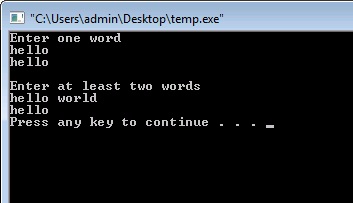
printf("Enter one word
");
scanf("%s",name);
printf("%s
",name);
printf("
Enter at least two words
");
scanf("%s",name);
printf("%s",name);
}

Output

Reading String from User

Explanation
As you can see I have used scanf() function two times. First time I have asked the user to enter only one word. So scanf() function is able to perform that task easily. But in the second time I have asked the user to enter at least two words. But in that case printf() has only printed “I”. Well the reason behind it is that, scanf() function can only take single word. It closes the string when it founds any blank space. To overcome this problem we have to use another function.


gets() function in C

This function is used to take the input from the user to the string. It overcomes the problem of storing only single word. With the usage of this function user can store any number of words or even sentences. Lets understand it with one program.


#include<stdio.h>

void main( )
{
char name[100];
printf("Enter at least two words
");
gets(name);
printf("Now its working fine: %s",name);
}

Output

gets() function in C

In the above program I have replaced scanf() function with gets function. As you can see now everything is working fine.


puts() function in C

As its name suggest puts() function is a counter part of gets(). It is used to print one string at a time on the screen. Remember we can only use one string at a time to print it on the screen. On the other hand printf() function can be used to print any number of strings. Lets make one simple program to understand its working.


#include<stdio.h>

void main()
{
char name[100]="Hello World!!!";
puts(name);
}

Output
Hello World!!!

Thursday, February 12, 2015

C program to calculate roots of quadratic equation ax 2 bx c 0


C program to calculate roots of quadratic equation ax^2+bx+c=0

#include<stdio.h>
#include<conio.h>
#include<math.h>


void main()
{
float root1,root2,a,b,c,d;
clrscr();
printf("Quadratic Equation is ax^2=bx+c=0");
printf("
Enter values of a,b and c:");

  scanf("%f%f%f",&a,&b,&c);


d=(b*b)-(4*a*c);
if(d>0)
{
printf("
Two real and distinct roots");

root1=(-b+sqrt(d))/(2*a);
root2=(-b-sqrt(d))/(2*a);
printf("
Roots are %f and %f",root1,root2);

}


else
if(d==0)
{
printf("
Two real and equal roots");

root1=root2=-b/(2*a);
printf("
Roots are %f and %f",root1,root2);

}
else
printf("
Roots are COMPLEX and IMAGINARY....!!!");

getch();
}

Wednesday, February 11, 2015

C Program to print given series 1 2 4 8 16 32 64 128


#include<iostream.h>
#include<conio.h>


void main()
{
clrscr();
int i;

for(i=1;i<=128;i*=2)
cout<<i<<" ";
getch();
}