Showing posts with label c. Show all posts

Monday, February 16, 2015

C program to swap two numbers without using temp variable

#include<iostream.h>
#include<conio.h>

void main()
{
clrscr();
int a,b;
cout<<"Enter value of a:";
cin>>a;
cout<<"Enter value of b:";
cin>>b;

a=a+b;
b=a-b;
a=a-b;

cout<<"
a="<<a;

cout<<"
b="<<b;

getch();
}

Friday, February 13, 2015

Nested if else in C

In the previous tutorial we have learnt about if-else statements. Those statements provide the flexibility to check for two possible faces of answer. But it is also possible that there will be more than two options for the answer. To make things more precise, take an example of school grading system. Suppose if you want to create a program that will print the grade of student based on his/her percentage marks. Then in that case you will need at least 4 conditions to check.

So to put those things on work we have to use nested if-else statements.


What are nested if-else statements?

As the name suggests, nesting means writing if-else statements inside another if or else block. Basically there is no limit of nesting. But generally programmers nest up to 3 blocks only.

General form of nested if-else statements is given below.

if (condition)
{
Statement 1
Statement 2 and so on
}

else
{
if (condition)
{
Statement a
Statement b
}
else
{
Statement c
Statement d
}
}

It’s a bit complex structure for beginners so lets try to understand its general form.

As you can see, I have nested another if-else block inside one else block. So while executing in this form. The compiler first check the condition if (primary or first) block. If it fails then it will move on to the else block. In the else block it will check the condition of secondary if statement, if it also fails then it will execute the statements under else block.

In our general form I have nested if-else block in else block. You can also nest that if-else statement under first if statement. This will also work.

Now lets try implement our knowledge in one program.

Question: Take one number from the user. Check it whether it is negative, zero or positive and print the message for it.


#include <stdio.h>

void main()
{
int num;
printf("Enter any number:");
scanf("%d",&num);

if (num < 0)
printf("number is negative");

else
{
if (num==0)
printf("number is 0");
else
printf("number is positive");
}
}


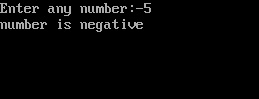
Output

Nested if-else in C - Output

Explanation

I have deliberately write that program which is similar to the last one. As I want to show the importance of if-else nesting inside C programming.

Initial statements of the program are self-explainable. So I will start my explanation with if-else statement.
  • In the first if statement, I have given a condition i.e. num<0, it will check the number whether it is negative or not. If it is negative then it will print the message "number is negative". But if condition fails then it will skip the statements under if block.
  • Am I forget to write curly braces {} after if statement? The program will also work by dropping them in our case. This is because the default scope of if statement is one statement after it. As I have written only one statement, so there is no need to use curly braces in it. However if you write more than one statements under that block then you have to insert curly braces.
  • After that I gave another else block. And inside that else block I have nested one if-else block. It means after entering the control inside else block it will check the condition of 2nd if block. If the condition turns out to be true then it will print the message "number is 0". Otherwise the control will transfer to the else block and it will print "number is positive".
  • In the above program you can clearly see the secondary if-else block. Because I have indented the 2nd if-else block to increase the readability of program. So it is advised to use indentation while using nested if-else.

String in C Part 2

Read: String in C - Part 1

In the last tutorial I gave you an overview of the strings in C language. I told you about the basic programs to print the elements inside a string. In today’s tutorial I will tell you about the best way to print the string on the screen. I will also tell you about the limitation of scanf() function with strings. So lets get started.


String in C

Text manipulation is one of the most frequently used function in any language. In the last program I have printed the string elements by accessing them one by one. However in serious programing it is very difficult to run loops when you have to print some string of characters on screen. To overcome this problem Dennis Ritchie introduced %s format specifier. It turns out to be very handy while printing the string on the go. Lets make one program to understand it.


#include<stdio.h>

void main()
{
char name[]="TheCrazyProgrammer";
printf("%s",name);
}


Output
TheCrazyProgrammer

Above program is self explanatory. I have only used %s format specifier to print the name string.


Reading String from User

So far I told you about printing the output on the screen. However taking input from the user to a string is equally important too. To perform this task, first answer that will hit your mind is scanf() function. Yes scanf() can be used to take the input. But it is not perfect for this task. Lets understand it with one program


#include<stdio.h>

void main( )
{
char name[100];
printf("Enter one word
");
scanf("%s",name);
printf("%s
",name);
printf("
Enter at least two words
");
scanf("%s",name);
printf("%s",name);
}

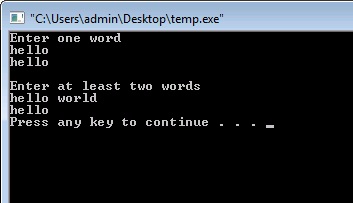
Output

Reading String from User

Explanation
As you can see I have used scanf() function two times. First time I have asked the user to enter only one word. So scanf() function is able to perform that task easily. But in the second time I have asked the user to enter at least two words. But in that case printf() has only printed “I”. Well the reason behind it is that, scanf() function can only take single word. It closes the string when it founds any blank space. To overcome this problem we have to use another function.


gets() function in C

This function is used to take the input from the user to the string. It overcomes the problem of storing only single word. With the usage of this function user can store any number of words or even sentences. Lets understand it with one program.


#include<stdio.h>

void main( )
{
char name[100];
printf("Enter at least two words
");
gets(name);
printf("Now its working fine: %s",name);
}

Output

gets() function in C

In the above program I have replaced scanf() function with gets function. As you can see now everything is working fine.


puts() function in C

As its name suggest puts() function is a counter part of gets(). It is used to print one string at a time on the screen. Remember we can only use one string at a time to print it on the screen. On the other hand printf() function can be used to print any number of strings. Lets make one simple program to understand its working.


#include<stdio.h>

void main()
{
char name[100]="Hello World!!!";
puts(name);
}

Output
Hello World!!!

Thursday, February 12, 2015

C program to calculate roots of quadratic equation ax 2 bx c 0


C program to calculate roots of quadratic equation ax^2+bx+c=0

#include<stdio.h>
#include<conio.h>
#include<math.h>


void main()
{
float root1,root2,a,b,c,d;
clrscr();
printf("Quadratic Equation is ax^2=bx+c=0");
printf("
Enter values of a,b and c:");

  scanf("%f%f%f",&a,&b,&c);


d=(b*b)-(4*a*c);
if(d>0)
{
printf("
Two real and distinct roots");

root1=(-b+sqrt(d))/(2*a);
root2=(-b-sqrt(d))/(2*a);
printf("
Roots are %f and %f",root1,root2);

}


else
if(d==0)
{
printf("
Two real and equal roots");

root1=root2=-b/(2*a);
printf("
Roots are %f and %f",root1,root2);

}
else
printf("
Roots are COMPLEX and IMAGINARY....!!!");

getch();
}

Wednesday, February 11, 2015

C program to print a message on the screen

C program to print a message on the screen

#include<stdio.h>
#include<conio.h>

void main()
{
clrscr(); //to clear the screen
printf("


***** Welcome to C Programming *****");

getch(); //to stop the screen
}

C Program to print given series 1 2 4 8 16 32 64 128


#include<iostream.h>
#include<conio.h>


void main()
{
clrscr();
int i;

for(i=1;i<=128;i*=2)
cout<<i<<" ";
getch();
}